Script to show the connection status of multiple devices IPv4 addresses in the local network, instead of launching cmd ping command several times.
For example, this can be useful for industrial on-site works with a lot of machines.
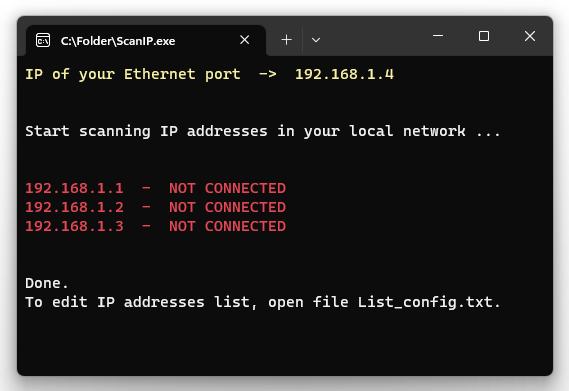
Simply download and run the ScanIP.bat latest release.
(In the latest relase v2.1 the script use the local active network subnet.)
- Download the
ScanIP.ps1andPS_Batch.ps1script from this repository and put in the same folder. - Start PowerShell terminal (also v5), go to the folder with
cdcommand and run.\PS_Batch.ps1. - It will generate in the same folder the .bat file.
OPTIONAL:
In case you change name to the ScanIP.ps1 file, then you have to update the name in PS_Batch.ps1 at lines 79 and 80.
If you have any arguments, be sure to replace the examples -ExecutionPolicy Bypass with your own, or if you have none remove that parameter.
Please, after generation, open the .bat file with a text editor and add the following command at the begin of file, to achive the auto installation/update of PowerShell 7 via winget in order to be able to run the script.
TITLE ScanIP

ECHO Checking PowerShell version...

:: Install Powershell 7
winget install --id Microsoft.PowerShell --source winget --disable-interactivity --accept-package-agreements --accept-source-agreements --silent >nul 2>&1

CLS
:: Run script
Just in case you haven't installed the fabulous Windows Package Manager, here are the 3 commands to run separately into PowerShell terminal:
Invoke-WebRequest -Uri https://aka.ms/getwinget -OutFile winget.msixbundle
Add-AppxPackage winget.msixbundle
Remove-Item winget.msixbundle
This script was written in PowerShell on Windows. For more details on PowerShell commands, refer to the Microsoft documentation.
The executable .bat file was generated thanks to the BatchWrappedPS script from tmontney. (I personally edit only the script filename because with spaces is more difficult to autocomplete the file selection into the terminal.)
In case you mention or fork this repository, please quote me.
Thank you for reading this far.