Windows
- Download XLaunch Server from https://sourceforge.net/projects/vcxsrv/ and install.
- Download Docker Desktop from https://docs.docker.com/desktop/install/windows-install/ and install.
- Download Visual Studio Code from https://code.visualstudio.com/download and install.
- Open VS Code and install an extension (shortcut CTRL+SHIFT+X) with the name "Remote Development".
- Download repository:
a) in web browser:
click a buttonCode --> Download ZIPand unzip,
b) or in the Command Window:
use command:git clone https://github.com/Jakubach/ros2_docker_code.git
Ubuntu
- Download Docker Engine, instruction: https://docs.docker.com/engine/install/ubuntu/#install-using-the-repository
- Optionally, you can follow a post-installation steps from Docker documentation:
https://docs.docker.com/engine/install/linux-postinstall/ - Download and install Visual Studio Code with command:
sudo apt-get install code - Open VS Code and install an extension (shortcut CTRL+SHIFT+X) with the name "Remote Development".
- Download repository:
a) in web browser:
change branch to Ubuntu, click a buttonCode --> Download ZIP, unzip,
b) or in the Terminal:
use command:git clone https://github.com/Jakubach/ros2_docker_code.git -b Ubuntu
Windows
- Run XLaunch Server with default settings.
- Run Docker Desktop (in the background).
- Run VS Code and open a directory
ros2_docker_code/src, follow the bellow screen.
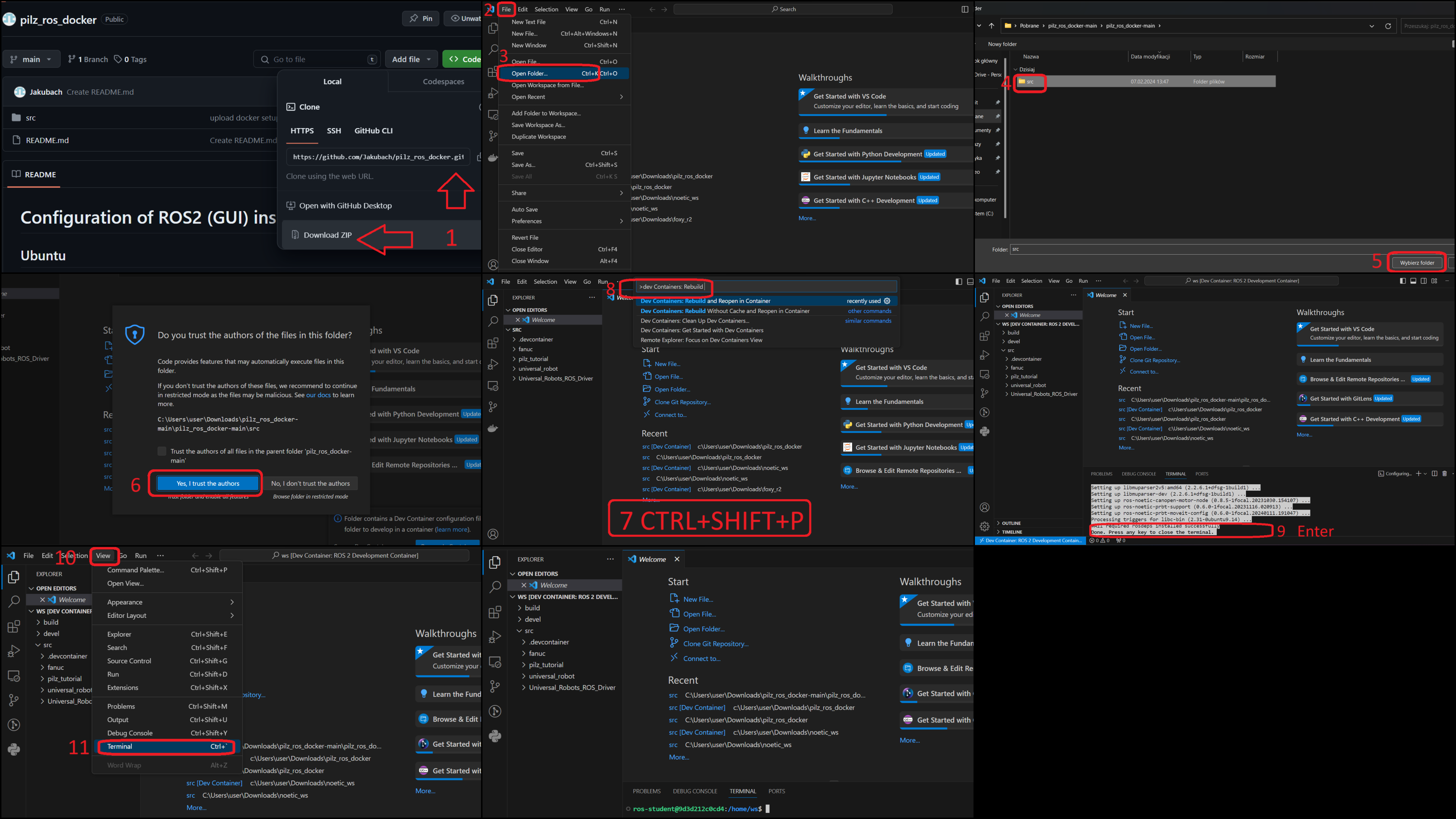
The first time you run it, you may need to wait a little longer for the necessary software to download and install.
Ubuntu
- Run Docker Engine with command
sudo systemctl start docker(may not be necessary). - Run VS Code and open a directory
ros2_docker_code/src, follow the bellow screen.
The first time you run it, you may need to wait a little longer for the necessary software to download and install.