Issue
Our member has the problem of compiling .qrc file menu.qrc in resource disk. Here, we configure the basic Pycharm IDE with pyqt5-tool to fix the problem.
Tutorial
View the “pycharm + qtdesigner + pyuic + pyrcc tutorial” when using
-
Install pyqt5-tool and PyQt5
QT designer is included in pyqt5, which is a python module, so we can install it directly through pip3 install pyqt5. Also, you can install it directly through pycharm.
Select File->Setting->Project Interpter:


-
Configure qtdesigner, pyuic and pyrcc
Select File->Setting->External Tools->Add

Specific configuration:
a. qtdesigner
- Name — enter the name of the last tool you want to render in the menu, such as qtdesigner
- Program — the location of the
designer.exe program, which is located in lib \site-packages\qt5_applications\Qt\bin\designer.exe of the currently used parser
Noticing that different versions of python have different paths of designer.exe
- Working directory —
designer.exe working path, set to $FileDir$

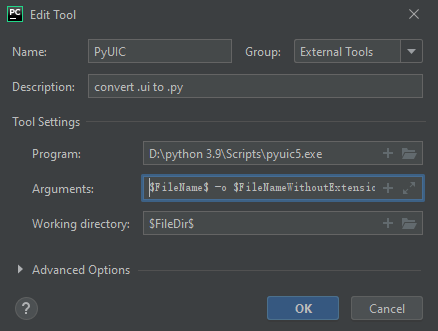
b. pyuic
- Program -- pyuic is located in
Scripts\pyuic5.exe of the current parser
- Arguments --
$FileName$ -o $FileNameWithoutExtension$.py
- Working directory --
$FileDir$
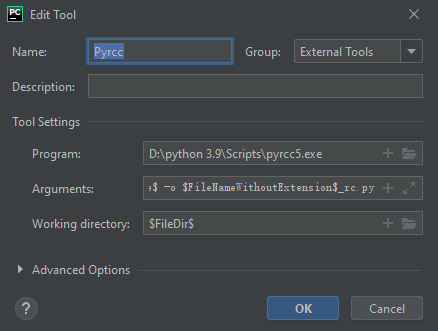
c. pyrcc
- Program -- pyrcc is located in
Scripts\pyrcc5.exe of the current parser
- Arguments --
$FileName$ -o $FileNameWithoutExtension$_rc.py
- Working directory --
$FileDir$
- Use External Tools
Specifically using pyrcc as the example :

The final meua_rc,py must be located in the root directory of your project directory
Issue
Our member has the problem of compiling
.qrcfile menu.qrc in resource disk. Here, we configure the basic Pycharm IDE withpyqt5-toolto fix the problem.Tutorial
View the “pycharm + qtdesigner + pyuic + pyrcc tutorial” when using
Install pyqt5-tool and PyQt5


QT designer is included in pyqt5, which is a python module, so we can install it directly through
pip3 install pyqt5. Also, you can install it directly through pycharm.Select File->Setting->Project Interpter:
Configure qtdesigner, pyuic and pyrcc

Select File->Setting->External Tools->Add
Specific configuration:
a. qtdesigner
designer.exeprogram, which is located in lib\site-packages\qt5_applications\Qt\bin\designer.exeof the currently used parserdesigner.exeworking path, set to$FileDir$b. pyuic
Scripts\pyuic5.exeof the current parser$FileName$ -o $FileNameWithoutExtension$.py$FileDir$c. pyrcc
Scripts\pyrcc5.exeof the current parser$FileName$ -o $FileNameWithoutExtension$_rc.py$FileDir$Specifically using pyrcc as the example :