| title | Summary of Java IO Basics | ||
|---|---|---|---|
| category | Java | ||
| tag |
|
IO stands for Input/Output, which refers to input and output. The process of inputting data into the computer's memory is called input, while the process of outputting data to external storage (such as databases, files, or remote hosts) is called output. The data transmission process is similar to the flow of water, hence the term IO stream. In Java, IO streams are divided into input streams and output streams, and further classified into byte streams and character streams based on how data is processed.
The more than 40 classes of Java IO streams are derived from the following four abstract class bases.
InputStream/Reader: The base class for all input streams, where the former is a byte input stream and the latter is a character input stream.OutputStream/Writer: The base class for all output streams, where the former is a byte output stream and the latter is a character output stream.
InputStream is used to read data (byte information) from a source (usually a file) into memory. The abstract class java.io.InputStream is the parent class of all byte input streams.
Common methods of InputStream:
read(): Returns the next byte of data from the input stream. The returned value is between 0 and 255. If no bytes have been read, it returns-1, indicating the end of the file.read(byte b[]): Reads some bytes from the input stream and stores them into the arrayb. If the length of arraybis zero, no bytes are read. If there are no available bytes to read, it returns-1. If there are available bytes to read, it reads up tob.lengthbytes and returns the number of bytes read. This method is equivalent toread(b, 0, b.length).read(byte b[], int off, int len): This method adds theoffparameter (offset) andlenparameter (maximum number of bytes to read) to theread(byte b[])method.skip(long n): Skipsnbytes in the input stream and returns the actual number of bytes skipped.available(): Returns the number of bytes that can be read from the input stream.close(): Closes the input stream and releases related system resources.
Starting from Java 9, InputStream has added several utility methods:
readAllBytes(): Reads all bytes from the input stream and returns a byte array.readNBytes(byte[] b, int off, int len): Blocks untillenbytes are read.transferTo(OutputStream out): Transfers all bytes from one input stream to an output stream.
FileInputStream is a commonly used byte input stream object that allows direct specification of the file path. It can read single-byte data or read into a byte array.
Example code for FileInputStream:
try (InputStream fis = new FileInputStream("input.txt")) {
    System.out.println("Number of remaining bytes:"
            + fis.available());
    int content;
    long skip = fis.skip(2);
    System.out.println("The actual number of bytes skipped:" + skip);
    System.out.print("The content read from file:");
    while ((content = fis.read()) != -1) {
        System.out.print((char) content);
    }
} catch (IOException e) {
    e.printStackTrace();
}
Content of input.txt:
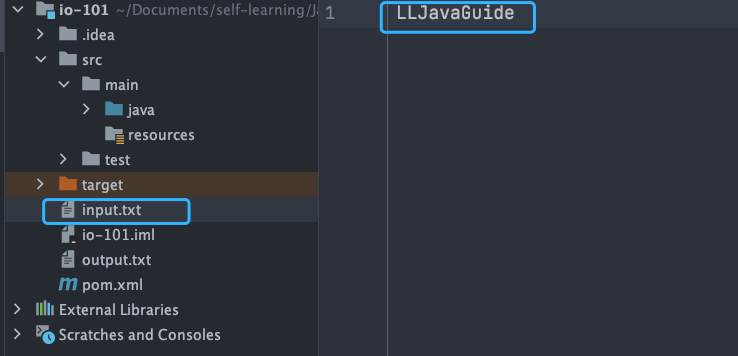
Output:
Number of remaining bytes:11
The actual number of bytes skipped:2
The content read from file:JavaGuide
However, we generally do not use FileInputStream alone; it is usually used in conjunction with BufferedInputStream (byte buffered input stream, which will be discussed later).
The following code is quite common in our projects, where we use readAllBytes() to read all bytes from the input stream and directly assign them to a String object.
// Create a new BufferedInputStream object
BufferedInputStream bufferedInputStream = new BufferedInputStream(new FileInputStream("input.txt"));
// Read the content of the file and copy it to a String object
String result = new String(bufferedInputStream.readAllBytes());
System.out.println(result);
DataInputStream is used to read data of specified types and cannot be used alone; it must be combined with other streams, such as `FileInputStream