Article importer details V2 #155

Description

as per this wireframe:
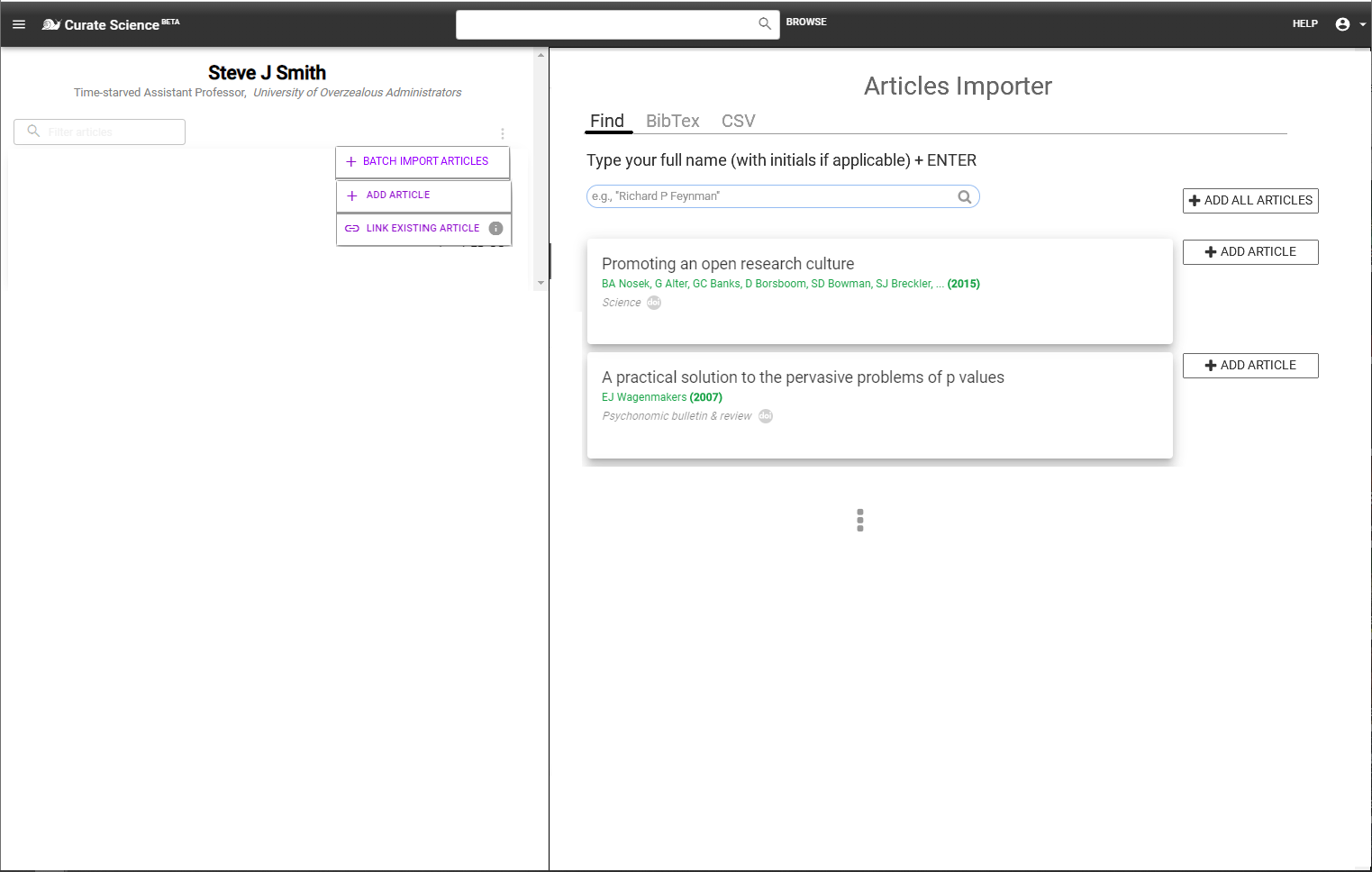
Details:
- Functionality accessible via an added additional action button ("+ BATCH IMPORT ARTICLES") in the vertical 3-dot menu (publication list actions) from an existing author page (e.g., https://curate-science-staging-2.appspot.com/app/author/thomas-tester ), see wireframe above.
- Clicking "+ BATCH IMPORT ARTICLES" will open the importer in the right-panel (just like the split-screen functionality when viewing a full-text article in a right-panel; if that's too onerous, could just display the importer in a modal window for now)
- Importer UI as depicted in the wireframe, with only the "Find" tab enabled for now (the less exciting import articles via BibTex or CSV file can be done later)
- Upon user/researcher typing their full name + pressing ENTER (or clicking SEARCH icon), populate a list of articles based on results returned from querying Microsoft Academic Graph's Academic Search open API for that name (eg via "EVALUATE" REST API , see Paper Entity attribute names metadata fields = article title ("Ti"), authors ("AA.AuN"), year published ("Y"), journal name ("J.JN"), and DOI ("DOI")). One of our competitors Owlstown is using this slick method, though i don't know the exact implementation he is using.
- NOTE 1: A free Microsoft account is needed to access open API, let me know if you want to use my credentials.
- NOTE 2: To simplify the UI for now, you can exclude from the populated list any article DOIs that are
- already in our DB AND already linked to current author page
- already in our DB, but NOT yet linked to current author page (which we can add later; we can get away with this because i'll only be using this importing functionality on our staging server for demonstration purposes).
- Then, clicking "+ ADD ARTICLE" buttons displayed to the right of any article card, adds it to author page.
- If the list of populated articles contain 2 or more articles, then also display a "+ADD ALL ARTICLES" button above the article list (top-right, see wireframe), which when clicked, adds ALL articles to the current author page.
LATER (Automatic Transparency (T) Metadata Extraction)
Once the importer is working, we can then ADD some "automatic Transparency metadata extraction" -- as part of the IMPORTING PROCESS -- to save users EVEN MORE TIME, which would be even more impressive/compelling for demonstration purposes. Workflow: Once >1 article imported from right-panel, T metadata extraction automatically starts within the author page (left-panel) for the imported articles, ideally with 2 kinds of progress bars:
- indicating overall T metadata extraction progress bar across all OA articles that will be text-mined and
- article-specific extraction progress bar (e.g., bottom border of article card, moving right as % of progress).
As a start (for demo purposes), we can 1st focus on automatically extracting only the following 3 Transparency metadata (populating the relevant article card fields and badges, more details will be provided):
- Open Access status and direct links via Unpaywall's free open API
- For subset of articles that have OA HTML/PDF full-texts available, extract, via Serghiou et al. (2021)'s rTransparent R package text-mining tool which can automatically extract such information from PDF or XML of OA articles , any
- Open Data/Code links, and
- Funding/conflict-of-interest (COI) disclosures.