| layout |
|---|
default |
Integration- and E2E-tests can often be brittle when testing against external services and infrastructure such as e.g. a database. As a consultant giving advice to a multitude of different companies and organisations, I've seen the following scenario several times.
Shared database
In this common integration test scenario, multiple developers (or Continous Integration pipelines) are executing commands and queries against a shared database. This is fine up until the point were a command alters data (aka State) that another test relies on. The database is no longer synchronized with requirements and assertions of the given integration test.
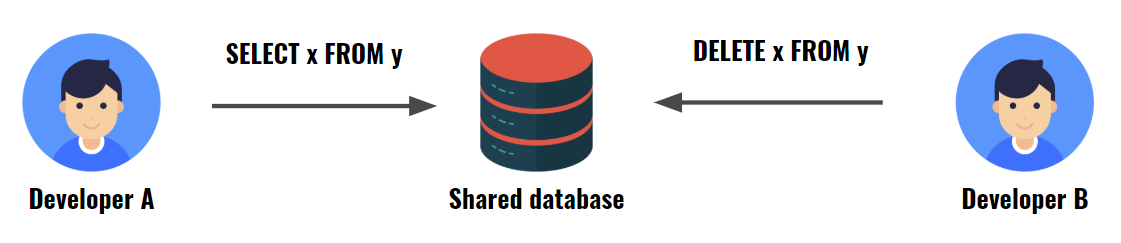
In order to synchronize the database, the data has to be truncated and re-inserted. This of course can be automated in the Test Fixture Tear Down, CI-process and whatnot. How ever since the database is shared, the script might be executed while others are querying the resource and hence the tests are very brittle.
Dedicated database
A better solution is to have a dedicated database per developer. This requires quite some setup and is prone for subtle differences in each environment. Re-synchronizing the data in the Test Fixture Tear Down method would be trivial, but might also prove to be very time consuming to execute depending on the amount of data.
Containerized database
An even better solution would be to use Containers. We could go for a scenario like the one below.
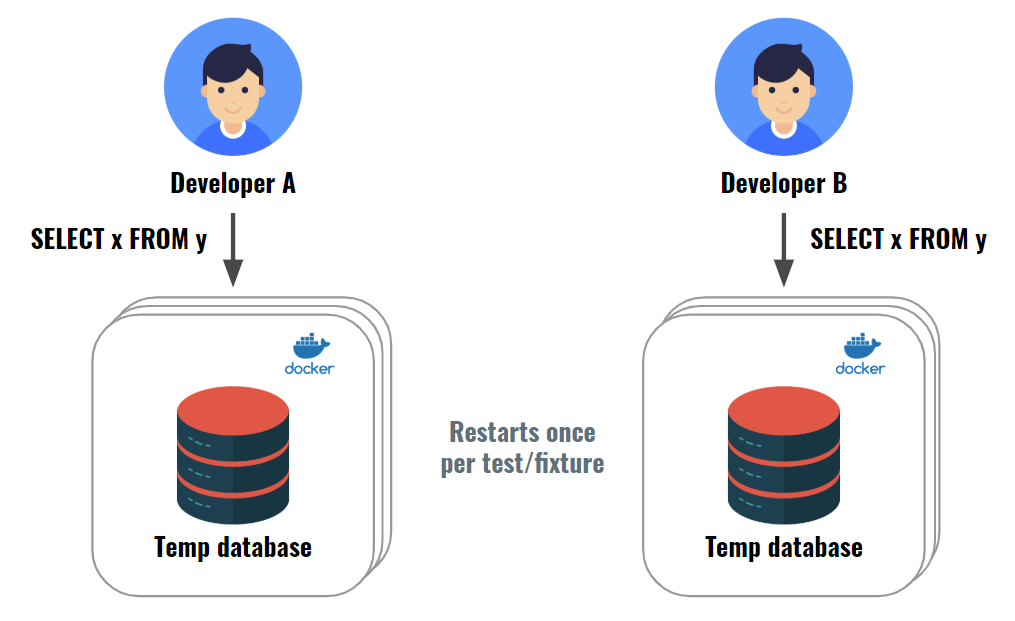
Each container would use the same Docker Image with a dedicated database (MySQL, SQL Server, Oracle DB etc.) and the required integration test data baked into the image. This would allow us to respawn the database with its initial state in a matter of a few seconds.
The FIRST principle in automated testing is an acronym for:
- Fast
- Independent
- Repeatable
- Self-validating
- Timely
You can follow this link to read more about the details of FIRST principle. In essence integration tests often have a hard time being compliant with the Fast and the Repeatable rules of the FIRST principle. In other words: Integration tests are usually slow and brittle, which in turn makes them non-repeatable.
Hence our solution should strive for multiple success criteria.
- Our tests should be fast to evaluate
- Our database should always re-synchronize at startup
- Our service implementation (the SUT) should not have any Docker dependency
- Our Test Fixture should easily be able to integrate the Docker container usage
- Our Test Fixture should be able to use multiple and different Docker containers
While we could make a solution with any choice of database vendor, I will choose MySQL for this example. Switching with e.g. SQL Server is very easy and just a matter of choosing another Docker Image for the container. Microsoft has an official release for the SQL Server Docker Image here.
In order for our test to be fast, we should make sure that the Docker Container can start in the least amount of time possible. The official MySQL Docker Image contains several features that we usually do not care about while performing integration testing and so we should look for a stripped down version. Luckily and thanks to Zanox this can be found right here.
We modify the Dockerfile slightly in order to bake our test data into the image.
Dockerfile
FROM zanox/mysql

EXPOSE 3306

COPY schema.sql /
RUN start-mysql && \
    mysql < /schema.sql && \
    stop-mysql
Where the schema.sql is responsible for creating the database schema and populating it with test data.
schema.sql
CREATE DATABASE TestDb;

USE TestDb;

CREATE TABLE Books (
    Id varchar(36),
    Title varchar(255),
    Author varchar(255) NULL,
    Isbn varchar(255) NULL,
    NumPages int,

    PRIMARY KEY (Id)
);

INSERT INTO Books (Id, Title, Author, Isbn, NumPages)
VALUES ('409b0915-b494-4993-9211-a533fb78f70d', 'Clean Code', 'Robert C. Martin', '978-0131177055', 464);

INSERT INTO Books (Id, Title, Author, Isbn, NumPages)
VALUES ('95aedbbc-e385-4762-b513-5b579cd0ac64', 'Breakfast of Champions', 'Kurt Vonnegut', '978-1501263378', 378);
We build and tag the Docker Image using the standard Docker build command:
docker build -t codingcronus/integrationtest-mysql .
Now that our Docker Image has been built, we can continue our work in Visual Studio. For this example I have implemented the dependencies in .NET Core, but other versions is supported as well.
We start out by fleshing out the Test Fixture. You could end up with something like the one below.
BookIntegrationSpecs.cs
[TestClass]
public class BookIntegrationSpecs
{
    private static readonly string _connectionString = "Server=127.0.0.1;Port=3306;Database=TestDb;Uid=root;Pwd=;";

    // Restore database per Test Fixture
    // Use [TestInitialize] to restore once per Test Method instead.
    [ClassInitialize]
    public static void InitializeFixture(TestContext context)
    {
        var server = new MySqlDockerServer(_connectionString);

        server.Connect().Wait(); //Async method, so Wait for completion
    }

    [TestMethod]
    public void Can_load_book_from_mysql_database()
    {
        // ARRANGE
        var bookId = "409b0915-b494-4993-9211-a533fb78f70d"; // From https://www.guidgenerator.com/online-guid-generator.aspx
        var sut = new BookRepositoryMySql(_connectionString);

        // ACT
        var result = sut.GetById(bookId);

        // ASSERT
        Assert.IsNotNull(result, "Book is null");
    }

    [TestMethod]
    public void Can_load_book_with_correct_title()
    {
        // ARRANGE
        var bookId = "409b0915-b494-4993-9211-a533fb78f70d";
        var sut = new BookRepositoryMySql(_connectionString);

        // ACT
        var result = sut.GetById(bookId);

        // ASSERT
        Assert.AreEqual("Clean Code", result.Title);
    }

    [TestMethod]
    public void Can_save_book()
    {
        // ARRANGE
        var bookId = "2c85f1a7-fd98-4ac2-986d-27d20efe062e";
        var book = new Book(bookId, "Harry Potter");

        var sut = new BookRepositoryMySql(_connectionString);

        // ACT
        var result = sut.Save(book);

        // ASSERT
        Assert.IsTrue(result);
    }
}
The test should be pretty self explanatory, but you might have noticed that I am using two other principles of good testing:
- The Arrange, Act and Assert (AAA) layout of each test method
- Only one assert per test rather than multiple assertions
Maybe you have also noticed that we are instantiating the MySqlDockerServer class with the same connection string as for the MySQL BookRepository (the SUT = System Under Test). The MySqlDockerServer has not yet been defined, so we do that next.
The MySqlDockerServer selects a name for the Container (CodingCronusIntegrationTestDb), the image tag from the prevous step and the version (latest). The constructor also takes the connection string as input and uses it in the overridden IsReady method to determine when the database is available.
MySqlDockerServer.cs
public class MySqlDockerServer : DockerServer
{
    public string ConnectionString { get; }

    public MySqlDockerServer(string connectionString) : base (
        "CodingCronusIntegrationTestDb",
        "codingcronus/integrationtest-mysql",
        "latest"
        )
    {
        ConnectionString = connectionString ?? throw new ArgumentNullException(nameof(connectionString));
    }

    protected override async Task<bool> IsReady()
    {
        try
        {
            using (var conn = new MySqlConnection(ConnectionString))
            {
                await conn.OpenAsync();

                return true;
            }
        }
        catch (Exception)
        {
            return false;
        }
    }
}
As you can see the class inherits from DockerServer. This is a slightly modified version of Jeremy D. Millers implementation. It uses the Docker.DotNet nuget package.
DockerServer.cs
public abstract class DockerServer
{
    private DockerClient client;

    public string ContainerName { get; }
    public string ImageName { get; }
    public string ImageTag { get; }
    public bool KeepAlive { get; }

    public DockerServer(string containerName, string imageName, string imageTag, bool keepAlive=false)
    {
        ContainerName = containerName ?? throw new ArgumentNullException(nameof(containerName));
        ImageName = imageName ?? throw new ArgumentNullException(nameof(imageName));
        ImageTag = imageTag ?? throw new ArgumentNullException(nameof(imageTag));
        KeepAlive = keepAlive;
        client = new DockerClientConfiguration(new Uri("npipe://./pipe/docker_engine")).CreateClient();
    }

    protected abstract Task<bool> IsReady();

    public async Task Connect()
    {
        var container = await DownloadImageToContainer();
        if (container == null) throw new NullReferenceException("Could not download Docker image to container");

        await StartContainer(container);

        var i = 0;
        while (!await IsReady())
        {
            i++;

            if (i > 20)
                throw new TimeoutException($"Container {ContainerName} does not seem to be responding in a timely manner");

            await Task.Delay(1000);
        }
    }

    private async Task<ContainerListResponse> DownloadImageToContainer()
    {
        var containers = await client.Containers.ListContainersAsync(new ContainersListParameters() { All = true });

        var container = containers.FirstOrDefault(c => c.Names.Contains("/" + ContainerName));
        if (container == null)
        {
            // Create the container
            var config = new Config()
            {
                Hostname = "localhost"
            };

            // Configure the ports to expose
            var hostConfig = new HostConfig()
            {
                PortBindings = new Dictionary<string, IList<PortBinding>>
                {
                    { "80/tcp", new List<PortBinding> { new PortBinding { HostIP = "127.0.0.1", HostPort = "8080" } } },
                    { "3306/tcp", new List<PortBinding> { new PortBinding { HostIP = "0.0.0.0", HostPort = "3306" } } },
                }
            };

            // Create the container
            var response = await client.Containers.CreateContainerAsync(new CreateContainerParameters(config)
            {
                Image = ImageName + ":" + ImageTag,
                Name = ContainerName,
                Tty = false,
                HostConfig = hostConfig,
            });

            // Get the container object
            containers = await client.Containers.ListContainersAsync(new ContainersListParameters() { All = true });
            container = containers.First(c => c.ID == response.ID);
        }

        return container;
    }

    private async Task StartContainer(ContainerListResponse container)
    {
        // Stop and remove existing container. Get a new container.
        if (container.State == "running" && !KeepAlive)
        {
            await client.Containers.StopContainerAsync(container.ID, new ContainerStopParameters());
            await client.Containers.RemoveContainerAsync(container.ID, new ContainerRemoveParameters());
            container = await DownloadImageToContainer();
        }

        // Start the container is needed
        if (container.State != "running")
        {
            var started = await client.Containers.StartContainerAsync(container.ID, new ContainerStartParameters());
            if (!started) throw new Exception("Cannot start Docker container");
        }
    }
}
Once implemented we are ready to run our integration tests. All tests should pass like the ones below.
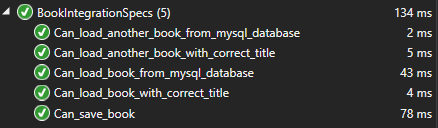
Using Docker Containers can stabilize and overall improve integration testing quality to a level previously unheard of. The tests can easily be extended with several other Docker services simply by providing the Test Fixture with similar implementations as the MySqlDockerServer class.
You can access the example project code in my repository here.
Cloud architect with many years of experience. Key areas include: Low-code Solutions, Scalable Cloud Architecture, Domain Driven Design, AI, Event Sourcing, CQRS, Automated Testing, Technical Due Diligence and many more.
I am based in Copenhagen, Denmark. You can contact me by writing a mail to mikkel@hempel.vc