-
Hot-Stanby Mode vs. Active-Standby Mode | DrayTek #ril
-
High Availability (HA) is a simple solution for business downtime caused by hardware failure. When HA is enabled, the network administrator can have a second router on the network to deliver full routing services during the downtime of the main router. Virtual IP is used for LAN clients' gateway IP, so there is no configuration change required when the backup router takes place.
DrayTek High Availability (HA) feature offers two modes, Hot-Standby and Active-Standby, this article explains the difference between them.
Hot-Standby Mode
-
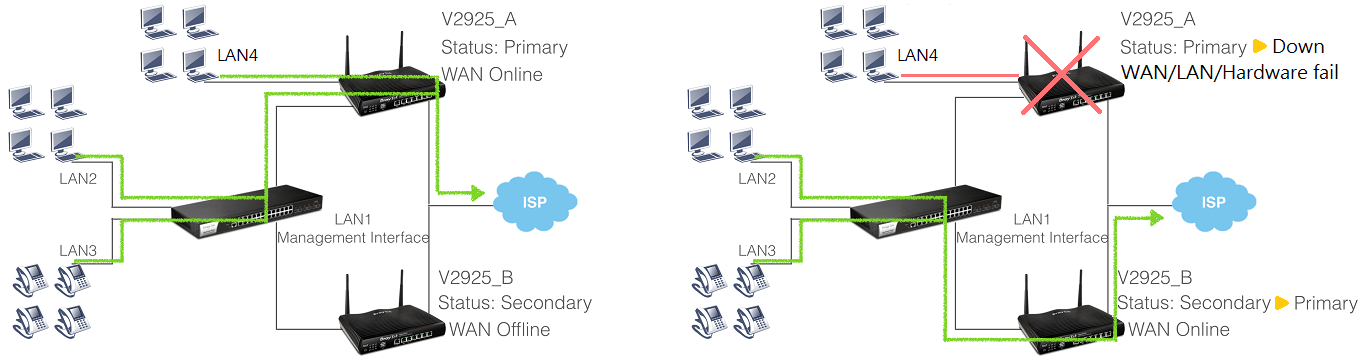
Primary and Secondary router SHARE THE SAME WAN SOURCE. Usually, only the Primary is online. When Primary goes down, Secondary comes up, dial up the same WAN line, and continue to provide Internet service to LAN clients. If there is a LAN does not set to have the HARDWARE REDUNDANCY, it will not be able to access the internet after the primary router goes down.
Active-Standby Mode
-
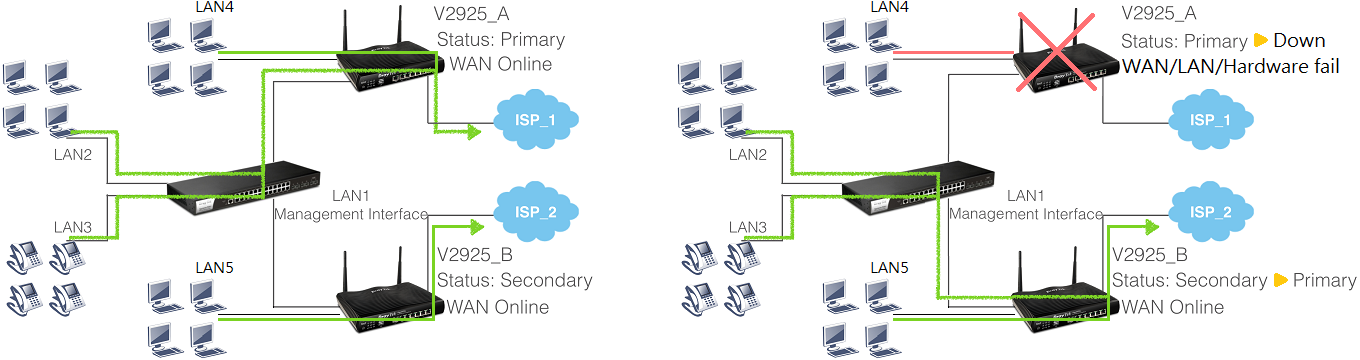
In the Active-Standby mode, the Primary and Secondary router connect to different WAN sources; also, the Secondary will always be online. The clients of the LAN which is configured to have the hardware redundancy (LAN2 and LAN3 in the following topology) will access the Internet through the primary router normally. When the primary router goes down, these clients will access the Internet through the secondary router. The clients of the LAN not having the hardware redundancy setup (LAN4 and LAN5 in the following topology) will access the Internet through the router which they connect to; when their router goes down, they lost Internet connection.
-