Merge stuff #3

Description

To Recap the situation:
- @denvercoder changed tiger to lion on the
lionbranch - @wwhite: changed mother to father on the
fatherbranch - @Julesw: Changed tiger to turtle on the
turtlebranch - YOU: Change an exclamation mark a punctuation mark directly on the
master.
---
title: The Poem
---

%%{init: { 'logLevel': 'debug', 'theme': 'base', 'gitGraph': {'showBranches': true, 'showCommitLabel':true,'mainBranchName': 'master'}} }%%

gitGraph
   commit id: "Poem added" tag: "ancestor"
   branch lion
   branch father
   branch turtle
   checkout master
   commit id: "! is ."
   checkout lion
   commit id: "tiger is lion"
   checkout father
   commit id: "mother is father"
   checkout turtle
   commit id: "tiger is turtle"
OK it looks like a mess; four people hacking in the same file at the same time.!
Let's play a game: You are now the integration manager of a software project.
It's actually a title used (less frequently nowadays). It's the person who does all the merges - sometimes also referred to as merge manager or simply "The Merge Guy". Does that sound like a fun job? Naah! Luckily it's not as common as it used to be. Thanks to tools like git and GitHub and to the spread of more agile processes - most developers today are expected to merge their own stuff and and push it.
But the whole Pull request culture - which is very popular - and strongly advocated by GitHub - is kind of a relic from the past. A distributed - and claimed contemporary - approach to an old school integration manager role. We'll touch on this later when we talk about pull requests.
Your job is now to make all the branches of the poem come together as one on the master branch
Bring them in one at a time and commit each successful merge before you proceed onto the next.
%%{init: { 'logLevel': 'debug', 'theme': 'base', 'gitGraph': {'showBranches': true, 'showCommitLabel':true,'mainBranchName': 'master'}} }%%

gitGraph
   commit id: "Poem added" tag: "ancestor"
   branch lion
   branch father
   branch turtle
   checkout master
   commit id: "! is ."
   checkout lion
   commit id: "tiger is lion"
   checkout father
   commit id: "mother is father"
   checkout turtle
   commit id: "tiger is turtle"
   checkout master
   merge lion
   commit id: "merged lion"
   merge father
   commit id: "merged father"
   merge turtle
   commit id: "merged turtle"
One of these merges is not going to go down easy - can you predict where you'll run into problems?
To merge something in git is dead-easy: A merge is a pull; that means you merge a branch into some other branch. The command is called merge and the synopsis is:
git merge [-n] [--stat] [--no-commit] [--squash] [--[no-]edit]
[--no-verify] [-s <strategy>] [-X <strategy-option>] [-S[<keyid>]]
[--[no-]allow-unrelated-histories]
[--[no-]rerere-autoupdate] [-m <msg>] [-F <file>]
[--into-name <branch>] [<commit>…]
git merge (--continue | --abort | --quit)
This most common flow is:
git checkoutthe branch who shall receive the mergegit mergethe branch you want to bring in.
Git will try to merge it without your help and but if it needs your attention it will halt the process in which case you will:
- Fix the un-mergeable file manually in your editor.
- Resume the merge by calling
git mergeagain with of the switches--continue,--abortor--quit.
Lets try the first on:
git co master
git merge lion
....Argh! The merge will create a commit after the file merge if it goes well - but as you know, a commit requires a message. A message file MERGE_MSG is opened in the editor Type something meaningful. It suggested Merge branch 'lion'. Hmm? that's sufficiently meaningful, so just save/close the file. The commit happens as soon at the file is closed.
Try to run your tree alias:
git tree
It looks right!
Or open the command palette in your CodeSpace and search for "Commit Graph" - open the GitLen tool. Aaaah!
One down - let's continue. This time we don't fall into the manual process of closing the commit message file:
git co master
git merge father --no-edit
WTF!!! There's a merge conflict! That was unexpected!
All @wwhite did was to change "mother" to "father" and no one else altered that particular line. So if the algorithm favours change: "change rules" remember? then why are we blocked by ... yeah by what exactly?
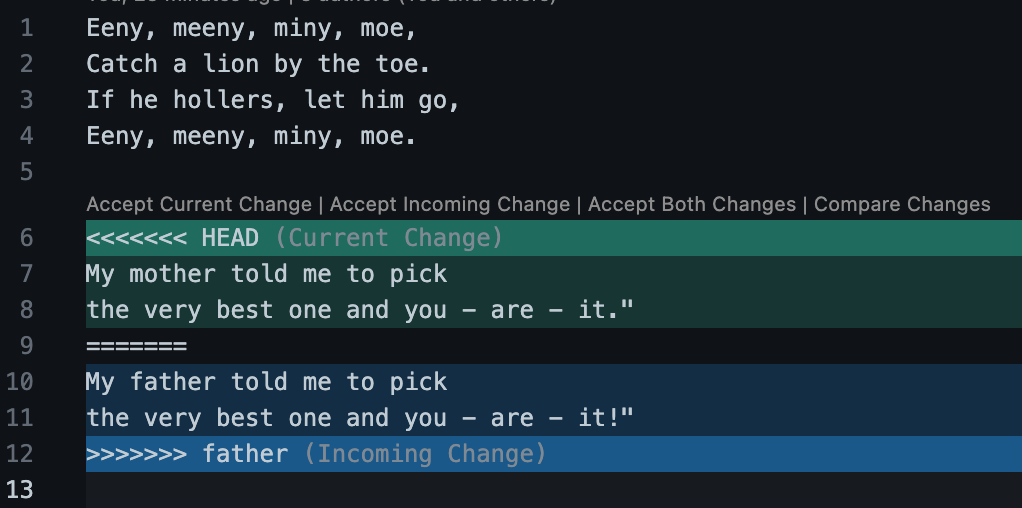
It turns out that it's the change that YOU did on master - where you changed "!" to "." that's causing the conflict.
Maybe @denvercoder was favoured for making the merge before @wwhite - if it had been the other way around perhaps @denvercoder would have received the conflict.
Naah! - that's not it! @wwhite would have received a conflict anyway.
The reason why this is - is because the two lines changed are next to each other - they are in the same block. The merge algorithm insist on not making border-line decisions.
Let's abort - and and analyse the situation.
git merge --abort
Let's test if we could have predicted this try to run
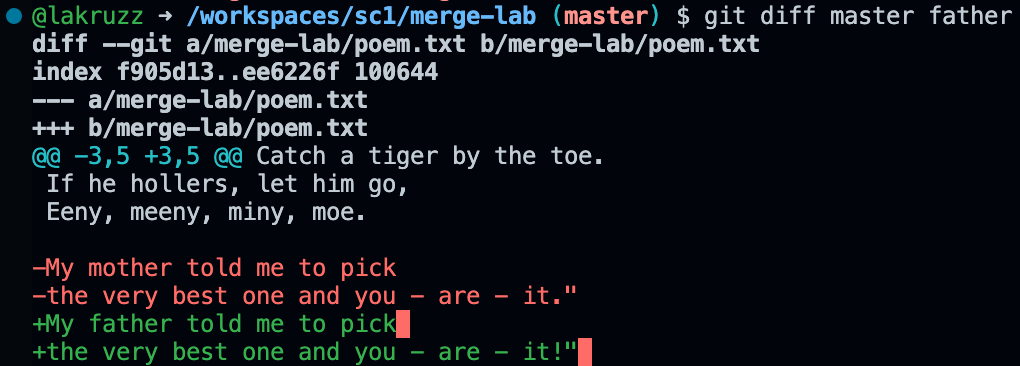
git diff master fatherHere's what I get:
Now see the diff to lion
git diff master lion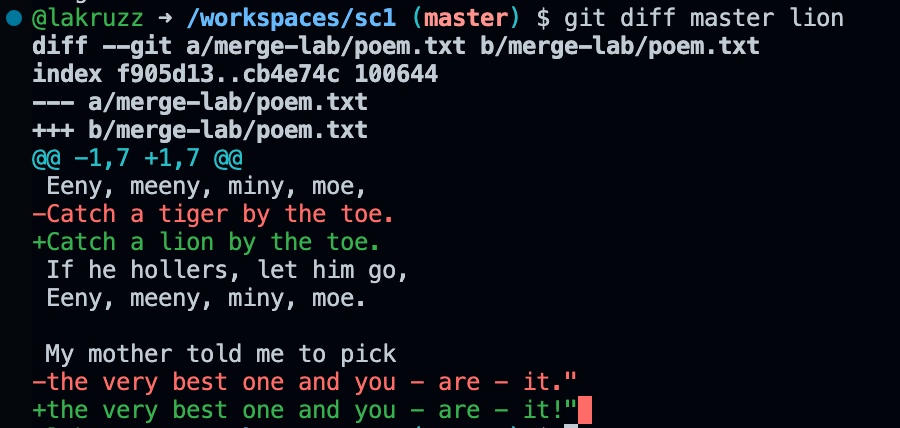
You see?
- The
master<>fatherdiff is shown as one diff of two lines. - The
master<>liondiff is shown as two diffs each of one line.
A subtle but important difference.
Wouldn't it be nice, if we had a git command like git mergetest or perhaps a switch --dry-run switch to git merge
Have a look at hit post on stack overflow: Is there a git-merge --dry-run option? Someone turned it into a nice alias
You can store it in your .gitconfig file if you want:
git config --file $(git root)/.gitconfig alias.mergetest '!f(){ git merge --no-commit --no-ff "$1"; git merge --abort; echo "Merge aborted"; };f '
...and then try it out:
git co master
git mergetest father
git mergetest lion
Alright - there's apparently not escaping this manual merge, so let's get back to it - run this again:
git co master
git merge father --no-edit
And then fix the file in the editor - Use the merge editor. and when you have completet your work complete the merge of the file.
And then go back and run
git merge --continue
You are done - If you merge had more conflicting files, you would have had to continue until all was settled.
OK Last one:
git co master
git merge turtle --no-edit
Again you get a conflict - but this one was expected!
The first bird get's the worm,
But the last mouse get's the cheese
Now wrap up!
- Push to GitHub
- Make sure both your working directory and stage area are clean!
Nice graphs by the way eh? They are made from MarkDown code too!