Summary
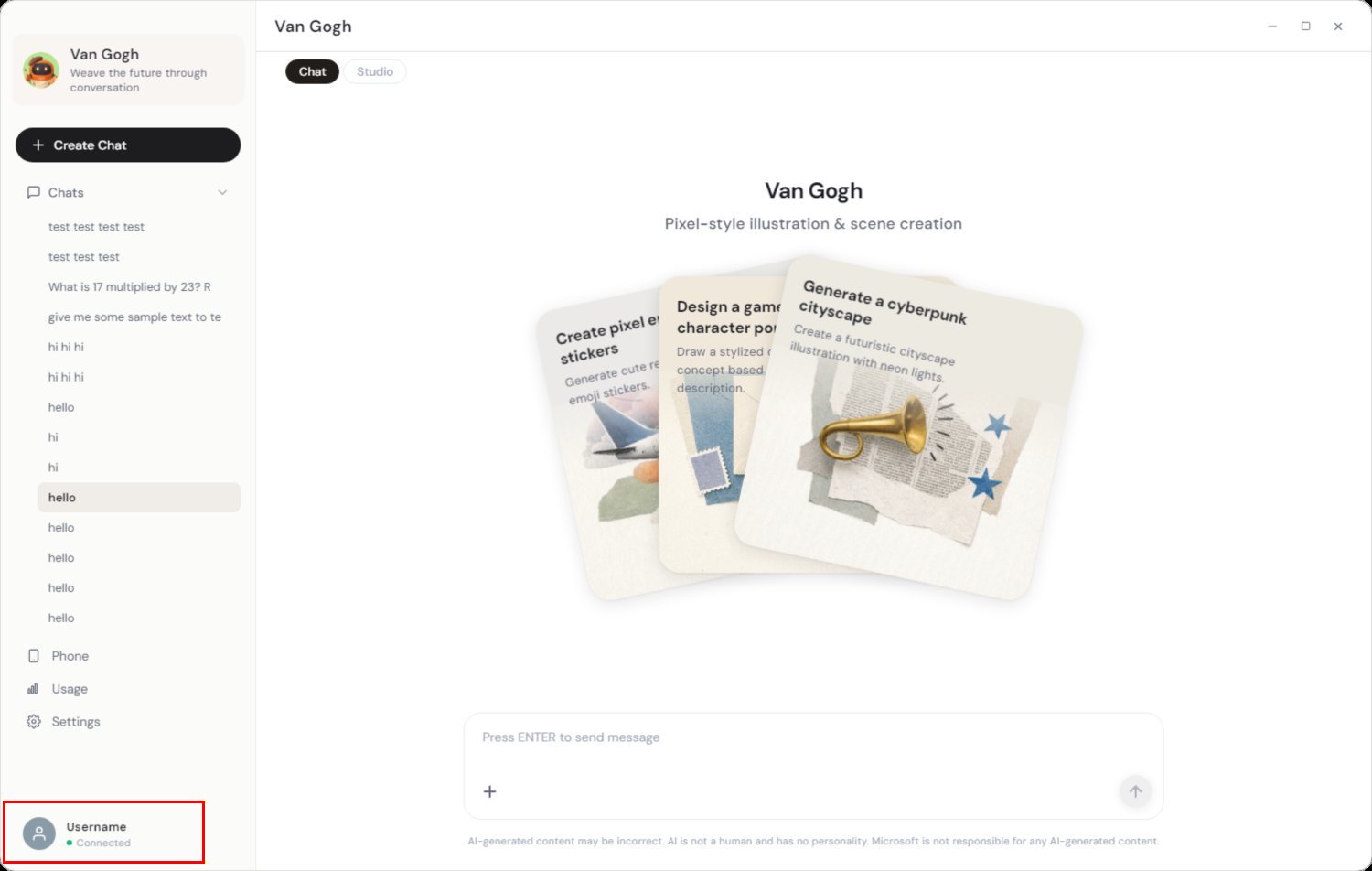
The bottom-left sidebar footer (SidePanel.vue) shows a user avatar, a "Username" label, and a green "Connected" status dot. However, the app has no user/account/login system at all, and this footer is entirely static/hardcoded — making it misleading in two ways.
Findings (from desktop/renderer/src/components/SidePanel.vue)
- "Username" is a hardcoded literal, not real data. It renders the static i18n string
sidebar.userName (= "Username"), not any user/profile value.
- The avatar is a static placeholder SVG — a generic person glyph on a grey circle (
#8a9ba8), not a real avatar image.
- The footer has no
@click handler — it is intentionally non-interactive, so the avatar/username imply an account feature that does not exist.
- The "Connected" status is also hardcoded. The green dot (
<span class="sp-status-dot"></span>) and the sidebar.connected label are static — not bound to chatStore.wsConnected. Everywhere else in the app connection UI is driven by chatStore.wsConnected (see App.vue, ChatView.vue), but this footer is not. As a result it will always display "Connected" even when the gateway WebSocket is actually disconnected.
Confirmed via a full grep of desktop/renderer/src: there is no auth/account system. The only login/account references are unrelated (WeChat channel login, model API-key setup, gateway WebSocket session, plugin accounts — all using accountId: "default").
Impact
- The avatar + "Username" imply a signed-in user / account system that does not exist (confusing UX).
- The always-green "Connected" indicator is actively misleading — it never reflects real connection state, so users get no signal when the gateway drops.
Repro
- Launch MicroClaw and look at the bottom-left of the sidebar.
- Observe the person avatar, "Username", and green "Connected" dot.
- Click it → nothing happens (no menu, no profile, no settings).
- Code:
desktop/renderer/src/components/SidePanel.vue (footer, ~lines 154–181); contrast with chatStore.wsConnected usage in App.vue / ChatView.vue.
Suggested fix (pick one)
- Remove the footer entirely, since it implies a feature (user accounts) that does not exist; or
- Repurpose it: make it a real entry point (e.g. to Settings/About) and bind the status dot + label to
chatStore.wsConnected so it reflects genuine Connected/Disconnected state.
Regardless of the above, the status dot should be wired to real connection state — the hardcoded "Connected" is the more concrete defect.
Found during a UI walkthrough of the desktop app.
Screenshots
The static Username avatar and hardcoded green Connected status (highlighted in red, bottom-left of the sidebar):

Summary
The bottom-left sidebar footer (
SidePanel.vue) shows a user avatar, a "Username" label, and a green "Connected" status dot. However, the app has no user/account/login system at all, and this footer is entirely static/hardcoded — making it misleading in two ways.Findings (from
desktop/renderer/src/components/SidePanel.vue)sidebar.userName(="Username"), not any user/profile value.#8a9ba8), not a real avatar image.@clickhandler — it is intentionally non-interactive, so the avatar/username imply an account feature that does not exist.<span class="sp-status-dot"></span>) and thesidebar.connectedlabel are static — not bound tochatStore.wsConnected. Everywhere else in the app connection UI is driven bychatStore.wsConnected(seeApp.vue,ChatView.vue), but this footer is not. As a result it will always display "Connected" even when the gateway WebSocket is actually disconnected.Confirmed via a full grep of
desktop/renderer/src: there is no auth/account system. The onlylogin/accountreferences are unrelated (WeChat channel login, model API-key setup, gateway WebSocket session, plugin accounts — all usingaccountId: "default").Impact
Repro
desktop/renderer/src/components/SidePanel.vue(footer, ~lines 154–181); contrast withchatStore.wsConnectedusage inApp.vue/ChatView.vue.Suggested fix (pick one)
chatStore.wsConnectedso it reflects genuine Connected/Disconnected state.Regardless of the above, the status dot should be wired to real connection state — the hardcoded "Connected" is the more concrete defect.
Found during a UI walkthrough of the desktop app.
Screenshots
The static
Usernameavatar and hardcoded greenConnectedstatus (highlighted in red, bottom-left of the sidebar):