Summary
When a user creates a new skill (e.g. by asking the agent / using the skill-creator flow), the skill is written to the managed skills directory (~/.openclaw/skills), not the custom skills directory (~/.agents/skills). As a result:
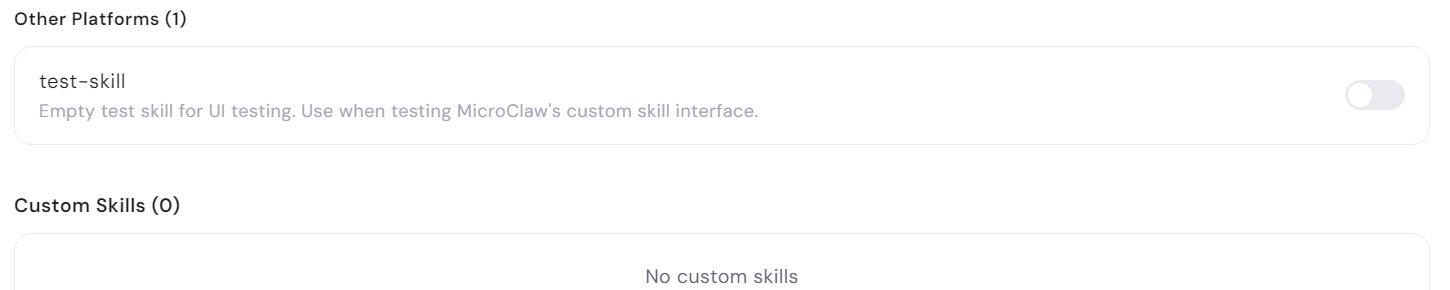
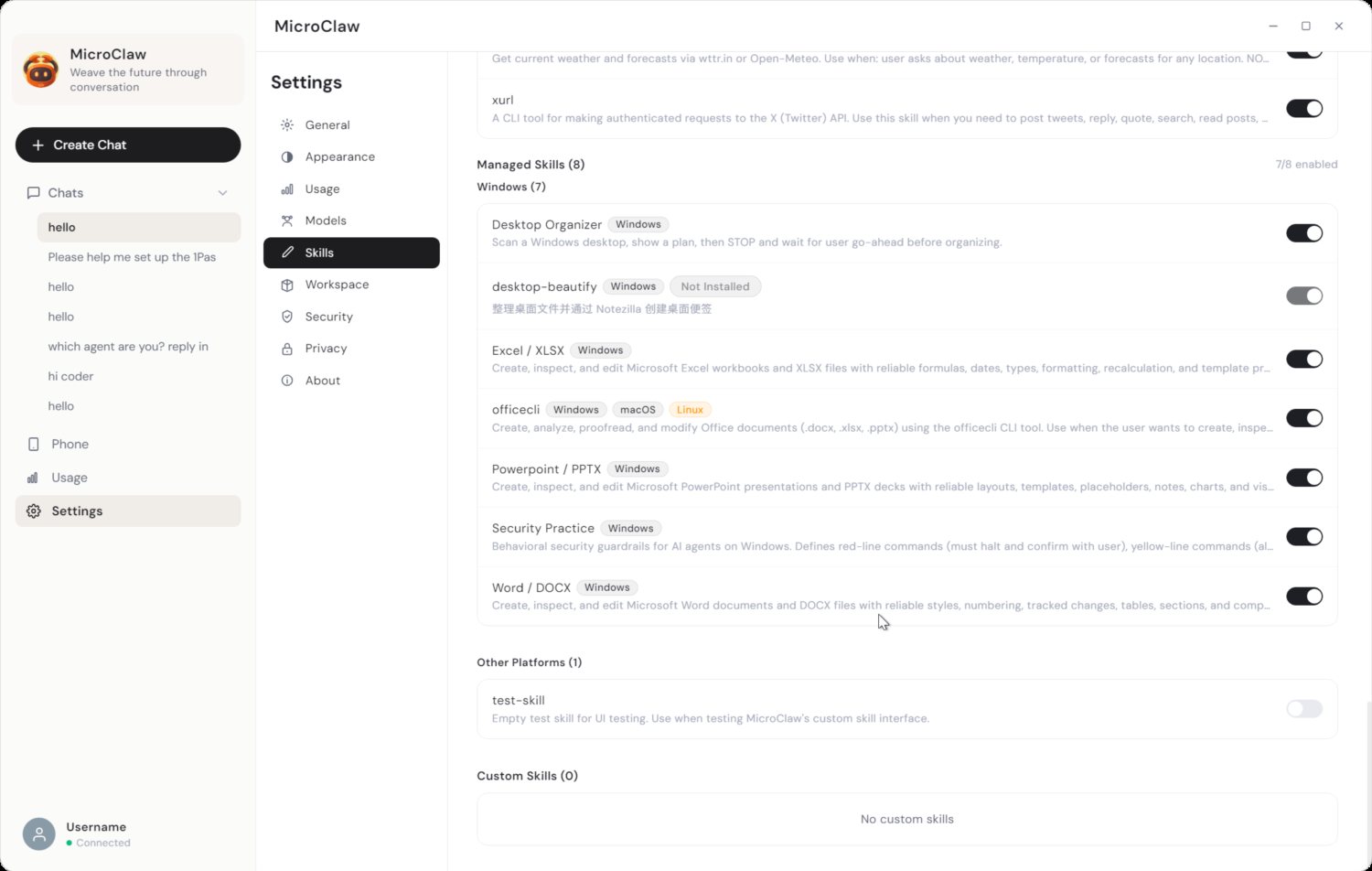
- The new skill appears under Managed Skills (in the "Other Platforms" sub-group), never under the "Custom Skills" section.
- The "Custom Skills" section stays empty ("No custom skills") because nothing in the normal create flow ever writes to
~/.agents/skills.
This makes the "Custom Skills" section effectively pointless — the natural way to author a skill never populates it.
Steps to reproduce
- Ask the agent in chat to create a new skill (e.g. "create a skill called test-skill").
- Open Settings → Skills and scroll to the bottom.
- Observe the new skill (
test-skill) shows under Managed Skills → Other Platforms, while Custom Skills (0) still says "No custom skills".
Expected
A user-created skill should appear under Custom Skills (that's the section's whole purpose), or the two concepts (custom dir vs. where skills are actually created) should be reconciled so the UI is consistent.
Actual
test-skill was written to C:\Users\<user>\.openclaw\skills\test-skill\SKILL.md (managed dir).- It renders under Managed Skills → Other Platforms (1).
- Custom Skills (0) remains empty.
Root cause / technical detail
Two separate directories back these two sections (desktop/src/main.ts, skills:list):
const customDir  = path.join(homeDir, ".agents", "skills");   // ← "Custom Skills" reads THIS
const managedDir = path.join(homeDir, ".openclaw", "skills");  // ← skills actually get created HERE
...
const custom       = scanSkills(customDir, "custom");
const managedOnDisk = scanSkills(managedDir, "managed");
The create/skill-creator flow writes to ~/.openclaw/skills (managed), but the Custom Skills UI only reads ~/.agents/skills (custom) — a directory that is never created or populated by the app. So user-authored skills can never land in the Custom section.
Additionally, the created SKILL.md has no platform: field:
---
name: test-skill
description: "Empty test skill for UI testing. Use when testing MicroClaw's custom skill interface."
---
Because it isn't in the managed catalog and has no windows platform, the list logic drops it into the "Other Platforms" managed sub-group (otherPlatformManagedSkills = managed skills whose platform doesn't include windows), which is misleading for a locally-authored skill.
Suggested fix
- Point the create/
skill-creator flow at the custom dir (~/.agents/skills) so authored skills appear under Custom Skills, or
- Have the Custom Skills section read from the same directory skills are actually created in, or
- Reconcile the "custom" vs "managed" concepts so user-created skills are surfaced consistently (and not mislabeled "Other Platforms" due to missing
platform metadata).
Screenshots
test-skill appears under Other Platforms, while Custom Skills is empty:
Full Skills page (Managed Skills → Other Platforms → Custom Skills):
Summary
When a user creates a new skill (e.g. by asking the agent / using the
skill-creatorflow), the skill is written to the managed skills directory (~/.openclaw/skills), not the custom skills directory (~/.agents/skills). As a result:~/.agents/skills.This makes the "Custom Skills" section effectively pointless — the natural way to author a skill never populates it.
Steps to reproduce
test-skill) shows under Managed Skills → Other Platforms, while Custom Skills (0) still says "No custom skills".Expected
A user-created skill should appear under Custom Skills (that's the section's whole purpose), or the two concepts (custom dir vs. where skills are actually created) should be reconciled so the UI is consistent.
Actual
test-skillwas written toC:\Users\<user>\.openclaw\skills\test-skill\SKILL.md(managed dir).Root cause / technical detail
Two separate directories back these two sections (
desktop/src/main.ts,skills:list):The create/
skill-creatorflow writes to~/.openclaw/skills(managed), but the Custom Skills UI only reads~/.agents/skills(custom) — a directory that is never created or populated by the app. So user-authored skills can never land in the Custom section.Additionally, the created
SKILL.mdhas noplatform:field:Because it isn't in the managed catalog and has no
windowsplatform, the list logic drops it into the "Other Platforms" managed sub-group (otherPlatformManagedSkills= managed skills whose platform doesn't includewindows), which is misleading for a locally-authored skill.Suggested fix
skill-creatorflow at the custom dir (~/.agents/skills) so authored skills appear under Custom Skills, orplatformmetadata).Screenshots
test-skillappears under Other Platforms, while Custom Skills is empty:Full Skills page (Managed Skills → Other Platforms → Custom Skills):