Summary
The Skills page shows 52 built-in skills as enabled/available, but the agent at runtime only sees a small subset (12 in this case). There is no indication in the UI of which skills are actually usable. The UI reflects only the allowBundled opt-in list, while the OpenClaw runtime additionally filters skills by whether their dependencies (required CLI binaries / env / OS) are satisfied on this machine. The two views disagree, and the app never surfaces the runtime eligibility, so users believe 52 skills are active when most are silently filtered out.
Reproduction
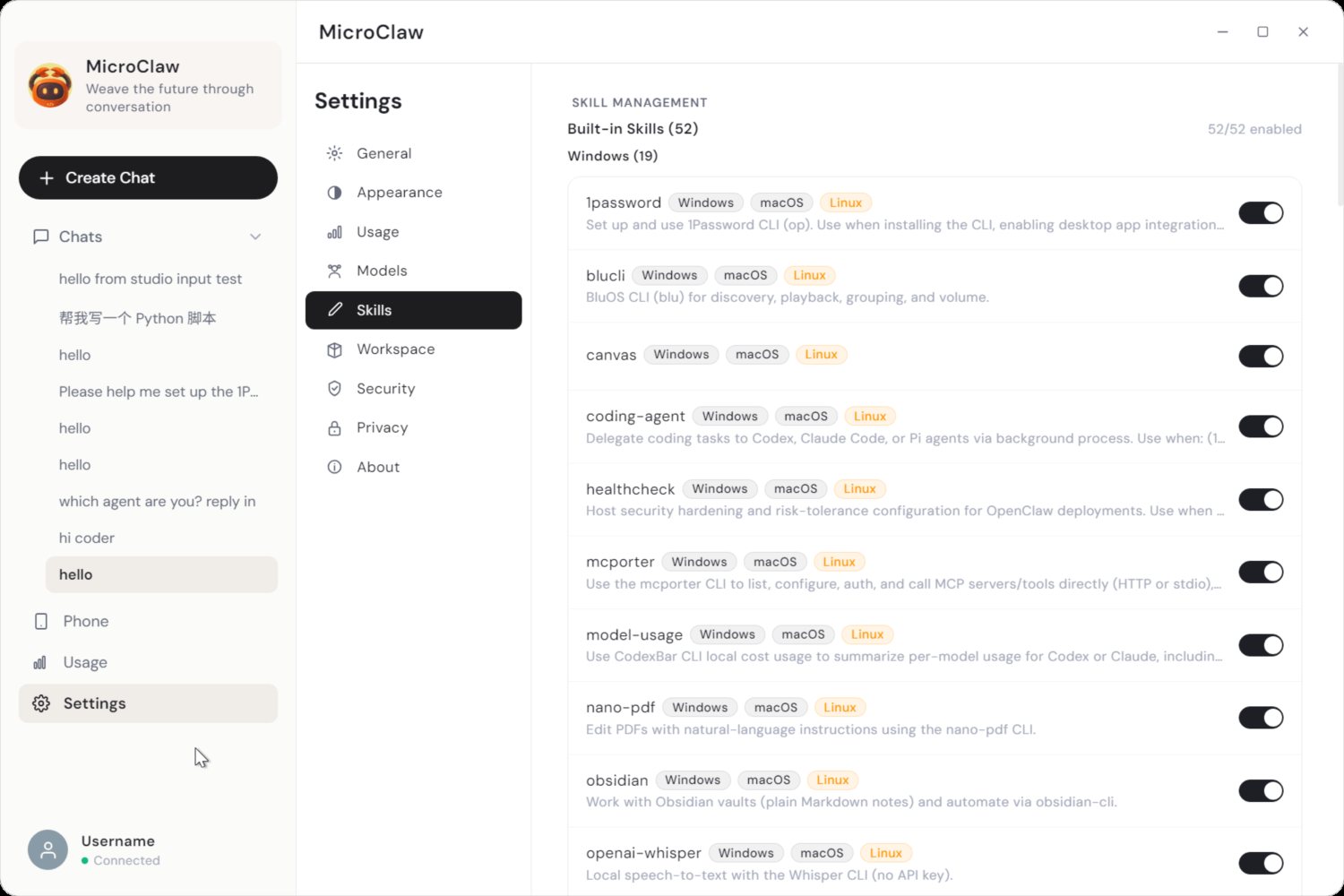
- Open Settings → Skills. It lists 52 built-in skills, all shown as installed and (mostly) enabled.
- Ask the agent "how many skills can you see / use?".
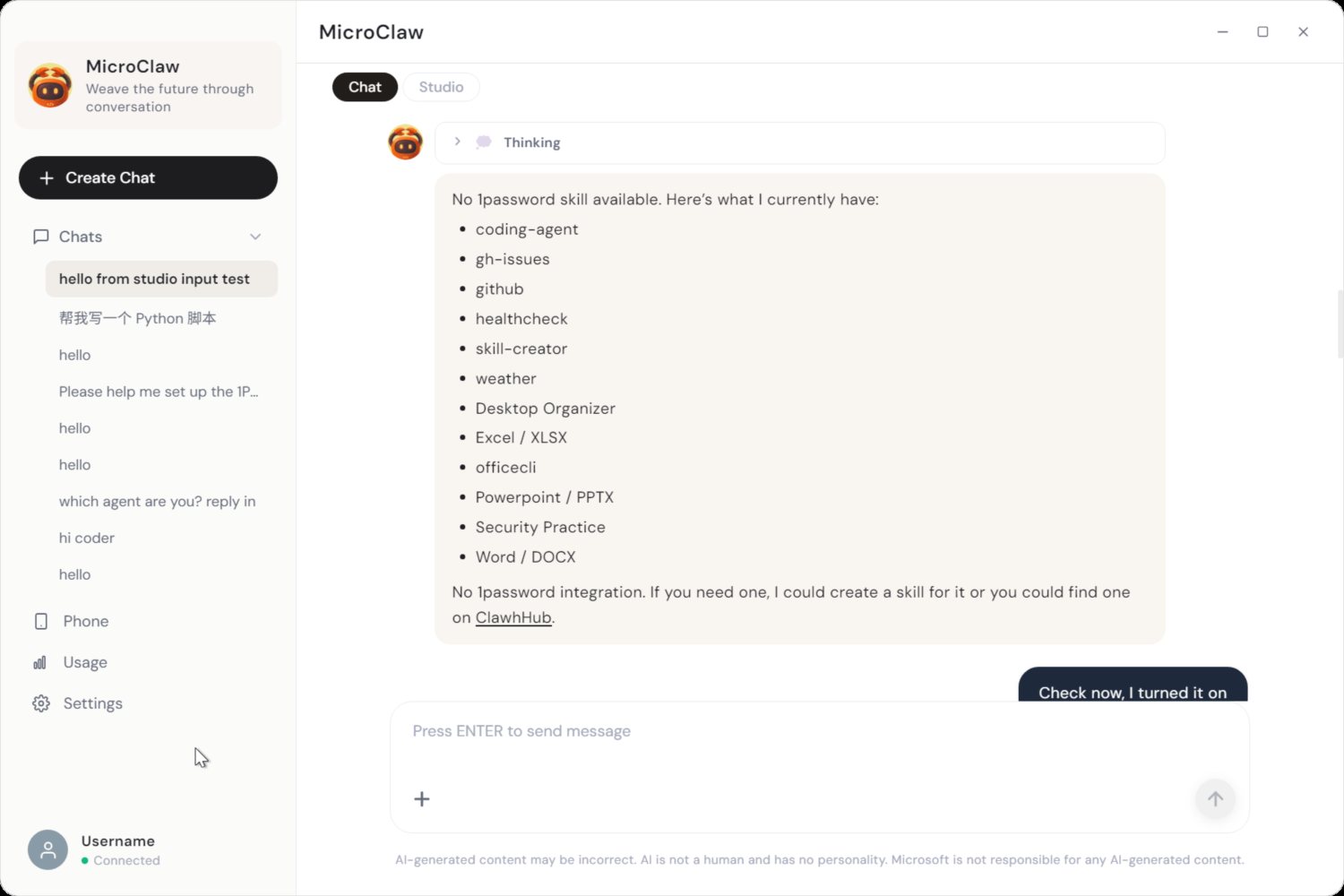
- The agent reports 12, not 52.
Observed on this Windows machine:
- 6 bundled skills loaded (deps satisfied):
coding-agent, gh-issues, github, healthcheck, skill-creator, weather.
- 6 user skills from
~/.openclaw/skills/ (no binary deps): desktop-organizer, excel-xlsx, officecli, powerpoint-pptx, security-practice, word-docx.
- ~40 bundled skills filtered out because their required CLIs aren't installed, e.g.
op (1password), curl, python3, jq+rg (session-logs), ffmpeg (video-frames), tmux, himalaya, sag, etc. Only git and gh are present from the full required-binary set. Many of these tools are macOS/Linux-oriented.
Root cause
The MicroClaw UI and the OpenClaw runtime compute "available" differently.
UI (desktop/src/main.ts skills:list, ~lines 2470–2568): a skill's enabled flag is derived only from the allowBundled opt-in list (and entries for managed), and every on-disk skill is returned with installed: true. There is no check of the skill's declared dependencies (required binaries, env vars, OS):
if (source === "builtin" && allowBundled && allowBundled.length > 0) {
  enabled = allowBundled.includes(entry.name);   // opt-in only; no dep check
}
...
results.push({ id, name, ..., enabled, installed: true });
Runtime (openclaw package, config-*.js shouldIncludeSkill): after the allowlist check, the skill must also pass evaluateRuntimeEligibility, which requires the declared binaries/env/OS to be present:
function shouldIncludeSkill(params) {
  ...
  if (skillConfig?.enabled === false) return false;
  if (!isBundledSkillAllowed(entry, allowBundled)) return false;
  return evaluateRuntimeEligibility({
    os, remotePlatforms, always, requires,
    hasBin: hasBinary,             // ← required CLI must exist on PATH
    hasEnv, ...
  });
}
So a skill can be allowBundled + enabled:true + installed:true in the UI, yet be excluded by the runtime because (say) op/ffmpeg/python3/tmux isn't installed. The UI has no visibility into requires/hasBin, so it always reports the skill as available.
Impact
- Misleading: users think all 52 skills are active; the agent actually exposes ~12. Asking the agent produces a number that contradicts the Skills page.
- No discoverability: nothing tells the user why a skill won't run or what to install to enable it (e.g. "requires
op CLI").
- Compounds with the existing "X/Y enabled" header count, which also ignores runtime eligibility.
Suggested fixes
- In
skills:list, evaluate each skill's declared dependencies (mirror OpenClaw's evaluateRuntimeEligibility / requires + binary-on-PATH check) and return an eligible/available flag plus the list of missing requirements.
- In the Skills UI, visually distinguish enabled-but-not-runnable skills (e.g. a "Requires:
op" badge / muted state), and show the count of actually-usable skills.
- Optionally surface an install hint / link per missing dependency (OpenClaw already tracks
install + missing.bins per skill in its control-ui skills view).
Environment
- MicroClaw desktop (Electron dev build), Windows.
- Built-in skills dir:
%APPDATA%\npm\node_modules\openclaw\skills (52 dirs).
- Runtime filtering in the bundled
openclaw package (shouldIncludeSkill / evaluateRuntimeEligibility).
Screenshots
Settings -> Skills shows Built-in Skills (52) with 52/52 enabled:
But the agent, asked what skills it has, lists only 12:
Summary
The Skills page shows 52 built-in skills as enabled/available, but the agent at runtime only sees a small subset (12 in this case). There is no indication in the UI of which skills are actually usable. The UI reflects only the
allowBundledopt-in list, while the OpenClaw runtime additionally filters skills by whether their dependencies (required CLI binaries / env / OS) are satisfied on this machine. The two views disagree, and the app never surfaces the runtime eligibility, so users believe 52 skills are active when most are silently filtered out.Reproduction
Observed on this Windows machine:
coding-agent,gh-issues,github,healthcheck,skill-creator,weather.~/.openclaw/skills/(no binary deps):desktop-organizer,excel-xlsx,officecli,powerpoint-pptx,security-practice,word-docx.op(1password),curl,python3,jq+rg(session-logs),ffmpeg(video-frames),tmux,himalaya,sag, etc. Onlygitandghare present from the full required-binary set. Many of these tools are macOS/Linux-oriented.Root cause
The MicroClaw UI and the OpenClaw runtime compute "available" differently.
UI (
desktop/src/main.tsskills:list, ~lines 2470–2568): a skill'senabledflag is derived only from theallowBundledopt-in list (andentriesfor managed), and every on-disk skill is returned withinstalled: true. There is no check of the skill's declared dependencies (required binaries, env vars, OS):Runtime (
openclawpackage,config-*.jsshouldIncludeSkill): after the allowlist check, the skill must also passevaluateRuntimeEligibility, which requires the declared binaries/env/OS to be present:So a skill can be
allowBundled+enabled:true+installed:truein the UI, yet be excluded by the runtime because (say)op/ffmpeg/python3/tmuxisn't installed. The UI has no visibility intorequires/hasBin, so it always reports the skill as available.Impact
opCLI").Suggested fixes
skills:list, evaluate each skill's declared dependencies (mirror OpenClaw'sevaluateRuntimeEligibility/requires+ binary-on-PATH check) and return aneligible/availableflag plus the list of missing requirements.op" badge / muted state), and show the count of actually-usable skills.install+missing.binsper skill in its control-ui skills view).Environment
%APPDATA%\npm\node_modules\openclaw\skills(52 dirs).openclawpackage (shouldIncludeSkill/evaluateRuntimeEligibility).Screenshots
Settings -> Skills shows Built-in Skills (52) with 52/52 enabled:
But the agent, asked what skills it has, lists only 12: