Complete end-to-end deployment guide for OpenTelemetry with Jaeger, Prometheus, Grafana, and ELK stack in Kubernetes using KIND.
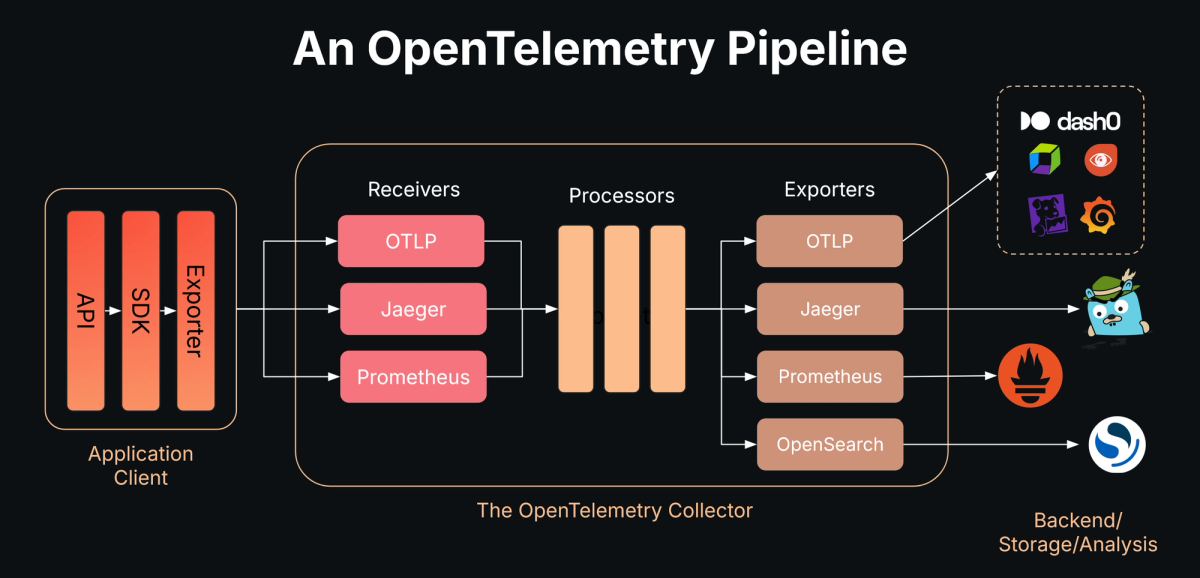
┌─────────────────────────────────────────────────────┐
│         Three-Tier Application Pods                 │
│    (Frontend, Backend, MySQL - threetierapp ns)     │
│         Auto-instrumented via OTel Operator         │
└────────────────────┬────────────────────────────────┘
                     │ OTLP (4317 gRPC / 4318 HTTP)
                     ▼
┌─────────────────────────────────────────────────────┐
│        OpenTelemetry Collector                       │
│           (observability namespace)                  │
│  otel-collector-opentelemetry-collector:4318        │
└──────┬───────────────┬──────────────┬───────────────┘
       │               │              │
       │ Traces        │ Metrics      │ Logs
       ▼               ▼              ▼
┌──────────────┐ ┌────────────┐ ┌────────────────┐
│   Jaeger     │ │ Prometheus │ │ Elasticsearch  │
│ :16686 (UI)  │ │  +Grafana  │ │   + Kibana     │
│ :4317 (OTLP) │ │  :3000 (UI)│ │   :5601 (UI)   │
│(observ. ns)  │ │(monitor ns)│ │  (logging ns)  │
└──────────────┘ └────────────┘ └────────────────┘
- OS: Ubuntu 20.04+ / macOS / Windows (with WSL2)
- CPU: 4+ cores recommended
- RAM: 8GB minimum, 16GB recommended
- Disk: 20GB free space
| Tool | Version | Purpose |
|---|---|---|
| Docker | 24.0+ | Container runtime |
| kubectl | 1.28+ | Kubernetes CLI |
| Helm | 3.12+ | Package manager |
| KIND | 0.20+ | Local K8s cluster |
echo "=== Checking Installed Tools ==="
docker --version && echo "✅ Docker installed" || echo "❌ Docker missing"
kubectl version --client --short && echo "✅ kubectl installed" || echo "❌ kubectl missing"
helm version --short && echo "✅ Helm installed" || echo "❌ Helm missing"
kind version && echo "✅ KIND installed" || echo "❌ KIND missing"
Expected Output:
✅ Docker installed
✅ kubectl installed
✅ Helm installed
✅ KIND installed
# Update system packages
sudo apt-get update

# Install prerequisites
sudo apt-get install -y \
    ca-certificates \
    curl \
    gnupg \
    lsb-release

# Add Docker's official GPG key
sudo mkdir -p /etc/apt/keyrings
curl -fsSL https://download.docker.com/linux/ubuntu/gpg | \
  sudo gpg --dearmor -o /etc/apt/keyrings/docker.gpg

# Set up Docker repository
echo \
  "deb [arch=$(dpkg --print-architecture) signed-by=/etc/apt/keyrings/docker.gpg] \
  https://download.docker.com/linux/ubuntu \
  $(lsb_release -cs) stable" | \
  sudo tee /etc/apt/sources.list.d/docker.list > /dev/null

# Install Docker Engine
sudo apt-get update
sudo apt-get install -y \
    docker-ce \
    docker-ce-cli \
    containerd.io \
    docker-buildx-plugin \
    docker-compose-plugin

# Add current user to docker group (avoid sudo)
sudo usermod -aG docker $USER
newgrp docker

# Verify installation
docker run hello-world# Download latest stable kubectl
curl -LO "https://dl.k8s.io/release/$(curl -L -s https://dl.k8s.io/release/stable.txt)/bin/linux/amd64/kubectl"
# Install kubectl
chmod +x kubectl
sudo mv kubectl /usr/local/bin/
# Verify installation
kubectl version --client# Download and install Helm
curl https://raw.githubusercontent.com/helm/helm/main/scripts/get-helm-3 | bash
# Verify installation
helm version# Download KIND binary (v0.24.0)
curl -Lo ./kind https://kind.sigs.k8s.io/dl/v0.24.0/kind-linux-amd64
# Install KIND
chmod +x ./kind
sudo mv ./kind /usr/local/bin/kind
# Verify installation
kind versioncat << 'EOF'
╔════════════════════════════════════════╗
║ Installation Verification ║
╚════════════════════════════════════════╝
EOF
docker --version
kubectl version --client --short
helm version --short
kind version
echo ""
echo "✅ All tools installed successfully!"# Create cluster configuration with exposed ports
cat <<EOF | kind create cluster --name otel-poc --config=-
kind: Cluster
apiVersion: kind.x-k8s.io/v1alpha4
nodes:
- role: control-plane
extraPortMappings:
# Grafana UI
- containerPort: 30000
hostPort: 30000
protocol: TCP
# Kibana UI
- containerPort: 30601
hostPort: 30601
protocol: TCP
# Jaeger UI
- containerPort: 31686
hostPort: 31686
protocol: TCP
# Application Frontend
- containerPort: 30001
hostPort: 30001
protocol: TCP
EOFVerify Cluster:
# Check cluster info
kubectl cluster-info --context kind-otel-poc

# Verify node is ready
kubectl get nodes

# Expected output:
# NAME                     STATUS   ROLES           AGE   VERSION
# otel-poc-control-plane   Ready    control-plane   1m    v1.27.x

# Add all required Helm repositories
helm repo add jetstack https://charts.jetstack.io
helm repo add open-telemetry https://open-telemetry.github.io/opentelemetry-helm-charts
helm repo add grafana https://grafana.github.io/helm-charts
helm repo add prometheus-community https://prometheus-community.github.io/helm-charts
helm repo add jaegertracing https://jaegertracing.github.io/helm-charts
helm repo add elastic https://helm.elastic.co

# Update repository cache
helm repo update
Verify Repositories:
helm repo list

# Expected output showing all 6 repositories

# Install cert-manager with CRDs
helm install cert-manager jetstack/cert-manager \
  --namespace cert-manager \
  --create-namespace \
  --version v1.16.2 \
  --set crds.enabled=true \
  --wait \
  --timeout 5m
Verify Installation:
# Check cert-manager pods
kubectl get pods -n cert-manager

# Expected: 3 pods Running (cert-manager, webhook, cainjector)

# Create observability namespace
kubectl create namespace observability

# Deploy Jaeger all-in-one with OTLP support
helm upgrade --install jaeger jaegertracing/jaeger \
  --namespace observability \
  --set allInOne.enabled=true \
  --set collector.enabled=false \
  --set query.enabled=false \
  --set agent.enabled=false \
  --set provisionDataStore.cassandra=false \
  --set storage.type=memory \
  --set allInOne.extraEnv[0].name=COLLECTOR_OTLP_ENABLED \
  --set allInOne.extraEnv[0].value=true \
  --set query.service.type=NodePort \
  --set query.service.nodePort=31686 \
  --wait
Verify Jaeger:
# Check Jaeger pods
kubectl get pods -n observability -l app.kubernetes.io/name=jaeger

# Check Jaeger services
kubectl get svc -n observability -l app.kubernetes.io/name=jaeger

# Create monitoring namespace
kubectl create namespace monitoring

# Deploy kube-prometheus-stack
helm upgrade --install monitoring prometheus-community/kube-prometheus-stack \
  --namespace monitoring \
  --set grafana.adminPassword=admin123 \
  --set prometheus.prometheusSpec.serviceMonitorSelectorNilUsesHelmValues=false \
  --set prometheus.prometheusSpec.podMonitorSelectorNilUsesHelmValues=false \
  --set prometheus.prometheusSpec.retention=7d \
  --set grafana.service.type=NodePort \
  --set grafana.service.nodePort=30000 \
  --wait
Verify Monitoring Stack:
# Check all monitoring pods
kubectl get pods -n monitoring

# Verify Grafana service
kubectl get svc -n monitoring monitoring-grafana

# Create logging namespace
kubectl create namespace logging

# Deploy Elasticsearch with security DISABLED (for dev/PoC)
cat > elasticsearch-direct.yaml <<'EOF'
apiVersion: v1
kind: Service
metadata:
  name: elasticsearch-master
  namespace: logging
  labels:
    app: elasticsearch
spec:
  type: ClusterIP
  ports:
  - port: 9200
    name: http
  - port: 9300
    name: transport
  selector:
    app: elasticsearch
---
apiVersion: apps/v1
kind: StatefulSet
metadata:
  name: elasticsearch-master
  namespace: logging
spec:
  serviceName: elasticsearch-master
  replicas: 1
  selector:
    matchLabels:
      app: elasticsearch
  template:
    metadata:
      labels:
        app: elasticsearch
    spec:
      initContainers:
      - name: fix-permissions
        image: busybox:1.36
        command: ['sh', '-c', 'chown -R 1000:1000 /usr/share/elasticsearch/data']
        volumeMounts:
        - name: data
          mountPath: /usr/share/elasticsearch/data
      - name: increase-vm-max-map
        image: busybox:1.36
        command: ['sysctl', '-w', 'vm.max_map_count=262144']
        securityContext:
          privileged: true
      containers:
      - name: elasticsearch
        image: docker.elastic.co/elasticsearch/elasticsearch:8.11.0
        ports:
        - containerPort: 9200
          name: http
        - containerPort: 9300
          name: transport
        env:
        - name: discovery.type
          value: "single-node"
        - name: ES_JAVA_OPTS
          value: "-Xms1g -Xmx1g"
        - name: xpack.security.enabled
          value: "false"
        - name: xpack.security.enrollment.enabled
          value: "false"
        - name: xpack.security.http.ssl.enabled
          value: "false"
        - name: xpack.security.transport.ssl.enabled
          value: "false"
        - name: cluster.name
          value: "elasticsearch"
        - name: node.name
          valueFrom:
            fieldRef:
              fieldPath: metadata.name
        resources:
          requests:
            cpu: 500m
            memory: 2Gi
          limits:
            cpu: 1000m
            memory: 2Gi
        volumeMounts:
        - name: data
          mountPath: /usr/share/elasticsearch/data
        readinessProbe:
          httpGet:
            path: /_cluster/health?local=true
            port: 9200
            scheme: HTTP
          initialDelaySeconds: 60
          periodSeconds: 10
  volumeClaimTemplates:
  - metadata:
      name: data
    spec:
      accessModes: ["ReadWriteOnce"]
      resources:
        requests:
          storage: 10Gi
EOF

# Apply Elasticsearch configuration
kubectl apply -f elasticsearch-direct.yaml

# Wait for Elasticsearch to be ready
kubectl wait --for=condition=ready pod -l app=elasticsearch \
  -n logging --timeout=300s
Test Elasticsearch:
# Test connection
kubectl run test-es --image=curlimages/curl -i --rm --restart=Never -n logging -- \
  curl -s http://elasticsearch-master:9200

# Expected output: JSON with cluster info# Create Kibana deployment
cat > kibana-deploy.yaml <<'EOF'
apiVersion: apps/v1
kind: Deployment
metadata:
name: kibana
namespace: logging
labels:
app: kibana
spec:
replicas: 1
selector:
matchLabels:
app: kibana
template:
metadata:
labels:
app: kibana
spec:
containers:
- name: kibana
image: docker.elastic.co/kibana/kibana:8.11.0
env:
- name: ELASTICSEARCH_HOSTS
value: "http://elasticsearch-master.logging.svc.cluster.local:9200"
- name: SERVER_HOST
value: "0.0.0.0"
- name: ELASTICSEARCH_SSL_VERIFICATIONMODE
value: "none"
- name: XPACK_SECURITY_ENABLED
value: "false"
- name: XPACK_ENCRYPTEDSAVEDOBJECTS_ENCRYPTIONKEY
value: "min-32-byte-long-strong-encryption-key-value"
ports:
- containerPort: 5601
name: http
resources:
requests:
cpu: 200m
memory: 1Gi
limits:
cpu: 1000m
memory: 2Gi
readinessProbe:
httpGet:
path: /api/status
port: 5601
initialDelaySeconds: 90
periodSeconds: 10
timeoutSeconds: 10
failureThreshold: 20
---
apiVersion: v1
kind: Service
metadata:
name: kibana
namespace: logging
labels:
app: kibana
spec:
type: NodePort
ports:
- port: 5601
targetPort: 5601
nodePort: 30601
protocol: TCP
name: http
selector:
app: kibana
EOF
# Deploy Kibana
kubectl apply -f kibana-deploy.yamlVerify Kibana:
# Watch Kibana pod startup
kubectl get pods -n logging -l app=kibana -w

# Check logs (should show successful startup)
kubectl logs -n logging -l app=kibana --tail=20

# Install OTel Operator
helm install opentelemetry-operator open-telemetry/opentelemetry-operator \
  --namespace observability \
  --set manager.collectorImage.repository=otel/opentelemetry-collector-contrib \
  --set manager.collectorImage.tag=0.140.0 \
  --wait
Verify Operator:
kubectl get pods -n observability -l app.kubernetes.io/name=opentelemetry-operator# Create instrumentation resource for auto-instrumentation
cat > instrumentation.yaml <<'EOF'
apiVersion: opentelemetry.io/v1alpha1
kind: Instrumentation
metadata:
name: otel-autoinstrumentation
namespace: observability
spec:
propagators:
- tracecontext
- baggage
sampler:
type: parentbased_traceidratio
argument: "1.0"
exporter:
endpoint: http://otel-collector-opentelemetry-collector.observability.svc.cluster.local:4318
java:
image: ghcr.io/open-telemetry/opentelemetry-operator/autoinstrumentation-java:latest
env:
- name: OTEL_EXPORTER_OTLP_PROTOCOL
value: "http/protobuf"
- name: OTEL_TRACES_EXPORTER
value: "otlp"
- name: OTEL_METRICS_EXPORTER
value: "otlp"
- name: OTEL_LOGS_EXPORTER
value: "otlp"
nodejs:
image: ghcr.io/open-telemetry/opentelemetry-operator/autoinstrumentation-nodejs:latest
env:
- name: OTEL_EXPORTER_OTLP_PROTOCOL
value: "http/protobuf"
- name: OTEL_TRACES_EXPORTER
value: "otlp"
- name: OTEL_METRICS_EXPORTER
value: "otlp"
- name: OTEL_LOGS_EXPORTER
value: "otlp"
python:
image: ghcr.io/open-telemetry/opentelemetry-operator/autoinstrumentation-python:latest
env:
- name: OTEL_EXPORTER_OTLP_PROTOCOL
value: "http/protobuf"
- name: OTEL_TRACES_EXPORTER
value: "otlp"
- name: OTEL_METRICS_EXPORTER
value: "otlp"
- name: OTEL_LOGS_EXPORTER
value: "otlp"
EOF
# Apply instrumentation configuration
kubectl apply -f instrumentation.yaml# Create collector configuration
cat > collector-values.yaml <<'EOF'
mode: deployment
image:
repository: otel/opentelemetry-collector-contrib
tag: 0.140.0
pullPolicy: IfNotPresent
presets:
kubernetesAttributes:
enabled: true
service:
type: ClusterIP
ports:
otlp-grpc:
enabled: true
containerPort: 4317
servicePort: 4317
protocol: TCP
otlp-http:
enabled: true
containerPort: 4318
servicePort: 4318
protocol: TCP
metrics:
enabled: true
containerPort: 8888
servicePort: 8888
protocol: TCP
resources:
requests:
cpu: 300m
memory: 512Mi
limits:
cpu: 1000m
memory: 1Gi
config:
extensions:
health_check:
endpoint: ":13133"
pprof:
endpoint: ":1777"
zpages:
endpoint: ":55679"
receivers:
otlp:
protocols:
grpc:
endpoint: 0.0.0.0:4317
http:
endpoint: 0.0.0.0:4318
prometheus:
config:
scrape_configs:
- job_name: "otel-collector"
scrape_interval: 30s
static_configs:
- targets: ["0.0.0.0:8888"]
processors:
memory_limiter:
check_interval: 5s
limit_percentage: 75
spike_limit_percentage: 25
batch:
send_batch_size: 1024
timeout: 10s
k8sattributes:
auth_type: serviceAccount
passthrough: false
resource:
attributes:
- key: deployment.environment
value: dev
action: insert
exporters:
debug:
verbosity: detailed
sampling_initial: 5
sampling_thereafter: 200
otlp/jaeger:
endpoint: jaeger-collector.observability.svc.cluster.local:4317
tls:
insecure: true
prometheus:
endpoint: 0.0.0.0:8888
resource_to_telemetry_conversion:
enabled: true
elasticsearch:
endpoints:
- http://elasticsearch-master.logging.svc.cluster.local:9200
logs_index: otel-logs
tls:
insecure_skip_verify: true
service:
extensions: [health_check, pprof, zpages]
telemetry:
logs:
level: info
metrics:
address: 0.0.0.0:8889
pipelines:
traces:
receivers: [otlp]
processors: [memory_limiter, k8sattributes, resource, batch]
exporters: [debug, otlp/jaeger]
metrics:
receivers: [otlp, prometheus]
processors: [memory_limiter, k8sattributes, resource, batch]
exporters: [prometheus, debug]
logs:
receivers: [otlp]
processors: [memory_limiter, k8sattributes, resource, batch]
exporters: [debug, elasticsearch]
EOF
# Deploy OpenTelemetry Collector
helm upgrade --install otel-collector open-telemetry/opentelemetry-collector \
-n observability \
-f collector-values.yaml \
--waitVerify Collector:
# Check collector pod
kubectl get pods -n observability -l app.kubernetes.io/name=opentelemetry-collector

# View collector logs
kubectl logs -n observability -l app.kubernetes.io/name=opentelemetry-collector --tail=50# Create application namespace
kubectl create namespace threetierapp
# Deploy secrets and ConfigMaps
kubectl apply -f K8s/secrets-configmap.yml -n threetierapp
# Deploy MySQL database
kubectl apply -f K8s/mysql-ds.yml -n threetierapp
# Deploy backend service
kubectl apply -f K8s/backend-ds.yml -n threetierapp
# Deploy frontend service
kubectl apply -f K8s/frontend-ds.yml -n threetierapp# Patch backend deployment for Java auto-instrumentation
kubectl patch deployment backend-deployment -n threetierapp --patch '{
"spec": {
"template": {
"metadata": {
"annotations": {
"instrumentation.opentelemetry.io/inject-java": "observability/otel-autoinstrumentation"
}
}
}
}
}'
# Patch frontend deployment for Node.js auto-instrumentation
kubectl patch deployment frontend-deployment -n threetierapp --patch '{
"spec": {
"template": {
"metadata": {
"annotations": {
"instrumentation.opentelemetry.io/inject-nodejs": "observability/otel-autoinstrumentation"
}
}
}
}
}'Verify Application:
# Check all application pods
kubectl get pods -n threetierapp

# Expected: 3 pods Running (mysql, backend, frontend)

# Access via NodePort
# URL: http://localhost:30000

# Or use port-forward
kubectl port-forward svc/monitoring-grafana -n monitoring 3000:80
# URL: http://localhost:3000
Credentials:
- Username:
admin - Password:
admin123

# Access via NodePort
# URL: http://localhost:31686

# Or use port-forward
kubectl port-forward svc/jaeger-query -n observability 16686:16686
# URL: http://localhost:16686

# Access via NodePort
# URL: http://localhost:30601

# Or use port-forward
kubectl port-forward svc/kibana -n logging 5601:5601
# URL: http://localhost:5601
Configure Index Pattern:
- Navigate to Stack Management → Index Patterns
- Create pattern:
otel-logs* - Select timestamp field:
@timestamp - View logs in Discover tab


# Check all namespaces
kubectl get pods --all-namespaces

# Check specific namespaces
kubectl get all -n observability
kubectl get all -n monitoring
kubectl get all -n logging
kubectl get all -n threetierapp
Expected: All pods in Running status
# Test Jaeger OTLP endpoint
kubectl run test-jaeger --image=curlimages/curl -i --rm --restart=Never -n observability -- \
  curl -v http://jaeger-collector:4318

# Test Elasticsearch
kubectl run test-es --image=curlimages/curl -i --rm --restart=Never -n logging -- \
  curl -s http://elasticsearch-master:9200

# Test Prometheus
kubectl run test-prom --image=curlimages/curl -i --rm --restart=Never -n monitoring -- \
curl -s http://monitoring-prometheus:9090/-/healthy# Send test OTLP trace to collector
kubectl run test-otlp --image=curlimages/curl -i --rm --restart=Never -n observability -- \
curl -X POST http://otel-collector-opentelemetry-collector:4318/v1/traces \
-H "Content-Type: application/json" \
-d '{
"resourceSpans": [{
"resource": {
"attributes": [{
"key": "service.name",
"value": {"stringValue": "test-service"}
}]
},
"scopeSpans": [{
"scope": {"name": "manual-test"},
"spans": [{
"traceId": "5B8EFFF798038103D269B633813FC60C",
"spanId": "EEE19B7EC3C1B174",
"name": "test-span",
"kind": 1,
"startTimeUnixNano": "1544712660000000000",
"endTimeUnixNano": "1544712661000000000"
}]
}]
}]
}'Verify in Jaeger:
- Open Jaeger UI at http://localhost:31686
- Select service:
test-service - Click Find Traces
- You should see the test trace
# Stream collector logs
kubectl logs -n observability -l app.kubernetes.io/name=opentelemetry-collector -f
Expected log entries:
info	TracesExporter	{"kind": "exporter", "#spans": 1}
info	MetricsExporter	{"kind": "exporter", "#datapoints": X}
info	LogsExporter	{"kind": "exporter", "#records": X}
Symptoms:
- Kibana UI shows connection error
- Kibana logs show "received plaintext http traffic on https channel"
Solution:
# Check Elasticsearch security settings
kubectl logs -n logging elasticsearch-master-0 | grep "security"

# If security is enabled, redeploy Elasticsearch with security disabled
kubectl delete statefulset elasticsearch-master -n logging
kubectl apply -f elasticsearch-direct.yamlSymptoms:
- No traces visible in Jaeger UI
- Collector shows connection errors to Jaeger
Solution:
# Verify Jaeger collector service exists
kubectl get svc jaeger-collector -n observability

# Check if OTLP port 4317 is exposed
kubectl describe svc jaeger-collector -n observability | grep 4317

# If missing, redeploy Jaeger with OTLP enabled
helm upgrade --install jaeger jaegertracing/jaeger \
  --namespace observability \
  --set allInOne.extraEnv[0].name=COLLECTOR_OTLP_ENABLED \
--set allInOne.extraEnv[0].value=trueSymptoms:
- Collector pod in
CrashLoopBackOffstate - Pod restarts continuously
Solution:
# Check collector logs for errors
kubectl logs -n observability -l app.kubernetes.io/name=opentelemetry-collector

# Common fixes:
# 1. Invalid exporter endpoint - verify service names
# 2. Memory limit too low - increase to 1Gi
# 3. Invalid YAML - validate collector-values.yaml

# Redeploy with corrected configuration
helm upgrade --install otel-collector open-telemetry/opentelemetry-collector \
  -n observability \
  -f collector-values.yaml \
--waitSymptoms:
- No telemetry data from application
- Pods don't show OTel init containers
Solution:
# Verify instrumentation resource exists
kubectl get instrumentation -n observability

# Check pod annotations
kubectl describe pod <pod-name> -n threetierapp | grep instrumentation

# Re-apply patches
kubectl patch deployment backend-deployment -n threetierapp --patch '{
  "spec": {
    "template": {
      "metadata": {
        "annotations": {
          "instrumentation.opentelemetry.io/inject-java": "observability/otel-autoinstrumentation"
        }
      }
    }
  }
}'# Delete all Helm releases
helm delete otel-collector opentelemetry-operator jaeger -n observability
helm delete monitoring -n monitoring
helm delete cert-manager -n cert-manager
# Delete Kubernetes resources
kubectl delete -f kibana-deploy.yaml
kubectl delete -f elasticsearch-direct.yaml
# Delete application
kubectl delete namespace threetierapp
# Delete infrastructure namespaces
kubectl delete namespace observability monitoring logging cert-manager
# Delete KIND cluster
kind delete cluster --name otel-poc# Delete only application
kubectl delete namespace threetierapp
# Delete only observability stack
helm delete otel-collector opentelemetry-operator jaeger -n observability
kubectl delete namespace observability
# Delete only monitoring stack
helm delete monitoring -n monitoring
kubectl delete namespace monitoring
# Delete only logging stack
kubectl delete -f kibana-deploy.yaml
kubectl delete -f elasticsearch-direct.yaml
kubectl delete namespace loggingUse this checklist to verify successful deployment:
- Cluster: KIND cluster created and accessible
- Cert-Manager: 3 pods running in cert-manager namespace
- Jaeger: Jaeger pod running, UI accessible at port 31686
- Prometheus/Grafana: All monitoring pods running, Grafana at port 30000
- Elasticsearch: Pod running and responding to health checks
- Kibana: Pod running, UI accessible at port 30601, connected to Elasticsearch
- OTel Operator: Operator pod running in observability namespace
- OTel Collector: Collector pod running, accepting OTLP on ports 4317/4318
- Application: All 3 application pods running in threetierapp namespace
- Auto-Instrumentation: Application pods show OTel init containers
- Traces: Test trace visible in Jaeger UI
- Metrics: Prometheus scraping metrics from collector
- Logs: Logs flowing to Elasticsearch and visible in Kibana
.
├── K8s/                          # Kubernetes manifests
│   ├── secrets-configmap.yml    # Application secrets
│   ├── mysql-ds.yml             # MySQL deployment
│   ├── backend-ds.yml           # Backend deployment
│   └── frontend-ds.yml          # Frontend deployment
├── frontend/                     # Frontend application code
├── backend/                      # Backend application code
├── snapshots/                    # Documentation screenshots
└── README.md                     # This file