A multi-provider AI coding assistant CLI — like Claude Code and Gemini CLI, but open source.




DevOrch gives you a coding assistant in your terminal that can execute shell commands, edit files, search your codebase, manage terminal sessions, and remember context across conversations — powered by any of 13+ AI providers or your own local models.
| Startup | Chat |
|---|---|
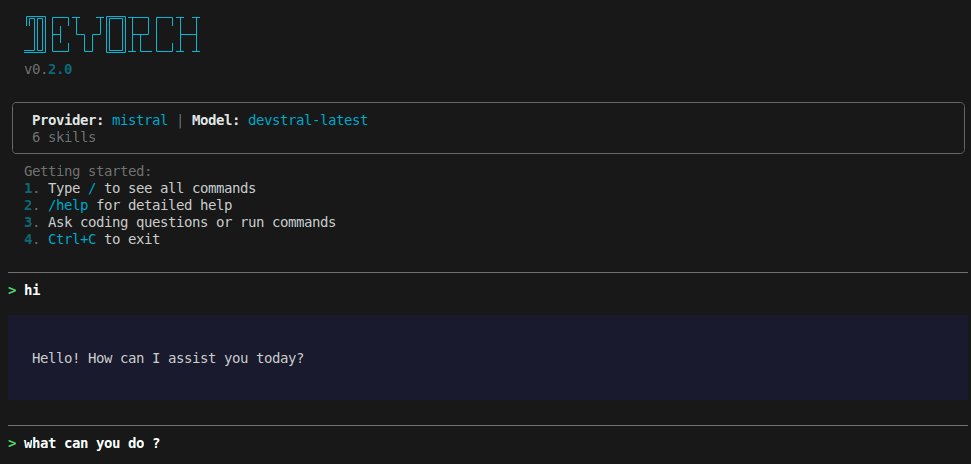 |
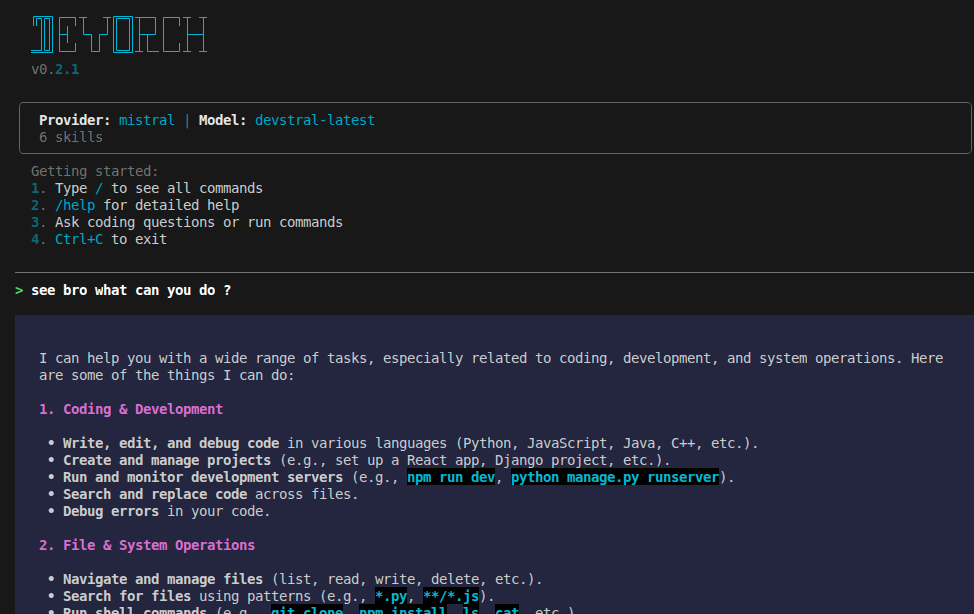 |
| Provider Selection | Model Selection |
|---|---|
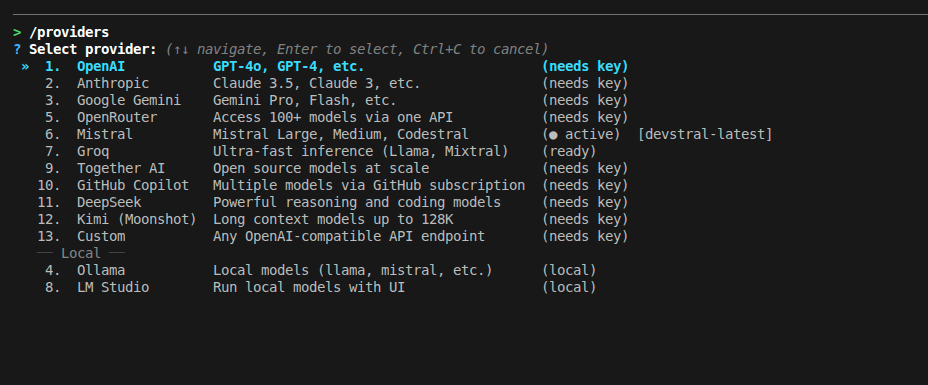 |
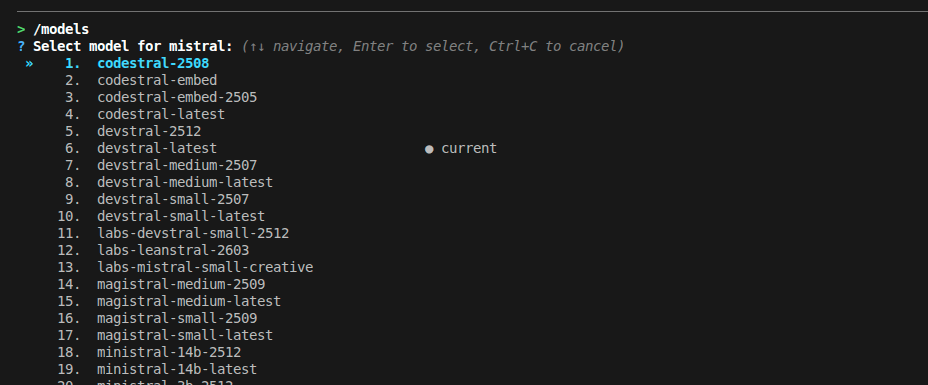 |
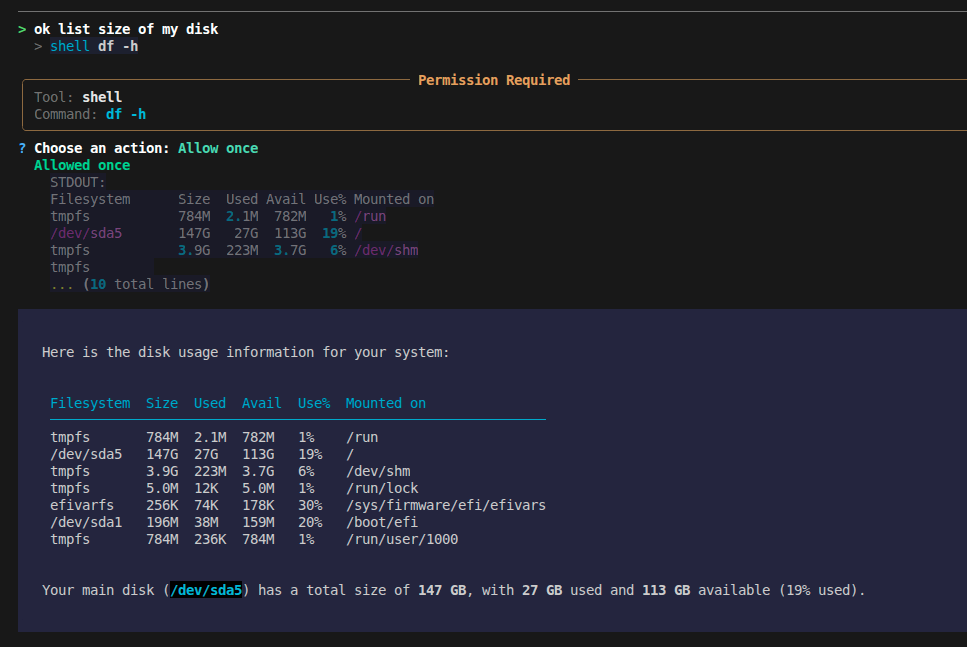
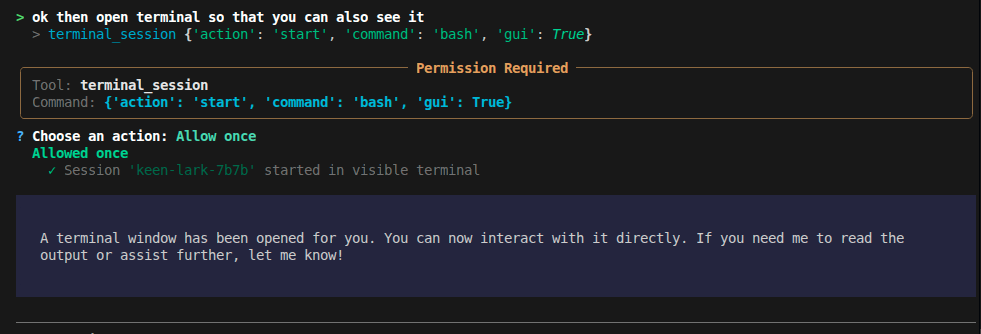
| Tool Execution | Terminal Session |
|---|---|
 |
 |
- Provider freedom — Switch between OpenAI, Anthropic, Gemini, Mistral, Groq, and 8 more providers (including local models) with a single command. No vendor lock-in.
- Actually does things — Runs shell commands, edits files, manages background processes, searches the web. Not just a chatbot.
- Remembers you — Persistent memory system stores your preferences, project context, and feedback across conversations.
- Extensible — Add custom skills as YAML files, connect MCP servers for additional tools, configure permissions per-tool.
# Recommended
pipx install devorch

# Or with pip
pip install devorch

# Or from source
git clone https://github.com/Amanbig/DevOrch.git
cd DevOrch && pip install -e .devorch # Interactive setup on first run
devorch -p openai # Use a specific provider
devorch -p local # Use Ollama (local models)
devorch --resume abc123 # Resume a previous sessionOn first run, DevOrch walks you through provider selection and API key setup.
| Cloud | Local / Self-Hosted |
|---|---|
| OpenAI (GPT-4o, o1) | Ollama (Llama, Mistral, CodeLlama) |
| Anthropic (Claude 4, 3.5) | LM Studio (any GGUF model) |
| Google Gemini (2.0, 1.5 Pro) | Custom (vLLM, TGI, llama.cpp) |
| Groq (ultra-fast Llama, Mixtral) | |
| Mistral (Large, Codestral) | |
| Together AI, OpenRouter, GitHub Copilot, DeepSeek, Kimi |
Switch anytime with /providers (interactive) or /provider <name> (direct).
DevOrch can act on your system, not just talk about it:
| Tool | What it does |
|---|---|
shell |
Execute commands (git status, npm install, etc.) |
terminal_session |
Managed background processes with optional GUI window |
filesystem |
Read, write, list files |
search / grep |
Find files and search contents |
edit |
Targeted find-and-replace edits |
task |
Track progress on multi-step work |
memory |
Persistent memory across conversations |
websearch / webfetch |
Search the web, fetch URLs |
DevOrch remembers context across conversations:
/remember I prefer TypeScript over JavaScript
/remember This project uses PostgreSQL, not MySQL
/memory                    # View all saved memories
/forget                    # Delete a memory interactively
Memory types: user (preferences), feedback (corrections), project (context), reference (external links).
Reusable prompt templates for common workflows:
/commit       # Generate a descriptive git commit
/review       # Review code changes for bugs
/test         # Run tests and analyze results
/fix          # Fix the last error
/explain      # Explain project structure
/simplify     # Simplify recent code changes
Add your own in ~/.devorch/skills/:
# ~/.devorch/skills/deploy.yaml
name: deploy
description: Deploy to production
prompt: |
  Run the deploy script and verify it succeeds.
Check the deploy logs for any errors.Background processes that persist across DevOrch restarts:
# Headless — AI monitors output
> terminal_session start command="npm run dev"
  Session 'swift-fox-a3f2' started (PID 12345)

# With GUI — user gets a visible terminal, AI can still read output
> terminal_session start command="bash" gui=true
  Session 'calm-owl-b7e1' started in visible terminal

# Check output / send input / stop
> terminal_session read session_id="swift-fox-a3f2"
> terminal_session send session_id="swift-fox-a3f2" input="rs\n"
> terminal_session stop session_id="swift-fox-a3f2"Extend DevOrch with external tool servers:
# ~/.devorch/config.yaml
mcp_servers:
  github:
    command: npx
    args: ["-y", "@modelcontextprotocol/server-github"]
    env:
      GITHUB_TOKEN: "ghp_xxx"
  filesystem:
    command: npx
    args: ["-y", "@modelcontextprotocol/server-filesystem", "/home/user"]
MCP tools appear alongside built-in tools automatically.
| Mode | Behavior |
|---|---|
| ASK (default) | Asks permission before each tool execution |
| AUTO | Executes tools automatically (dangerous commands still blocked) |
| PLAN | Shows a plan before executing, asks for approval |
Fine-grained control over what DevOrch can do:
devorch permissions list                    # View current rules
devorch permissions set shell allow         # Always allow shell
devorch permissions allow shell "git *"     # Allow specific patterns
devorch permissions deny shell "rm -rf *"   # Block dangerous commands
Or use /auth in-chat to set API keys without restarting.
| Command | Description |
|---|---|
/help |
Show all commands |
/models |
Browse and switch models (interactive) |
/model <name> |
Switch model (partial match supported) |
/providers |
Browse and switch providers (interactive) |
/provider <name> |
Switch provider directly |
/mode |
Switch mode (Plan/Auto/Ask) |
/status |
Show current config |
/auth [provider] |
Set/update API key |
/memory |
Show saved memories |
/remember <text> |
Save to memory |
/forget |
Delete a memory |
/skills |
List available skills |
/skill <name> |
Run a skill |
/commit /review /test /fix /explain /simplify |
Skill shortcuts |
/session |
Session info |
/history |
Conversation history |
/clear |
Clear history |
/compact |
Summarize history |
/save |
Save to file |
/undo |
Undo last message |
/mcp |
MCP server status |
/config |
Show configuration |
/permissions |
Show permissions |
/tasks |
Show task list |
# Secure keychain storage
devorch set-key openai
devorch set-key anthropic

# Or in-chat
/auth openai

# Or environment variables
export OPENAI_API_KEY=sk-...
export ANTHROPIC_API_KEY=sk-ant-...
export GOOGLE_API_KEY=...
export GROQ_API_KEY=gsk_...
export MISTRAL_API_KEY=...
export OPENROUTER_API_KEY=sk-or-...
export TOGETHER_API_KEY=...
export GITHUB_TOKEN=ghp_...
export DEEPSEEK_API_KEY=sk-...
export MOONSHOT_API_KEY=sk-...# ~/.devorch/config.yaml
default_provider: openai
providers:
openai:
default_model: gpt-4o
anthropic:
default_model: claude-sonnet-4-20250514
custom_vllm:
default_model: meta-llama/Meta-Llama-3-70B-Instruct
base_url: http://localhost:8000/v1
mcp_servers:
github:
command: npx
args: ["-y", "@modelcontextprotocol/server-github"]
env:
GITHUB_TOKEN: "ghp_xxx"~/.devorch/
├── config.yaml # Provider settings, MCP servers
├── permissions.yaml # Tool permission rules
├── sessions.db # Chat history (SQLite)
├── memory/ # Persistent memories
│ ├── MEMORY.md
│ └── *.md
├── skills/ # Custom skill definitions
│ └── *.yaml
└── sessions/ # Terminal session logs
├── registry.json
└── *.log
Contributions are welcome! Here's how to get started:
# Clone and install in development mode
git clone https://github.com/Amanbig/DevOrch.git
cd DevOrch
pip install -e ".[dev]"

# Run linting
ruff check .
ruff format .

# Run tests
pytest- Run
ruff check .andruff format .before submitting - Add tests for new features
- Keep PRs focused — one feature or fix per PR
- Update the README if adding user-facing features
DevOrch/
├── cli/              # CLI entry point and REPL
├── core/             # Agent, executor, memory, MCP, skills
├── config/           # Settings, permissions
├── providers/        # AI provider implementations
├── tools/            # Built-in tools (shell, edit, search, etc.)
├── schemas/          # Pydantic models
├── utils/            # Logging, display helpers
└── tests/            # Test suite
- Streaming responses
- Multi-file context awareness
- Plugin marketplace
- VS Code extension
- Agent-to-agent delegation
- Python 3.10+
- Works on Linux, macOS, and Windows
Built by Aman — star the repo if you find it useful!