For machine learning, the libraries NumPy and Matplotlib help handle the datasets that are used.
Before moving on, it's important to understand there are two types of data:
- Training data
- Testing data
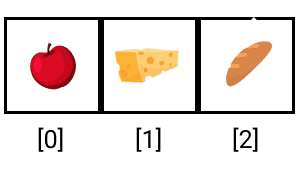
For example, you can have an array called "foods" that will contain "apple," "cheese," and "bread."
The index starts at 0, so the index of "apple" will be 0, "cheese" will be 1, and "bread" will be 2.
A value in an array can be referenced like any other variable.
"cheese" is
food[1], so if you were to say print(food[1]), "cheese" will print out.
NumPy introduces many functions that help with large datasets.
Python lists can't be used because in order to apply a function, a loop is needed to go through every value in the list. A NumPy array can increase the value of all the elements at once.
Imagine the
foods[] array from before. If you wanted to multiply each food item by 2, you'll need to go through each index in the array.
For NumPy arrays, however, the elements can all be multiplied by 2 simultaneously.
Machine learning uses many operations on arrays of data. These data sets often contain thousands of numbers and to iterate through every single value one at a time would be difficult and lengthy. NumPy simplifies all of this. Type:
import numpy as npThis code loads NumPy into your program.
The NumPy library is renamed to make it quicker to access using the as keyword. The code above renames the library to “np;” when calling NumPy in your program, refer to it as "np." 1. In a new cell, create a variable named "array".
2. Set array to equal to
np.array([]).
The empty angled brackets (
[ ]) represent an empty array. The starting array is going to be empty.
If you print the array you should get a set of empty brackets. Empty data is kinda boring, so next you'll add some values.
3. Inside the brackets, add the values "1, 2, 3, 4":
array = np.array([1, 2, 3, 4])4. In the following cell, add:
print(array)Now the print statement outputs
[1 2 3 4].
Knowing the size of data tells you how many different data points exist in the array. With machine learning algorithms, these sizes must be known in order for most of the algorithms to work.
To check the size of a NumPy array:
5. Type the name of the variable followed by a period
., then the word shape:
print(array.shape)This calls the shape property of NumPy arrays and lets you see the size of the array.
After running the code above, the output is
(4, ) — this means there are four individual values inside the array.
Next, you'll make this a two-dimensional array; Jupyter Notebook has shortcuts to make this process easier.
1. Highlight the data you want to put in an array.
2. Press the left angle bracket on the keyboard.
Now your data should be grouped
[1,2] and [3,4].
You've just created an array of arrays! This means your first array value is the array
[1,2] and the second array value is the array [3,4].
3. Run the cell that prints the size of the array.
The size will be
(2,2), which is read as two sets of two values. There are two array values each with two values.
In the previous example, the shape was
(4, ), which is read as just four array values.
If the NumPy array is
[[1, 2, 3],[2, 3, 4],[5, 4, 3]],the shape should be (3,3), which is read as three sets of three values.