



A NetBox 4.5.x / 4.6.x plugin that adds Custom Objects tabs to object detail pages,
showing Custom Object instances from the netbox_custom_objects plugin that reference
those objects via OBJECT or MULTIOBJECT fields. Works on standard NetBox models (Device,
Site, Rack, …), third-party plugin models, and Custom Object detail pages themselves
(CO→CO relationships).
Two tab modes are available:
- Combined tab — a single tab showing all Custom Object Types in one table, with pagination, text search, column sorting, type/tag filtering, and HTMX partial updates.
- Typed tabs — each Custom Object Type gets its own tab with a full-featured list view (type-specific columns, filterset sidebar, bulk actions, configure table) matching the native Custom Objects list page.
- NetBox 4.5.0 – 4.6.99
netbox_custom_objectsplugin ≥ 0.5.0 installed and configured (≥ 0.5.1 strongly recommended — 0.5.0 has an upstream Delete bug that 0.5.1 fixes; see Known Issues)
| Plugin version | NetBox version | netbox_custom_objects version |
|---|---|---|
| 2.4.x | 4.5.4+ / 4.6.x | ≥ 0.5.0 required (≥ 0.5.1 strongly recommended — fixes Delete bug) |
| 2.3.x | 4.5.4+ / 4.6.x | ≥ 0.4.6 (≥ 0.5.0 on 4.6) |
| 2.2.x | 4.5.4+ / 4.6.x | ≥ 0.4.6 (≥ 0.5.0 on 4.6) |
| 2.1.x | 4.5.4+ | ≥ 0.4.6 |
| 2.0.x | 4.5.x | ≥ 0.4.6 |
| 1.0.x | 4.5.x | ≥ 0.4.4 |
Plugin 2.4.x enforces the 0.5.0 minimum at startup: PluginConfig.ready()
probes for the upstream is_polymorphic model field and raises
ImproperlyConfigured with an upgrade message if the installed upstream is
older. The check is behaviour-based (looks for the field, not a version
string) so it stays correct across forks and pre-release tags.
source /opt/netbox/venv/bin/activate
pip install netbox-custom-objects-tab
Add to NetBox configuration.py:
PLUGINS = [
    'netbox_custom_objects',
    'netbox_custom_objects_tab',
]

# Optional — defaults shown below
PLUGINS_CONFIG = {
    'netbox_custom_objects_tab': {
        'combined_models': ['dcim.*', 'ipam.*', 'virtualization.*', 'tenancy.*'],
        'combined_label': 'Custom Objects',
        'combined_weight': 2000,
        'typed_models': [],       # opt-in: e.g. ['dcim.*']
        'typed_weight': 2100,
    }
}
Restart NetBox. No database migrations required.
| Setting | Default | Description |
|---|---|---|
combined_models |
['dcim.*', 'ipam.*', 'virtualization.*', 'tenancy.*'] |
Models that get the combined "Custom Objects" tab. Accepts app_label.model_name or app_label.* wildcards. |
combined_label |
'Custom Objects' |
Text displayed on the combined tab. |
combined_weight |
2000 |
Tab position for the combined tab; lower = further left. |
typed_models |
[] |
Models that get per-type tabs (opt-in, empty by default). Same format as combined_models. |
typed_weight |
2100 |
Tab position for all typed tabs. |
A model can appear in both combined_models and typed_models to get both tab styles.
# Combined tab only (default)
'combined_models': ['dcim.*', 'ipam.*', 'virtualization.*', 'tenancy.*']

# Per-type tabs for dcim models
'typed_models': ['dcim.*']

# Both modes for dcim, combined only for others
'combined_models': ['dcim.*', 'ipam.*', 'virtualization.*', 'tenancy.*'],
'typed_models': ['dcim.*'],

# Only specific models
'combined_models': ['dcim.device', 'dcim.site', 'ipam.prefix']

# Third-party plugin models work identically
'combined_models': ['dcim.*', 'ipam.*', 'inventory_monitor.*']

# Tabs on Custom Object detail pages (CO → CO relationships)
'typed_models': ['netbox_custom_objects.*']

# Combined tab on Custom Object pages + typed tabs on Device pages
'combined_models': ['dcim.*', 'netbox_custom_objects.*'],
'typed_models': ['dcim.*', 'netbox_custom_objects.*'],
Third-party plugin models are fully supported — Django treats plugin apps and built-in apps the same way in the app registry. Add the plugin's app label and restart NetBox once.
Setting netbox_custom_objects.* in combined_models or typed_models enables tabs on
Custom Object detail pages themselves. This is useful when one Custom Object Type has a
field referencing another Custom Object Type — the referenced object will show a tab listing
all objects that link to it.
Because Custom Object model classes are generated dynamically (one per type, on-demand), a NetBox restart is required whenever a new Custom Object Type is added — the same requirement that applies to all typed tabs.
The tab is hidden automatically (hide_if_empty=True) when no custom objects reference
the object being viewed, so it only appears when relevant.
Results are paginated using NetBox's standard EnhancedPaginator. The page size respects
the user's personal NetBox preference and can be overridden with ?per_page=N in the URL.
Page controls appear at the top and bottom of the table.
A search box in the card header filters results by:
- Custom Object instance display name
- Custom Object Type name
- Field label
Filtering uses the ?q= query parameter and is applied before pagination.
A dropdown (shown when 2 or more Custom Object Types are present) lets you narrow
results to a single type. Uses the ?type=<slug> query parameter. The dropdown
auto-submits on selection and is populated from the types actually present in the
current result set.
A dropdown (shown when at least one linked Custom Object has a tag) lets you narrow
results to objects with a specific tag. Uses the ?tag=<slug> query parameter. The
dropdown auto-submits on selection and is populated from the tags present across the
full result set. Tag data is pre-fetched in bulk so there is no N+1 query cost.
Clicking the Type, Object, or Field column header sorts the table in-memory. A second click on the same header reverses the direction. The active column shows an up/down arrow icon. Sort state is preserved when the search form is submitted.
Pagination clicks, column sort clicks, search form submissions, type-dropdown changes,
and tag-dropdown changes all update the table zone in-place using HTMX — no full page
reload. The URL is updated via pushState so links stay shareable and the browser back
button returns to the previous filter/page state.
Each row includes a Value column showing the actual field value on the Custom Object instance:
- Object fields: a link to the related object.
- Multi-Object fields: comma-separated links to the related objects, truncated at 3 with an ellipsis when more are present.
A Configure Table button in the card header opens a NetBox modal that lets
authenticated users show, hide, and reorder the table columns (Type, Object, Value,
Field, Tags). Preferences are stored per-user in UserConfig and respected on every
subsequent page load, including HTMX partial updates. The Actions column is always
visible and cannot be hidden.
Each row has right-aligned action buttons, shown only when the user has the relevant permission:
- Edit (pencil icon) — links to the Custom Object instance's edit page. Shown when the user has
changepermission on the object. - Delete (trash icon) — links to the Custom Object instance's delete confirmation page. Shown when the user has
deletepermission on the object.
Users without either permission see no action buttons in the row. After completing either action, NetBox redirects back to the Custom Objects tab on the same parent object.
The tab badge (shown in the tab bar on every detail page) is computed with a
COUNT(*) query per field — no object rows are fetched. Full object rows are only
loaded when the tab itself is opened. This keeps detail page loads fast even when
thousands of custom objects reference an object.
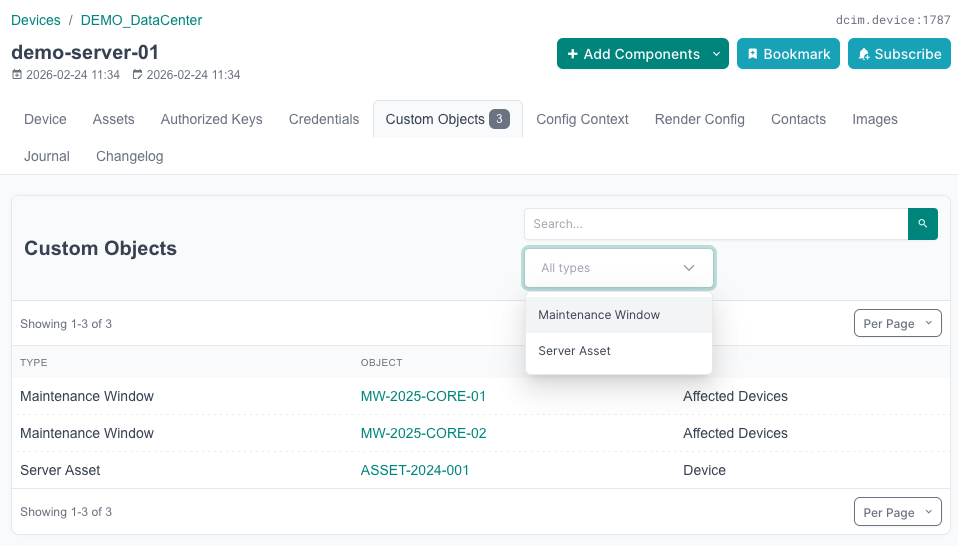
When a Custom Object Type has a field of type Object or Multi-Object pointing to a NetBox model (e.g. Device), any Custom Object instances with that field set will appear in the "Custom Objects" tab on the referenced object's detail page.
The tab displays:
| Column | Content |
|---|---|
| Type | Custom Object Type name (sortable); links to the type detail page when the user has view permission |
| Object | Link to the Custom Object instance (sortable) |
| Value | The value stored in the linking field — a link for Object fields, comma-separated links for Multi-Object fields |
| Field | The field that holds the reference (sortable) |
| Tags | Colored tag badges assigned to the Custom Object instance; — when none |
| (actions) | Edit and Delete buttons, each shown only when the user has the corresponding permission |
Affected versions: netbox-custom-objects == 0.5.0 only.
Fixed in: netbox-custom-objects main (PR
#501,
merged 2026-05-11) and the forthcoming 0.5.1 release.
Not affected: 0.4.x (no polymorphic through-models) and any build
that contains PR #501.
Deleting a Custom Object instance through the NetBox UI on a 0.5.0
install can raise a ValueError inside
netbox_custom_objects.CustomObjectDeleteView:
ValueError: Cannot query "<row title>": Must be "Table<N>Model" instance.
(at netbox_custom_objects/views.py:977, inside _get_dependent_objects,
called by Django's Collector.collect()). The same crash also occurs from
the bulk-delete view (CustomObjectBulkDeleteView) because NetBox's
generic BulkDeleteView.post() iterates the queryset and calls obj.delete()
per row — the same code path. Bulk Delete is NOT a workaround
(earlier versions of this README claimed it was; that was incorrect).
The cleanest resolution is to upgrade netbox-custom-objects to a
build that contains PR #501. As of writing (2026-05-13) no 0.5.1
release tag exists yet, so the options are:
# Option A: install from upstream main (contains PR #501)
pip install --upgrade --force-reinstall \
    git+https://github.com/netboxlabs/netbox-custom-objects.git@main

# Option B: wait for the 0.5.1 release tag and pin to it
pip install --upgrade 'netbox-custom-objects>=0.5.1'
Then restart NetBox. The entire delete-bug class disappears regardless of this plugin's state — no plugin-side change required.
Several adjacent fixes also landed in upstream main post-0.5.0 and
will ship with 0.5.1: PR #504 (cross-COT FK fields after restart),
PR #505 (stale through-model FK path_infos on COT regeneration), and
PR #510 (self-referential FK isinstance check). Upgrading once closes
the whole family.
manage.py shelldirect delete (recommended for one-off rows). A freshly-spawned shell process initialises the model cache exactly once, so the class identity is consistent throughout the session and the collector's identity-check succeeds:/opt/netbox/venv/bin/python /opt/netbox/netbox/manage.py shell <<'PY' from netbox_custom_objects.models import CustomObjectType cot = CustomObjectType.objects.get(slug="<your-slug>") cot.get_model().objects.filter(pk=<row-pk>).delete() PY
- Refresh the typed-tab list page between Create and per-row Delete. This worked reliably for non-polymorphic fields on earlier versions and still often works on 0.5.0, but it is no longer guaranteed — polymorphic-MultiObject rows can drift the model cache mid-flow.
- Restart NetBox. Clears
_model_cacheoutright. Reliable but heavyweight; use when shell access isn't available.
netbox-custom-objects 0.5.0 introduced is_polymorphic=True Object /
MultiObject fields. Each polymorphic Object field adds a
GenericForeignKey descriptor and each polymorphic MultiObject field
adds a per-field through model. Django's collector traverses every
related model when collecting deletion dependencies, so each extra
related-model is another opportunity to hit a stale class generation in
CustomObjectType._model_cache. Plugin 2.4.0's discovery code walks
those same descriptors to find inbound links (the original goal of
2.4.0), which warms the cache enough that the upstream drift becomes
deterministic rather than intermittent.
Each Custom Object Type backs a dynamically-generated Django model
(Table<N>Model), and the class registry can rebuild between requests
(or during a request that touches get_model(no_cache=True)). Django's
Collector then sees the queryset's model class on one side and a
related-field descriptor's .to pointing at a different copy of the
same class name on the other — its identity check raises ValueError.
PR #501 fixes the symptom by overriding
CustomObjectDeleteView._get_dependent_objects to filter through-table
entries out of the collector's dependency walk before the identity check
runs. This plugin does not override delete or model caching and cannot
patch the bug from its own code.
On builds that already contain PR #501, the delete-success toast for
some dynamic models renders as "Deleted <Type> <Type> None" — the
patched view reads str(obj) after the row's deletion, so the
dynamic model's primary field returns None. Models whose __str__
captures the display value before delete are unaffected. This is a
cosmetic, post-fix upstream issue; it does not affect the delete
itself.
- Open an issue on GitHub
Pull requests are welcome. For significant changes, please open an issue first.
Apache-2.0