Setting up SSL on PostgreSQL
This guide will take you through the steps to ensure SSL is installed and usable on your PostgreSQL server. It will also have an additional section describing how to enforce using SSL to connect.
- PostgreSQL is installed
- PostgreSQL was configured with the flag
--with-openssl(most installations do). To check you can run pg_config.exe and in the responseCONFIGUREwill have many flags and one of them should be--with-openssl
- Go to PostgreSQL data folder:
C:\Program Files\PostgreSQL\10\data - Open
postgresql.confand uncomment (remove pound) of ssl = off, ssl_cert_file, and ssl_key_file. Change ssl = off to ssl = on. Should look like this: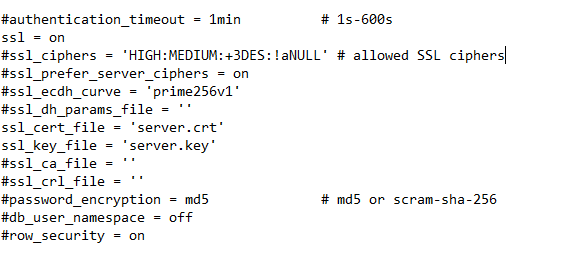
- Copy the certificate and key that you generated in last step of the previous section to the data directory. rename them to be named
server.crtandserver.key - Restart the server by entering
pg_ctl restart -D "C:\Program Files\PostgreSQL\10\data"in command prompt
- Open
pg_hba.confand at bottom of file replace host with hostssl for IPv4 and IPv6. Should look like this: - Restart the server by entering
pg_ctl restart -D "C:\Program Files\PostgreSQL\10\data"in command prompt

Now to connect through psql you will have to use the connection parameter sslmode=require to connect with ssl EX) psql "sslmode=require host=localhost dbname=test". If you want to avoid using that flag you can change the authentication method. Go here for more information about changing the authentication method or altering the required connection parameters.