This Ranked Choice Voting app is free to use, free to improve, and free to share with the general public!
Here are a few advantages to RCV:
- Better representation
- No “Settling”
- No wasted votes
- Vote by preference
- Great for multi-seat elections
- Easy to use
For a short, 1-minute explanation of RCV; check out this video: https://youtu.be/oHRPMJmzBBw
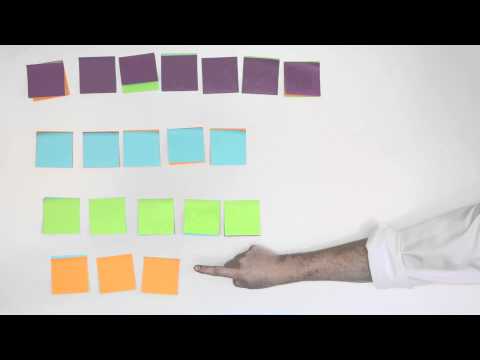
Ranked Choice voting is about representing the people in the best way possible. The key is allowing the voter to choose more than just their favorite candidate. The problem with only voting for one choice, is that if that choice does not come in first or second, it could be considered a “wasted vote.” Therefore, people are more likely to vote for their second or third choice on the idea that it has a higher chance of winning and it’s better than their last choice.
With Ranked Choice Voting, there is no issue with voting for your first choice first, second choice second, and third choice third. Because if your first choice doesn’t win, then your vote automatically gets transferred to your second choice! And that is the beauty of the system.
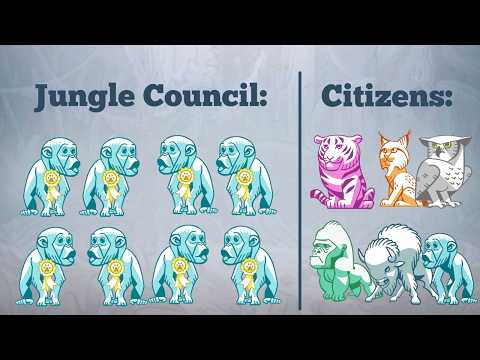
Another thing it works really well for voting for more than one position. Everyone’s vote is still counted as one vote, but if their first choice is elected, then a portion of their vote goes to second place. To better illustrate this point, there is a video that describes the use of ranked choice voting in the Animal Kingdom:
Click here to watch https://youtu.be/l8XOZJkozfI
This project uses:
- Frontend: AngularJS 1.5, Bootstrap 3, jQuery
- Backend: PHP with MySQL database
- Build Tool: Vite (modern ES modules bundler)
- Package Manager: npm
Before starting, run the verification script to check your environment:
bash verify-setup.shThis will automatically check:
- ✓ Required tools (Node.js, npm, PHP, MySQL)
- ✓ Service status (MySQL running)
- ✓ Port availability (3000, 8000)
- ✓ Project files (config.php, node_modules)
- ✓ Database connection
The script will tell you exactly what's missing and how to fix it.
- Node.js 18+ (for running the development server)
- PHP 7.4+ (for the backend API)
- MySQL 5.6+ (for the database)
macOS:
brew install node php mysql
brew services start mysql
Ubuntu/Debian:
sudo apt-get update
sudo apt-get install nodejs npm php php-mysql mysql-server
sudo systemctl start mysql
Windows:
- Node.js: nodejs.org/download
- PHP: windows.php.net
- MySQL: dev.mysql.com/downloads/installer
Other systems: See Node.js, PHP, and MySQL official installation guides.
-
Install dependencies
npm install
-
Configure the database
cp src/api/config_sample.php src/api/config.php
Then edit
src/api/config.phpand input your MySQL credentials:define('SERVER', 'localhost:3306'); define('USERNAME', 'your_username'); define('PASSWORD', 'your_password'); define('DB', 'rcv_db');
-
Set up the database
Run the production schema script (creates database, user, and tables):
mysql -u root -p < src/api/setup-database-prod.sqlFor detailed setup instructions and test data, see src/api/SETUP.md
-
Start the development servers
You need to run two servers simultaneously (use two terminal windows):
Terminal 1 - Frontend (Vite dev server):
npm run dev
This starts the frontend at
http://localhost:3000Terminal 2 - Backend (PHP server):
cd src
php -S localhost:8000
This starts the API backend at
http://localhost:8000 -
Open your browser
Navigate to
http://localhost:3000The Vite dev server automatically proxies API requests from
/apito the PHP backend.
To build the project for production:
npm run buildThis creates a dist/ folder with all compiled assets. To test the production build locally:
npm run previewOr serve the dist/ folder with PHP:
cd dist
php -S localhost:8080rcv/
├── src/ # Source code
│ ├── index.html # Main single-page application
│ ├── main-entry.js # Vite entry point
│ ├── js/
│ │ ├── app.js # Angular module definition
│ │ └── main.js # Main controller and application logic
│ ├── api/ # PHP backend API endpoints
│ │ ├── config.php # Database configuration (create from sample)
│ │ └── *.php # API endpoints
│ ├── css/ # Stylesheets (LESS files)
│ ├── img/ # Images
│ └── fonts/ # Font files
├── dist/ # Production build output (generated)
├── public_html/ # Legacy production code (reference only)
├── vite.config.js # Vite build configuration
├── Schema.sql # Database schema
└── package.json # Dependencies and scripts
- Ballot Creation: Create custom RCV ballots with multiple candidates
- Flexible Voting: Drag-and-drop interface for ranking candidates
- Multiple Election Types: Single or multi-seat elections
- Result Visualization: Integration with RCVis for visual results
- Voter Privacy Options: Anonymous, optional, or required voter names
- Secure Elections: Support for voter code validation
- User Accounts: Manage multiple ballots with registration
Contributions are welcome and appreciated! Here's how you can help:
- Report bugs: Open an issue describing the problem
- Suggest features: Share your ideas for improvements
- Submit pull requests: Fix bugs or add features
- Improve documentation: Help make the setup process clearer
Note: Please contact me at davidmoritz@gmail.com before starting significant work to avoid duplicate efforts.
- Mobile responsiveness improvements (Maybe an app in the App Store?)
- Accessibility enhancements
- Test coverage
- Modernization of AngularJS code
When encountering any issues, always start here:
bash verify-setup.shThis will diagnose common problems and provide specific fix commands.
API requests failing with 404
- Make sure the PHP backend is running on port 8000
- Check that
src/api/config.phpexists and has correct database credentials
Database connection errors
- Verify MySQL is running
- Check database credentials in
src/api/config.php - Follow the database setup guide: src/api/SETUP.md
Port already in use
- Change the Vite port in
vite.config.js(default: 3000) - Change the PHP port:
php -S localhost:PORT(default: 8000)
Build errors
- Delete
node_modulesand runnpm installagain - Clear Vite cache:
rm -rf node_modules/.vite
This project was recently updated with modern tooling:
- Migration from Grunt to Vite: Faster builds and better development experience
- ES Module support: Modern JavaScript module system
- Hot Module Replacement: Instant updates during development without full page reloads
- Optimized builds: Automatic code splitting and dependency optimization
- Fixed AngularJS dependency issues: Resolved module loading timing problems
- Automated environment verification: Added
verify-setup.shscript for easier onboarding
This project is open source and free to use. See LICENSE file for details.
If you find this app useful, consider supporting the project.
For questions or feedback, email davidmoritz@gmail.com.