中文:PC 端投屏服务端,把电脑画面实时投到 EDC Book / M5Stack Paper 等墨水屏,支持触控反控。固件可在 M5Burner 下载,致谢梦西游啊游大佬原创。
English: PC casting server — stream your screen to EDC Book / M5Stack Paper (e-ink) in real time, with touch control. Firmware via M5Burner; credits to 梦西游啊游.
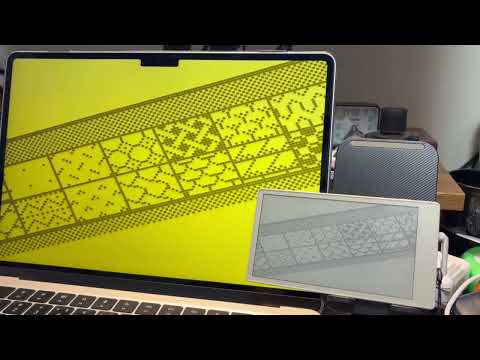
PC 端投屏服务端:将电脑画面实时投到 EDC Book / M5Stack Paper 等墨水屏设备,支持触控反控电脑。设备固件可在 M5Burner 下载,互动投屏基于梦西游啊游大佬的原创固件与协议。
- M5Burner:M5Burner 中搜索并下载 EDC Book / 梦西游啊游 等固件。
- 致谢:互动投屏基于 梦西游啊游 原创固件与协议,本仓库仅提供 PC 端 Caster 工具。
- 实时传输电脑画面到墨水屏
- 触控反控电脑(点击、滑动)
- mDNS 发现(
edcbook_cast.local) - 支持 Windows 与 macOS
前置条件:电脑与设备在同一局域网;设备已刷写支持互动投屏的固件。
步骤:
- 启动本工具,调整窗口中的截图区域(横竖屏均可)。
- 看软件左下角地址:若为 edcbook_cast.local 则在设备上直接打开「互动投屏」;若为 IP 地址 则在设备「在线配置」里填写 WS 地址与端口(如
ws://192.168.x.x:8080)。 - 投屏成功后可用设备触控操作电脑;长按屏幕退出投屏。
- 直接运行:
pip install numpy pillow mss pynput websockets zeroconf后执行python EDCBook_Caster_1.0.py(macOS 多为python3)。 - macOS 安装包:从 Releases 下载
EDCBook_Caster_1.0.dmg,打开后拖入「应用程序」。自行构建:./build_dmg.sh。 - Windows:从 Releases 下载
EDCBook_Caster_1.0.exe直接运行。
Python 3.x;numpy, Pillow, mss, pynput, websockets, zeroconf。
请遵守梦西游啊游固件与协议的相关说明。本 Caster 工具源码仅供学习与配合 EDC Book 使用。
PC casting server: stream your screen to EDC Book / M5Stack Paper (e-ink) in real time, with touch control to operate the PC. Device firmware is available from M5Burner; interactive casting is based on the original firmware and protocol by 梦西游啊游.
- M5Burner: Download EDC Book / 梦西游啊游 firmware from M5Burner.
- Credits: Interactive casting is based on the original firmware and protocol by 梦西游啊游. This repo only provides the PC-side Caster tool.
- Real-time screen streaming to e-ink
- Touch control (click, scroll) to operate the PC
- mDNS discovery (
edcbook_cast.local) - Windows and macOS support
Requirements: PC and device on the same LAN; device flashed with casting firmware.
Steps:
- Launch the tool and adjust the capture area in the window (landscape or portrait).
- Check the address at the bottom-left: if edcbook_cast.local, start “Interactive casting” on the device; if an IP address, set the WS address and port in the device’s “Online config” (e.g.
ws://192.168.x.x:8080). - After casting starts, use the device to control the PC; long-press to exit.
- From source:
pip install numpy pillow mss pynput websockets zeroconf, thenpython EDCBook_Caster_1.0.py(usepython3on macOS). - macOS app: Download
EDCBook_Caster_1.0.dmgfrom Releases and drag the app into Applications. To build:./build_dmg.sh. - Windows: Download
EDCBook_Caster_1.0.exefrom Releases and run it.
Python 3.x; numpy, Pillow, mss, pynput, websockets, zeroconf.
Use in accordance with 梦西游啊游’s firmware and protocol terms. This Caster source is for learning and use with EDC Book only.