OVision Reconstruction is an iOS app that generates 3D point cloud reconstructions of human faces using the iPhone's front-facing TrueDepth camera. The reconstructions are exported as PLY files for use with the Overlay OvOne robot, which uses them to drive precise spatial awareness and interaction with human faces.
Developed by Josh Urban Davis for Overlay Robots.


/                                   ← root is the StandardCyborgSDK Swift Package
├── Package.swift                   ← package definition (name: "StandardCyborgSDK")
├── Sources/
│   ├── StandardCyborgFusion/       ← reconstruction engine (Swift/ObjC++/Metal/C++)
│   ├── StandardCyborgCapture/      ← Swift scanning toolkit (iOS-only)
│   ├── StandardCyborgCaptureObjC/  ← ObjC++ scan data model (internal target)
│   └── include/                    ← public bridging headers
├── Tests/                          ← SDK tests
├── libigl/                         ← vendored libigl headers
├── scsdk/                          ← nested pure-C++ core package
├── CppDependencies/                ← 8 nested C++ dependency packages
├── images/
├── README_SC_PLY_FORMAT.md
└── Examples/
    └── TrueDepthFusion/
        ├── TrueDepthFusion.xcodeproj   ← example app project
        └── TrueDepthFusion/            ← example app sources
The package exposes two public iOS-facing products:
| Product | Purpose |
|---|---|
StandardCyborgFusion |
Reconstruction engine (Swift/ObjC++/Metal/C++): SCPointCloud, SCReconstructionManager, SCMeshTexturing, etc. |
StandardCyborgCapture |
Swift iOS scanning toolkit: CameraManager, renderer, ScanningSession, ScanStore, MeshingService, ScanningView, ScanPreviewView, ScanControls. Depends transitively on internal capture/objective-c targets. |
StandardCyborgCaptureObjC remains an internal implementation target and is not a public package product.
dependencies: [
    .package(url: "https://github.com/<owner>/<repo>", from: "1.0.0")
],
targets: [
    .target(name: "MyApp", dependencies: [
        .product(name: "StandardCyborgCapture", package: "<repo>"),
    ])
]import StandardCyborgCapture
import SwiftUI
@main
struct MyScanApp: App {
@StateObject private var scanStore = ScanStore()
var body: some Scene {
WindowGroup {
ScanningView(
onExport: { scan, mesh in /* present your share sheet */ },
onShowSettings: { /* present settings */ },
onDone: { /* dismiss */ },
onShowLatestScan: { /* push to your scans list */ }
)
.environmentObject(scanStore)
}
}
}StandardCyborgCapture is iOS-only. The SDK ships ready-made ScanningView + ScanPreviewView screens; supply your app-specific export/share/settings UX via closures.
Full public API documentation for both public products is in docs/api/README.md.
- iPhone X or later (any iPhone with a front-facing TrueDepth camera)
- iOS 16+
- For Jetson export: Jetson Nano running the jetson_receiver service, connected to the same Wi-Fi network as the iPhone
- Open OVision on your iPhone.
- Point the front camera at the subject's face. Use the oval guide to frame and the distance label to position correctly (30–50 cm is ideal).
- Tap the record button to begin scanning. The camera locks its exposure at the start to prevent color drift.
- Slowly rotate your viewpoint around the face to capture coverage from multiple angles. The reconstruction updates in real time. The oval fades during scanning — focus on moving slowly and smoothly.
- If you see "Move slower — tracking lost", slow down and hold steady until tracking recovers.
- Tap the stop button when done.
Before tapping record, a dashed oval guide is shown on screen indicating where to position the face. A distance label appears above the oval if the subject is too close or too far:
- "Move closer" — subject is more than ~60 cm from the camera
- "Move back" — subject is less than ~25 cm from the camera
- No label — distance is good, ready to scan

Once the face is centered in the oval and no distance warning is shown, tap the shutter button to begin.
- The completed scan appears in the Scans list. Tap it to preview the point cloud.
- Optionally tap Mesh to run Poisson surface reconstruction and generate a triangle mesh from the point cloud.
- Tap the Export button (share icon). You will be prompted: "What is your name?" — enter a name to export as
model_<name>.ply, or leave blank to use a timestamp default (e.g.model_2026-05-08--14-30-00.ply). - Choose an export action:
- Send to Jetson — uploads the PLY directly to the Jetson Nano over HTTP.
- Share / Export — opens the iOS share sheet (AirDrop, Files, etc.).
- You can also swipe left on any scan in the list to access Export, Jetson, or Delete actions directly.
Tap the gear icon (top right of the Scans screen) to open Jetson settings. Enter the IP address and port of your Jetson Nano receiver.
The Jetson must be running the jetson_receiver service before sending a file. See that repo for setup instructions.
The reconstruction pipeline runs entirely on-device in real time.
┌─────────────────────────────────────────────┐
│              TrueDepth Camera               │
│  Depth map (Float32, up to 640×360 @ 30fps) │
│  Color frame (up to 1920×1080 @ 30fps)      │
└───────────────────┬─────────────────────────┘
                    │ synchronized frames
                    ▼
┌─────────────────────────────────────────────┐
│           Metal GPU Depth Processing        │
│  · Bilateral smoothing of raw depth         │
│  · Per-pixel normal estimation (gradients)  │
│  · Per-pixel weight (angle of incidence)    │
└───────────────────┬─────────────────────────┘
                    │ processed depth + normals
                    ▼
┌─────────────────────────────────────────────┐
│             Surfel Estimation               │
│  Each valid depth pixel → surfel:           │
│  position (xyz), normal, color, weight,     │
│  radius. Color sampled from RGB frame via   │
│  bilinear interpolation.                    │
└───────────────────┬─────────────────────────┘
                    │ new surfel candidates
                    ▼
┌─────────────────────────────────────────────┐
│           ICP Pose Estimation               │
│  Iterative Closest Point aligns new frame   │
│  to existing model to track camera motion.  │
│  (18 iterations, 5% downsampled point set)  │
└───────────────────┬─────────────────────────┘
                    │ camera pose (4×4 matrix)
                    ▼
┌─────────────────────────────────────────────┐
│              Surfel Fusion                  │
│  GPU index map gives O(1) lookup of nearby  │
│  existing surfels. New surfels are merged   │
│  by weighted average (cos²θ weighting).     │
│  Surfels too far from any existing surfel   │
│  are added to the model as new geometry.    │
└───────────────────┬─────────────────────────┘
                    │ global surfel model
                    ▼
         ┌──────────────────────┐
         │   PLY Point Cloud    │  ← exported to Jetson / Files
         └──────────┬───────────┘
                    │ tap Mesh (optional)
                    ▼
┌─────────────────────────────────────────────┐
│       Poisson Surface Reconstruction        │
│  Surfel normals define an indicator         │
│  function solved on an adaptive octree.     │
│  Marching cubes extracts the iso-surface    │
│  as a triangle mesh with vertex colors.     │
└───────────────────┬─────────────────────────┘
                    │
                    ▼
         ┌──────────────────────┐
         │   PLY Triangle Mesh  │  ← exported to Jetson / Files
         └──────────────────────┘
The following modifications were made on top of the Standard Cyborg SDK to improve reconstruction quality and add Overlay-specific workflows:
- Face oval guide — A dashed oval overlay on the scanning screen shows where to position the subject's face before recording begins. The oval fades to 30% opacity while scanning to remain visible without being distracting.
- Center guide label — "Center your face / in the oval" is displayed in the middle of the oval before scanning. It fades out with a 0.4s animation when the scan starts and reappears when it stops.
- Distance indicator — Before scanning begins, the center depth pixel cluster is sampled each frame from the raw TrueDepth depth map. If the subject is outside the optimal 25–60 cm range, a label reads "Move closer" or "Move back" just below the center guide. The label hides automatically when the distance is correct and disappears entirely once scanning starts.
- Exposure lock during scanning — Auto-exposure is locked at the start of each scan. Previously, fluctuating exposure mid-scan caused color inconsistencies and surface speckling in the PLY output.
- Bilinear interpolation for depth-to-color mapping — When projecting depth pixels onto the color image, the original code used nearest-neighbor (integer truncation). We replaced this with bilinear interpolation across the four neighboring color pixels, which reduces aliasing and produces smoother per-point colors.
- Custom filename prompt before export — Before exporting or sending a PLY file, the app prompts for a model name. The name is sanitized (spaces → underscores, non-alphanumeric characters stripped) and the file is exported as
model_<name>.ply(e.g.model_josh.ply). Leaving the field blank falls back to a timestamp default (e.g.model_2026-04-22--14-30-00.ply) so files don't overwrite each other. - Jetson Nano HTTP export — A "Send to Jetson" action uploads the PLY file directly to a configured Jetson Nano over HTTP (local network), enabling a wireless scan-to-robot pipeline without needing a Mac in the loop. The Jetson IP and port are configurable from a settings panel in the app.
- Removed QuickLook / AR preview on export — Sharing a scan previously opened a QuickLook AR viewer instead of the standard iOS share sheet. Export now goes directly to
UIActivityViewController(AirDrop, Files, etc.), and the USDZ/AR code path has been removed entirely.
- Crash on launch fix — The original code used a force-try (
try!) when reading the scans directory on launch. A corrupted or inaccessible Documents directory would crash the app immediately. This is now a gracefuldo-catchthat logs the error and starts with an empty scan list. - Surfel data race condition fix — During live scanning,
buildPointCloudwas handing the UI thread a raw pointer into the surfel buffer without synchronization. If the reconstruction engine reallocated the buffer mid-read, the app could crash or render corrupted geometry. The read is now serialized on the model queue with a proper copy, eliminating the race. - Poor tracking warning — When the reconstruction engine loses tracking (e.g. the phone moves too fast), the app now shows a "Move slower — tracking lost" message on screen after 5 consecutive poor-tracking frames. Previously, tracking loss was silent and the scan would silently degrade in quality.
- Idle timer fix — After visiting the scanning view,
isIdleTimerDisabledwas incorrectly left astruewhen leaving the view, preventing the screen from ever auto-dimming or locking until the app was restarted. - Metal shader error handling — Metal GPU pipeline creation previously used force-try (
try!), which would crash with a generic error if a shader failed to compile. Now usesdo-catchwith descriptive error messages for easier debugging. - Delegate race condition fix — The reconstruction engine called its delegate on the main thread without first retaining it, creating a brief window where a deallocated delegate could be messaged between stopping a scan and the view dismissing. The delegate is now captured as a local strong reference before the call.
- Division by zero in depth sampling —
AverageDepthFromValuesdivided by the valid pixel count without checking if it was zero. If the center region contained no valid depth pixels (all NaN or negative), this produced a NaN result that could propagate into the distance guidance UI. Now returns-1when no valid pixels are found. - JetsonUploader settings crash fix — The port field in the Jetson settings alert used a force-unwrap on
textFields![1], which would crash if the array was unexpectedly short. Replaced with safe optional chaining. - Jetson settings accessible from scan preview — The gear icon for Jetson settings was only reachable from the Scans list. It now also appears in the scan preview screen, inline with the share button, so settings can be adjusted without leaving the preview.
- Mesh button available immediately after scanning — The Mesh button was hidden on the scan preview screen until the scan had been saved to disk (i.e. after tapping Done). Since meshing only requires the in-memory point cloud, the button now appears as soon as a scan is completed.
- Mesh button styling — The Mesh button in the scan preview was plain floating text with no visual affordance. It now has a system blue border and rounded corners to read clearly as a tappable control.
This app is built on top of the Standard Cyborg Cocoa SDK, an open-source real-time 3D scanning framework for iOS. The SDK was developed by the team at Standard Cyborg — a company that originally built 3D-printed prosthetics, then open-sourced their scanning framework before closing. We are grateful to the Standard Cyborg authors and contributors for making this available under the MIT license.
Original SDK authors (via git history and documentation):
- Aaron Thompson
- Eric Schkufza
- Nigel Morris
- and contributors at Standard Cyborg, Inc.
This SDK enables real-time 3D scanning on iOS using the TrueDepth camera, plus analysis and other tools for generated scans.
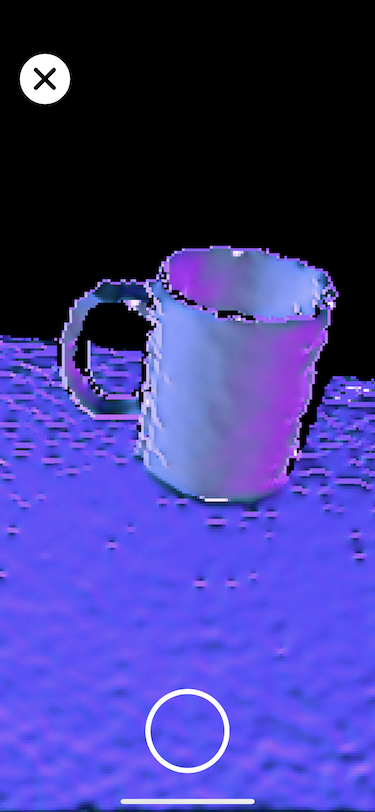

To run the example app, open Examples/TrueDepthFusion/TrueDepthFusion.xcodeproj in Xcode. The project consumes the SDK as a local Swift Package at the repo root (../.. relative to the xcodeproj). For the scanning UI, import StandardCyborgCapture — see the "Consuming the SDK" section above.
The SDK is consumed as a local Swift Package at the repo root. If you need to reference the upstream Standard Cyborg packages separately (e.g. in your own project), see Package.swift for the local-path declaration and the upstream sources below:
StandardCyborgFusion: https://github.com/StandardCyborg/StandardCyborgCocoaStandardCyborgUI(optional): https://github.com/StandardCyborg/StandardCyborgCocoa
The version of StandardCyborgFusion hosted via Cocoapods is now deprecated and unmaintained.
Standard Cyborg was once a company that developed 3D-printed prosthetics, then later, this software package for 3D scanning and analysis. The company no longer exists, but in its death, it was able to open-source this 3D scanning and analysis framework under the MIT license.
All feature development, maintenance, and support is provided only by open source maintainers.
This codebase is released under the MIT license
See LICENSE file