A beautiful, intuitive SQLite database viewer built right into Visual Studio Code


Your all-in-one solution for exploring SQLite databases without leaving VS Code.
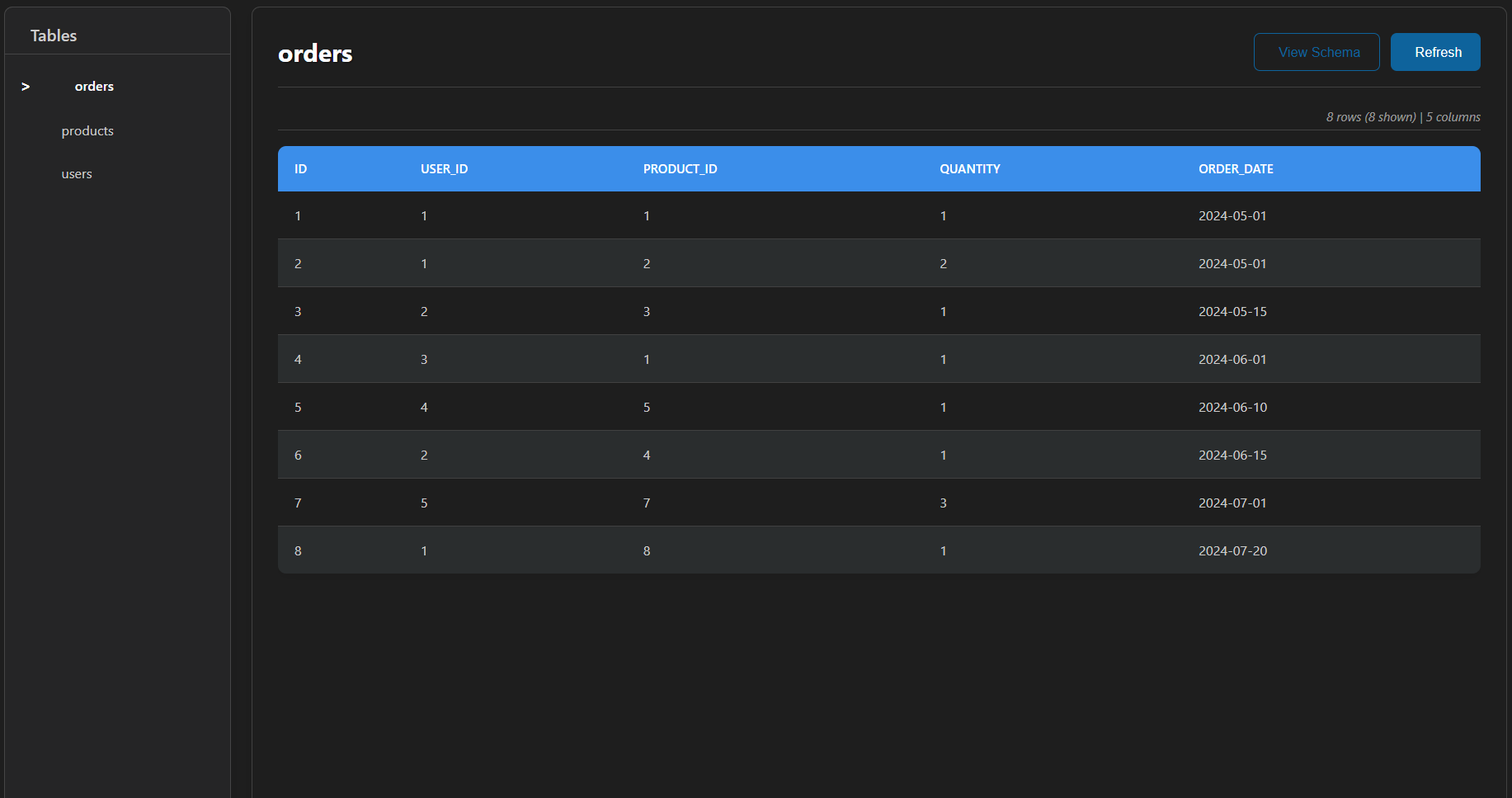
Tired of switching between VS Code and external database tools? DB Viewer brings the power of SQLite database exploration directly into your favorite editor. With a beautiful, native interface that feels like part of VS Code itself, you can instantly inspect and understand your database structure and data.
- Smart Table Navigation - Clean sidebar with all tables and row counts
- Real-time Search - Filter tables instantly by name
- Row Count Badges - See table sizes at a glance
- Smooth Animations - Delightful transitions and loading states
- Sortable Columns - Click any column header to sort (ascending/descending)
- Data Filtering - Real-time search across all columns
- Cell Preview - Click any cell to view full content
- Copy Cell Values - One-click copy of any data cell
- Pagination Controls - Navigate large tables with customizable page sizes (50/100/200/500 rows)
- Responsive Table View - Horizontal scrolling for wide tables
- Data Type Color Coding - Visual distinction for numbers, strings, NULL values
- CSV Export - Download table data as CSV with one click
- JSON Export - Export data in JSON format for APIs or scripts
- Copy All Data - Copy entire table to clipboard
- Custom Queries - Run any SQL query on your database
- Collapsible Panel - Built-in query editor
- Query Results - View results in the same beautiful table format
- Safe Read-Only - All queries are read-only for data safety
Ctrl+RorF5- Refresh current tableCtrl+F- Focus search inputCtrl+Shift+C- Copy all table data
- Seamless integration with VS Code themes
- Responsive design that adapts to your workspace
- Auto dark mode support
- Professional Microsoft Blue color scheme
Getting started takes seconds:
- Locate your database file in VS Code's Explorer
- Click on any SQLite database file (
.db,.sqlite,.sqlite3, etc.) - The database opens automatically in the beautiful viewer
That's it! Your database will open in an interactive viewer.
- Open VS Code
- Go to Extensions (
Ctrl+Shift+X) - Search for "DB Viewer"
- Click Install
code --install-extension MJStudio.db-viewer| Extension | Description |
|---|---|
.db |
SQLite Database |
.sqlite |
SQLite Database |
.sqlite3 |
SQLite 3 Database |
.db3 |
SQLite 3 Database |
.s3db |
SQLite 3 Database |
.sl3 |
SQLite 3 Database |
.sdb |
SQLite Database |
.sqlitedb |
SQLite Database |
- Click File - Simply click any supported database file to open it
- Right-Click - Right-click file → "Open with Database Viewer"
- Command Palette -
Ctrl+Shift+P→ "Open Database"
- Browse Tables - See all tables in the left sidebar with row counts
- View Data - Click any table to view its contents
- Sort & Filter - Click column headers to sort, use search to filter
- Copy Data - Click any cell to copy its value
- Export - Use export buttons for CSV or JSON downloads
- Run Queries - Open SQL editor panel to run custom queries
┌─────────────────────────────────────────────────┐
│  Tables Sidebar    │    Main Data Viewer        │
│  ─────────────     │    ─────────────────       │
│  🔍 Search         │    Filter: [________]      │
│                    │                            │
│  📊 users (1,243)  │    ┌─────┬─────┬──────┐   │
│  📊 posts (892)    │    │ id  │name │email │   │
│  📊 comments (...)  │    ├─────┼─────┼──────┤   │
│                    │    │  1  │John │...   │   │
│                    │    │  2  │Jane │...   │   │
│                    │    └─────┴─────┴──────┘   │
│                    │                            │
│                    │    [Prev] Page 1/10 [Next] │
└─────────────────────────────────────────────────┘
DB Viewer is optimized for smooth performance:
| Feature | Capability |
|---|---|
| Pagination | 50-500 rows per page |
| Sorting | All columns, instant sorting |
| Filtering | Real-time search with instant results |
| Export | Full table export in CSV/JSON |
| SQL Queries | Full SELECT query support |
| Responsive | Handles wide tables with horizontal scroll |
- Verify file is a valid SQLite database
- Check file permissions
- Try reloading VS Code window (
Ctrl+Shift+P→ "Developer: Reload Window")
- Verify table contains data using SQLite CLI
- Check database isn't corrupted
- Try refreshing with
Ctrl+R
- Reload VS Code window
- Check for extension updates
- Try switching VS Code theme
- ✅ Copy Cell Functionality - Click any cell to copy value
- ✅ Copy All Data - Copy entire table to clipboard
- ✅ Refresh Button - Reload table data with one click
- ✅ Responsive Tables - Better handling of wide tables
- ✅ Improved Copy Button - Cleaner, more professional tooltip
- ✅ Data Type Color Coding - Visual distinction for different data types
- ✅ Keyboard Shortcuts - Quick access to common actions
- ✅ Table Alignment - Perfect alignment between header and data
- Added cell copy functionality
- Added copy all data feature
- Added refresh button
- Improved responsive table design
- Enhanced copy button styling
- Added data type color coding
- Added keyboard shortcuts
- SQL Query Interface
- CSV & JSON Export
- Data Filtering & Sorting
- Pagination support
- Table search in sidebar
- Initial release
- Basic SQLite viewer
- Table browsing
- Data display
- Schema visualization with ER diagrams
- Query history and saved queries
- Advanced column-specific filters
- Binary data preview (images)
- Multiple table tabs
- Query templates and snippets
- Database statistics dashboard
Contributions are welcome! Please feel free to submit a Pull Request.
This project is licensed under the MIT License - see the LICENSE file for details.
If you find this extension helpful:
- ⭐ Rate it on the VS Code Marketplace
- 🐛 Report bugs on GitHub Issues
- 💡 Suggest features on GitHub Discussions
Made with ❤️ by Mujeeb ur Rehman
Making database exploration beautiful and accessible