A powerful extension that adds a "New Python Package..." option to the Explorer context menu. Create Python packages with customizable __init__.py files, automatic additional files, snippet support, and conditional content based on your project structure.
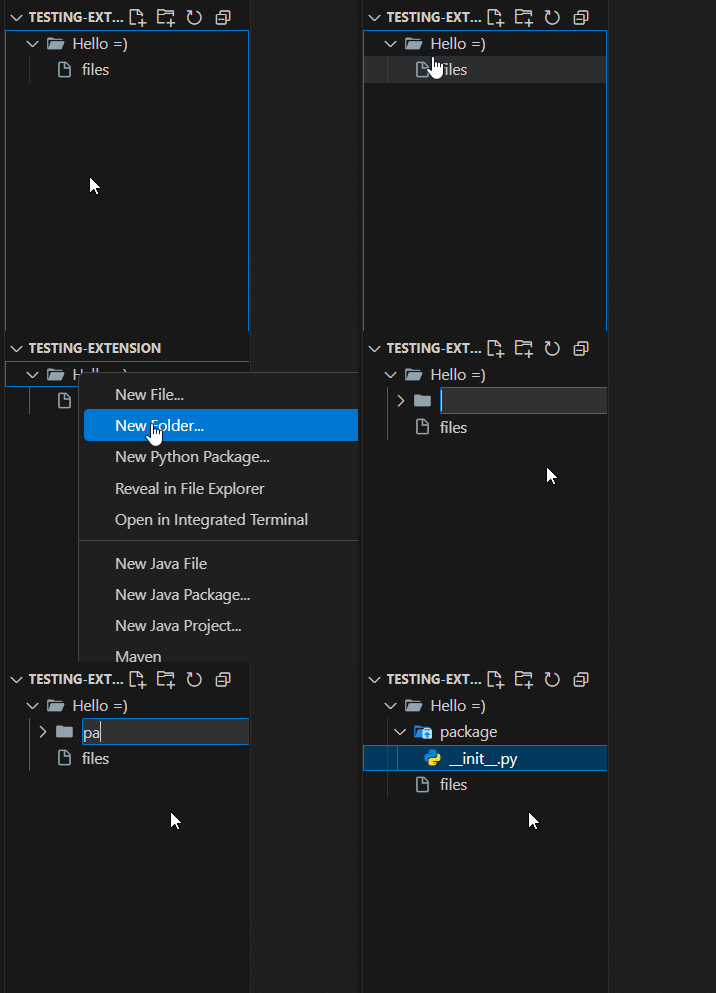
- Context Menu Integration - "New Python Package..." appears right after "New Folder..."
- Variable Interpolation - Use
${name},${name:pascal}, and more in your content - Conditional Content - Different
__init__.pycontent based on location or package name - Additional Files - Auto-generate extra files (models, views, tests, etc.)
- Snippet Support - Insert VS Code snippets with full tabstop support
- Template Files - Use external template files for complex boilerplate
- Parent Packages - Automatically create
__init__.pyin parent folders
- Right-click on any folder in the Explorer
- Select "New Python Package..."
- Name your package
- Done! Your package is created with all configured files
{
  "new-python-package.initFileContent": "\"\"\"${name:pascal} package.\"\"\"",
  "new-python-package.openFilesAfterCreation": true,
  "new-python-package.additionalFiles": [
    {
      "when": { "pathMatches": "**/models/**" },
      "files": [
        {
          "name": "${name}.py",
          "content": "class ${name:pascal}:\n    pass"
        }
      ]
    }
  ]
}📖 Full documentation on the GitHub Wiki
Found a bug or have a feature request? Open an issue on GitHub.
MIT