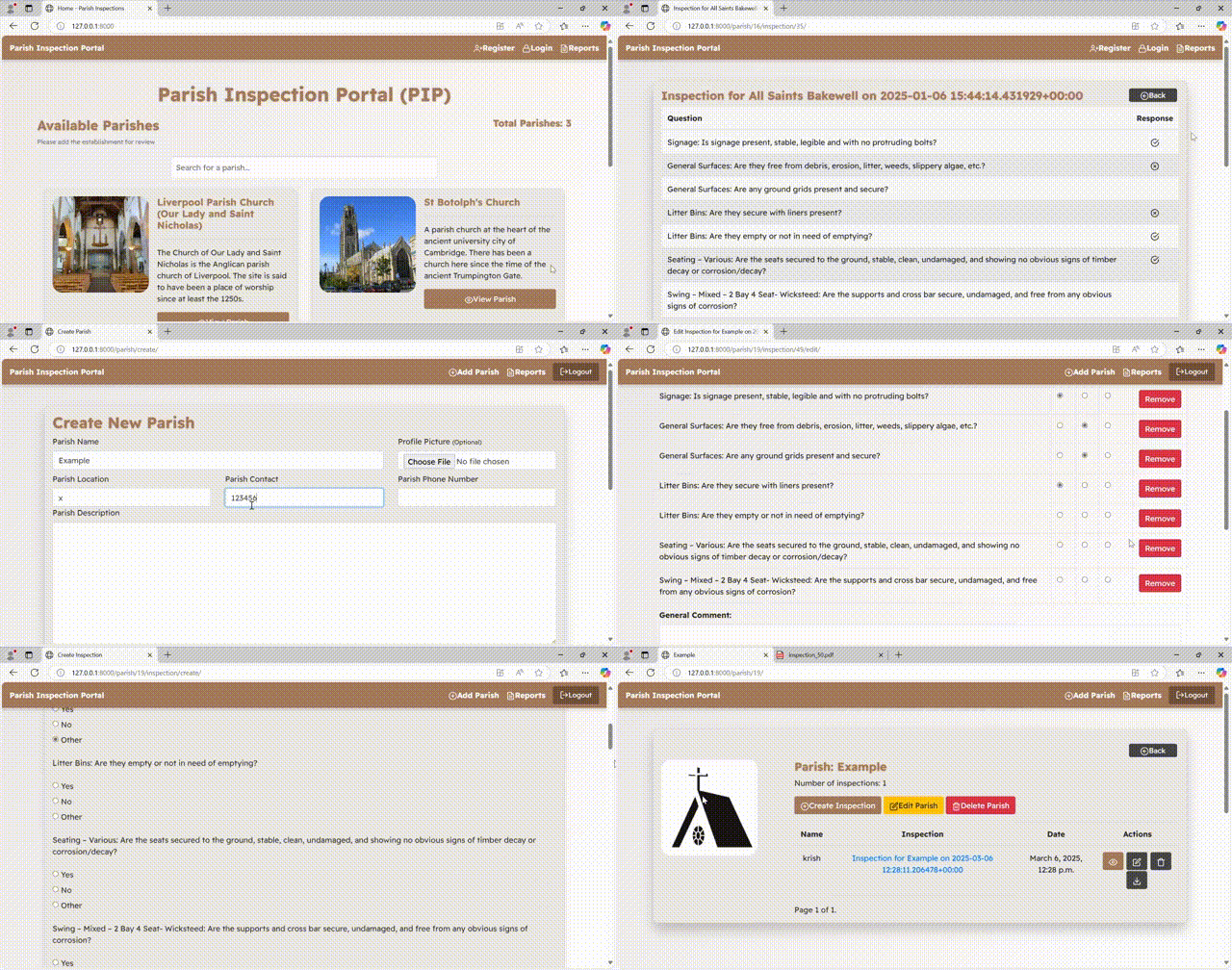
Parish Inspection Portal is a web application (PoC startup project) designed to streamline and digitize the inspection process for parish facilities. Built with Django, this portal enables parish council clerks to manage inspections for multiple parishes through a user-friendly interface. The system supports dynamic inspection checklists, image uploads for general comments, report generation, and more, all while providing secure user authentication and responsive design.
Current version was finalized for demo purposes for parish client in UK, small team members participated in making this idea a reality.
- User Registration & Authentication: Secure login and registration to manage access.
- Parish Management: Create, edit, and delete parish profiles with details such as name, description, location, contact, phone number, and profile picture.
- Inspection Management: Create and update inspections with dynamic checklists, general comments, and the ability to upload up to 5 images per inspection.
- Inspection Reports: Generate, view, and download detailed inspection reports. Reports are searchable and sortable through an integrated data table.
- Responsive & Modern UI: Sleek design with animations, drop shadows, and progressive web app (PWA) enhancements for offline support and home screen installation.
- Python 3.x
- Django 5.x (or later)
- Virtual environment tool (e.g.,
venvorvirtualenv) - A database (SQLite is used by default)
-
Clone the repository:
git clone https://github.com/yourusername/parish-inspection-portal.git cd parish-inspection-portal -
Create and activate a virtual environment:
python -m venv venv
source venv/bin/activate  # On Windows use `venv\Scripts\activate`
-
Install dependencies:
pip install -r requirements.txt
-
Apply migrations:
python manage.py migrate
-
Create a superuser:
python manage.py createsuperuser
-
Run the development server:
python manage.py runserver
Access the application: Open your browser and navigate to http://127.0.0.1:8000/
1- Import the code in local system with the project directory being parish_inspection, make sure to load your own virtual env directory (venv)
2- Open terminal once located in the directory and run the following command
python manage.py shell
3- Inside the shell run the default questions usually presented in Uk parishes:
from inspections.models import Question

default_questions = [
    "Signage: Is signage present, stable, legible and with no protruding bolts?",
    "General Surfaces: Are they free from debris, erosion, litter, weeds, slippery algae, etc.?",
    "General Surfaces: Are any ground grids present and secure?",
    "Litter Bins: Are they secure with liners present?",
    "Litter Bins: Are they empty or not in need of emptying?",
    "Seating – Various: Are the seats secured to the ground, stable, clean, undamaged, and showing no obvious signs of timber decay or corrosion/decay?",
    "Swing – Mixed – 2 Bay 4 Seat- Wicksteed: Are the supports and cross bar secure, undamaged, and free from any obvious signs of corrosion?",
    "Swing – Mixed – 2 Bay 4 Seat- Wicksteed: Are all caps fitted?",
    "Swing – Mixed – 2 Bay 4 Seat- Wicksteed: Is the unit stable?",
    "Swing – Mixed – 2 Bay 4 Seat- Wicksteed: Are the swing seats free from damage and secure?",
    "Swing – Mixed – 2 Bay 4 Seat- Wicksteed: Are the chains and shackles showing no signs of excessive wear and working freely?",
    "Swing – Mixed – 2 Bay 4 Seat- Wicksteed: Is the surfacing undamaged and in a good condition without erosion/puddling?",
    "Slide – Embankment: Is the starting section secure, stable and free from damage?",
    "Slide – Embankment: Is the slide-chute in a good condition, clean and free from any foreign objects and with no sharp edges?",
    "Slide – Embankment: Is the surfacing undamaged and in a good condition?",
    "Cableway: Are all the supports, barriers secure and undamaged with no signs of obvious corrosion/decay present?",
    "Cableway: Is the unit stable?",
    "Cableway: Are all component parts present including caps?",
    "Cableway: Are the cable, seat, and suspension chain present, secure and free from damage?",
    "Cableway: Does the traveller run smoothly with no undue noise?",
    "Cableway: Are the take-off and landing areas undamaged?",
    "Cableway: Is the surfacing undamaged and free from trips?",
    "Agility Tunnel Mound -Large: Are the tunnel ends free from damage?",
    "Agility Tunnel Mound -Large: Is the tunnel clean and undamaged?",
    "Agility Tunnel Mound -Large: Are the palisade logs, steps, ladder and barriers in a good stable condition with no obvious signs of decay?",
    "Agility Tunnel Mound -Large: Is the surfacing in good order?",
    "Natural Play – Logs: Are the logs secure, free from damage and any obvious signs of decay?",
    "Natural Play – Logs: Is the unit free from slippery algae?",
    "Natural Play – Logs: Is the surfacing undamaged and in a good condition with no erosion and puddling?",
    "Climber - Logs: Are all supports stable, secure and free from damage and any obvious signs of decay?",
    "Climber - Logs: Are all component parts present and secure including caps and holds?",
    "Climber - Logs: Is the unit stable and free from slippery algae?",
    "Climber - Logs: Are the climbing holds present, secure and non-rotating?",
    "Climber - Logs: Is the surfacing undamaged and free from trips?"
]

for question_text in default_questions:
    Question.objects.create(question_text=question_text, is_default=True)
4- This will load all the default question in the system (34).
5- Make migrations and migrate if necessary (shouldn't be the case because the migrations file is present).
6- Before you run the server make sure to install this package:
 pip install xthml2pdf

 pip install django-ajax-datatable
7- Run the server:
python manage.py runserver
The Questions tab in admin will show all the default 34 questions, that can be modified by the admin and the changes will propagate throughout the site.
The Parishs tab contains all Parishs created.
The Inspections tab contains all Inspections created.
The Inspection questions tab contains all responses of users for their inspections.
Various UI improvements, bug fixing and image upload feature on inspections.


1- Search bar implemented in the home screen, as soon as the user types in something, it would show them the list of parishes. Any query matching the Parish would be shown in the dropdown list.
2- Inspection References from #number changed to actual inspection name. The names are intentionally long with their full reference so that they can be cited and searched.
3- Edit inspection and Inspection View pages both have 7 fields to show per page as per the pagination. Keeping consistency.
4- Edit Inspection page has now two more features: Add and Remove questions. These are loaded and updated in the Inspection questions tab rather than Questions tab because of how the Questions tab propagates it's changes as per the model structure to all inspections. Thus also, editing a question is not possible, due to the fact that all questions from the Inspection questions tab are loaded from the Questions tab, and the parameter that shows the question in a given instance of inspection in Inspection questions tab is actually just taking the questions non-editable from the Questions tab. Which means that we would have to modify the Questions tab questions, and doing that means that all questions change because of a single user. The adding and removing feature just adds or eliminates questions for the instances in the Inspection questions tab which is possible to integrate in the site.
5- Adding a question means that whilst one is editing the inspection, the question will only be modifiable in its responses upon re-editing the inspection.
6- View inspection page and edit inspection page go hand in hand for changes in a single inspection
7- Inspections are autonomous, changes in one inspection will not affect the other inspections in the same parish.
8- New Reports page added in home page within base.html, along with Register and Login redirects, this is accessible to authenticated and also public users (to everyone basically). If it should only be available to authenticated users, the change is very simple in base.html, change the redirect element to be in "if user is authenticated" condition only.
9- Inspection reports uses the django-ajax-datatable package and its modules, the operation is quite complex to derive all inspections and on top of that have a search engine to filter by a column. There is an Ajax endpoint for reports redirect URL. Each report is an inspection, within 5 columns, 10 entries shown in each page.
10- Reports page datatable shows all inspections and their values for the columns, each column can actually be sortable (By parish name, By Inspection Owner, By Date and also Report Name. Report Names for example are sorted by their ids (which means that oldest made reports will be the first ids and newest will be greater in number, works for sorting them by old to new and viceversa).
11- Download feature in the reports page uses the same logic (and to take advantage of the alredy built download option in Parish page), so the URL redirect is the same and thus logic is reused.
12- Search engine implemented in the reports page by parish name, it would seem practical for a user to see all reports for a given Parish, instead of trying to search for the reports name which might be tedious due to the long and datetime included name that the report consists of. Also retrieving the reports name to be a searchable parameter was not in the given options with the logic, so for the practical reason and its more time investment approach, it was best considered to implement searching by parish name.
13- New addition in pdf downloads, the inspection name is also added below the parish name on top of the pdf.
History table, would need more time to look into it and its implementation.


1- Questions was wrong formatted to start with, having more than 34 questions already preloaded and with an unintended question, making it seem as if there is a ‘data bug’. Solution is to remove all questions from the admin panel and add them though shell again (34) checking the validity in the Questions tab.
2- The inspection view page is ok, added a feather.js slash symbol for ‘other’, would be ideal to have a symbol for other as well and not just blank. However, on a general note the symbols could be confusing for new users or those who are not familiar with the site, instead of a tick symbol or cross for ‘yes’ or ‘no’ respectively, we could just add the text in itself (‘yes’, ‘no’, ‘other’). Sometimes making the site more aesthetically pleasing could lead to worse user experience, we should try to aim for simplicity and easy comprehension for users.
3- Inspection edit page was not showing the questions and its associated answers (blank), fixed by tweaking the views.py code for the edit view.
4- Removed inspection edit button from the inspection detail page, for two reasons, 1: it doesn’t work and if we had to make it work would have to change the inspection detail view code logic, 2: avoiding duplication of action, there is already an edit button in parish detail, no need to add another button in inspection detail as well. Instead, what could be added is “Go back” button (done).
5- Code duplication:
<a class="navbar-brand text-white" href="/">Parish Inspection Portal</a>
<a href="{% url 'home' %}" class="text-white">Home</a>
Both of these do the same thing, they are exactly the same, we should just keep one. For this, I have removed ‘Home’ reference.
6- Inspection detail page shows 5 questions in each page, this is too low, I would aim higher as it also leads to 7 pages, we want to somewhat occupy the page and have minimal pages. 10 questions per page leads to 4 pages in total, seems a good number.
7- Implemented download button, the pdf generation template does not use base.html intentionally, as we are creating the draft. The download button is available in parish detail page.
8- Changed the delete inspection icon to actual right icon: trash.
- Views.py is now modified to be class based instead of function based.
- Edited inspections will update their own date and time and move up to recent inspections in the list.
- All edited inspections are autonomous in their behaviour, no collision in responses with other inspections in the same parish.
- Improved register and login page UI
- For each Parish creation, a profile pic default or user uploaded will be shown.
- In Parish details page, the UI is better now and Number of inspections.
- Admin has control over all parishes and inspections (CRUD)
- Questions UI is better, fixed where certain answers where not appearing.
- Edit inspection UI now shows the questions as well (not just the topics as before).
- Delete option confirmation page is made.
- Options for question responses are now "yes", "no", and "other", can make general comments at the end
- Pagination on homepage
- UI better for all pages.
- Option to remove parishes.
- A return to button in parish and inspection page, to go back to previous page.
- Signals works to make the questions from the Questions tab in admin link to each inspection (whether it would be to create or edit).