
Video Archiver automatically downloads new videos from your playlists in the background. Simply add playlists to monitor, and the app handles everything else - no manual intervention needed. Works with any platform supported by yt-dlp.
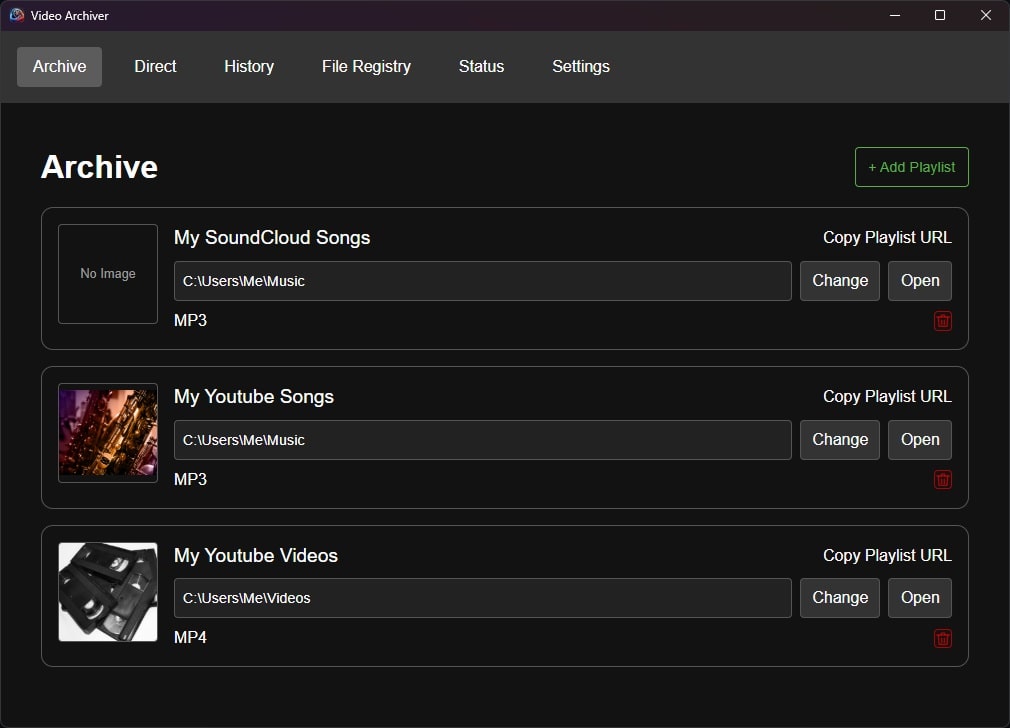
- Playlist Monitoring: Watches your playlists and automatically downloads new videos
- Direct Downloads: Manual download option for individual videos
- Background Processing: Runs in the background
- Format Options: Choose your preferred format per playlist
- File Registry: Builds a file registry from directories to enable additional duplicate detection.
Download the latest Windows installer from the Releases page:
- Windows:
videoarchiver-windows-installer.exe- Full installer with NSIS
Quick Install (Recommended)
Run the installation script with a single command:
curl -fsSL https://raw.githubusercontent.com/NotCoffee418/videoarchiver/refs/heads/main/install.sh | bashManual Installation
Download the latest release for your platform from the Releases page:
- Linux (amd64):
videoarchiver-linux-amd64- For x86_64 systems
- Add a playlist URL to monitor
- Video Archiver will check for new videos periodically
- New videos are automatically downloaded to your specified folder
- Use the direct download option for one-off videos
Requirements:
- Go 1.25+
- Node.js 22
- Wails v2:
go install github.com/wailsapp/wails/v2/cmd/wails@latest
# Clone the repository
git clone https://github.com/NotCoffee418/videoarchiver.git
cd videoarchiver

# Install frontend dependencies
cd frontend && npm install && cd ..

# Build the application
wails build

# For Windows installer
wails build -nsisThis software is intended for archiving videos you have the right to download. Users are responsible for ensuring they comply with applicable laws and terms of service.
This software automatically downloads and uses:
- yt-dlp (https://github.com/yt-dlp/yt-dlp) - Licensed under The Unlicense
- FFmpeg (https://ffmpeg.org/) - Licensed under LGPL 2.1
- FFmpeg source: https://github.com/FFmpeg/FFmpeg
- LGPL license: https://www.gnu.org/licenses/old-licenses/lgpl-2.1.html
Linux: Missing WebKit Dependencies
If you encounter issues with the application not starting or displaying properly on Linux, you may need to install WebKit dependencies manually:
- Ubuntu 24.04+:
sudo apt install libwebkit2gtk-4.1-dev libgtk-3-dev - Ubuntu 22.04-:
sudo apt install libwebkit2gtk-4.0-dev libgtk-3-dev - Fedora:
sudo dnf install webkit2gtk4.1-devel gtk3-devel