


Monitor and control your Bosch eBike directly from Home Assistant! Track battery level, charging status, range estimates, and create smart charging automations.
⚠️ IMPORTANT REQUIREMENTS
This integration requires:
- ConnectModule hardware installed on your bike (sold separately, ~€100-150)
- Bosch eBike Flow+ subscription (~€30-50/year)
- Bosch eBike Flow app (Gen 4 systems)
This will NOT work with older Bosch eBike Connect app (Gen 3 and below).
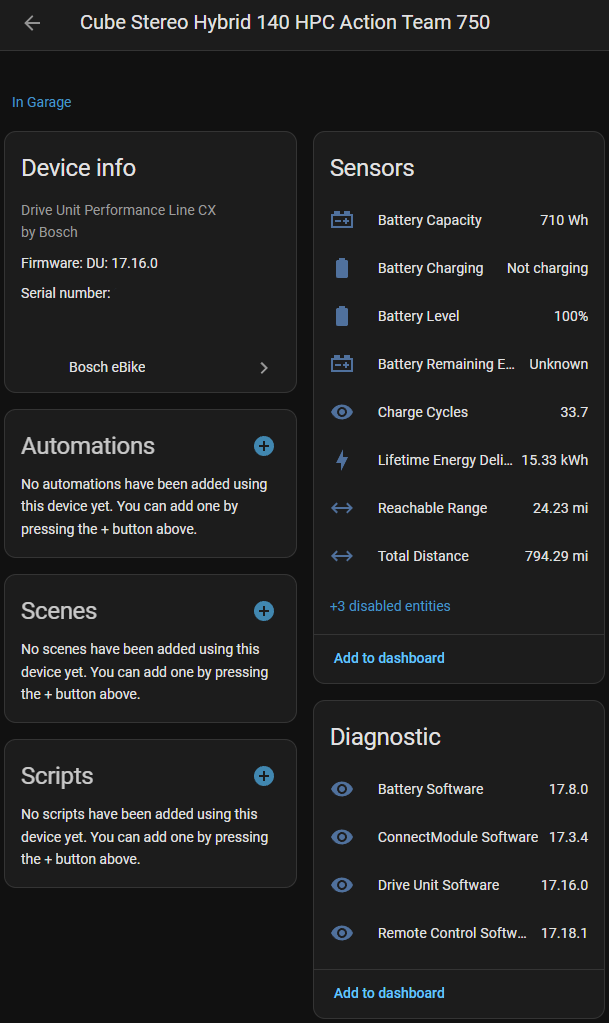
- Battery Level - Real-time battery percentage
- Battery Remaining Energy - Available energy in Watt-hours
- Battery Capacity - Total battery capacity
- Battery Charging - Active charging status
- Total Distance - Lifetime odometer reading
- Charge Cycles - Number of full charge cycles completed
- Lifetime Energy - Total energy delivered over the bike's lifetime
- Reachable Range - Estimated range per riding mode (when bike is online)
- Software Versions - Track firmware versions of all components
- Component Details - Serial numbers and product info
- Cloud-based polling every 5 minutes
- Real-time updates while charging
- OAuth2 authentication with Bosch eBike Flow
- Automatic token refresh
- Multi-bike support (if you have multiple eBikes)
This integration is ONLY for bikes using the Bosch eBike Flow system (Gen 4). It will NOT work with the older Bosch eBike Connect app (Gen 3 and below).
- 🔌 Bosch ConnectModule - Required hardware that connects your bike to the cloud
- Cost: ~€100-150 (depending on region)
- NOT included with most bikes by default
- Must be purchased separately and installed on your bike
- Available from Bosch dealers or online retailers
- 💳 Bosch eBike Flow+ Subscription
- Cost: ~€30-50/year (varies by region)
- Required for cloud connectivity and remote features
- Subscribe through the Bosch eBike Flow app
- 📱 Bosch eBike Flow app installed and working
- 🏠 Home Assistant 2024.1.0 or newer
- 🌐 Internet connection for cloud API access
This integration ONLY works with Gen 4 Bosch systems using the Flow app:
- ✅ Performance Line CX (Gen 4)
- ✅ Performance Line (Gen 4)
- ✅ Cargo Line (Gen 4)
- ✅ Any Gen 4 system with ConnectModule installed
Not Compatible:
- ❌ Gen 3 and older Bosch systems (use Bosch eBike Connect app)
- ❌ Non-Bosch eBike systems
- ❌ Bosch systems without ConnectModule hardware
-
Add Custom Repository:
- Open HACS in Home Assistant
- Click the 3 dots in the top right
- Select "Custom repositories"
- Add URL:
https://github.com/Phil-Barker/hass-bosch-ebike - Category:
Integration - Click "Add"
-
Install Integration:
- Search for "Bosch eBike Flow" in HACS
- Click "Download"
- Restart Home Assistant
-
Configure:
- Go to Settings → Devices & Services
- Click "+ ADD INTEGRATION"
- Search for "Bosch eBike Flow"
- Follow the OAuth login flow with your Bosch eBike Flow credentials
- Copy the
custom_components/bosch_ebikefolder to your Home Assistant'scustom_componentsdirectory - Restart Home Assistant
- Add the integration via Settings → Devices & Services
The integration uses OAuth2 for secure authentication:
- Click "Add Integration" and select "Bosch eBike Flow"
- Copy the authorization URL (don't click it directly)
- Paste it in a new browser tab on your computer
- Log in with your Bosch eBike Flow app credentials
- Use browser Developer Tools (F12) to extract the authorization code
- Paste the code back into Home Assistant
- Select which bike to monitor (if you have multiple)
📖 Detailed Step-by-Step Authentication Guide - Includes screenshots and troubleshooting!
If you have multiple eBikes registered in the Bosch eBike Flow app:
- Add the integration once for each bike
- Each bike will appear as a separate device in Home Assistant
The ConnectModule updates the Bosch Cloud API when:
- ✅ Bike is charging (plugged in)
- ✅ Bike is powered on
- ✅ Alarm is triggered by motion
When the bike is unplugged, powered off, and stationary, the ConnectModule goes into low-power mode and stops sending updates.
- 📊 While charging: Sensors update every 5 minutes with current data
- 🔋 Perfect for: Monitoring charge sessions and creating smart charging automations
⚠️ Limited when: Bike is stored unplugged and powered off
For detailed sensor reliability information, see SENSOR_RELIABILITY.md.
Preserve battery health by stopping the charge at 80%:
automation:
  - alias: "eBike: Stop charging at 80%"
    description: "Turn off smart plug when bike reaches 80% to preserve battery"
    trigger:
      - platform: numeric_state
        entity_id: sensor.your_bike_battery_level
      above: 80
    condition:
      - condition: state
        entity_id: binary_sensor.your_bike_battery_charging
      state: "on"
    action:
      - service: switch.turn_off
        target:
          entity_id: switch.bike_charger_plug
      - service: notify.mobile_app
        data:
          title: "🔋 eBike Charging Paused"
message: "Battery at {{ states('sensor.your_bike_battery_level') }}% - charging stopped to preserve battery health"Get notified when your bike is fully charged:
automation:
- alias: "eBike: Notify when fully charged"
trigger:
- platform: numeric_state
entity_id: sensor.your_bike_battery_level
above: 99
- platform: state
entity_id: binary_sensor.your_bike_battery_charging
to: "off"
for:
minutes: 1
condition:
- condition: numeric_state
entity_id: sensor.your_bike_battery_level
above: 95
action:
- service: notify.mobile_app
data:
title: "🚴♂️ eBike Ready!"
message: "Your bike is {{ states('sensor.your_bike_battery_level') }}% charged and ready to ride!"type: entities
title: eBike Status
entities:
- entity: sensor.your_bike_battery_level
name: Battery Level
- entity: sensor.your_bike_battery_remaining_energy
name: Energy Remaining
- entity: binary_sensor.your_bike_battery_charging
name: Charging
- entity: sensor.your_bike_total_distance
name: Total Distance
- entity: sensor.your_bike_charge_cycles
name: Charge Cycles- Check Home Assistant logs for errors
- Ensure you're running HA 2024.1.0 or newer
- Try restarting Home Assistant after installation
- Make sure you're using your Bosch eBike Flow app credentials
- Check that your bike is registered in the Bosch eBike Flow app
- Ensure your ConnectModule is paired and online
- Check that your bike's ConnectModule is paired with the Flow app
- Power on your bike or plug it in to trigger an update
- Wait up to 5 minutes for the next polling cycle
The ConnectModule only sends updates when:
- Bike is charging
- Bike is powered on
- Alarm is triggered
This is normal behavior. The sensors will update once you power on or plug in your bike.
Additional sensors are disabled by default but can be enabled:
- Go to Settings → Devices & Services
- Find your eBike device
- Click the device
- Enable desired sensors (software versions, serial numbers, etc.)
Enable debug logging in configuration.yaml:
logger:
  default: warning
  logs:
custom_components.bosch_ebike: debug- 🐛 Report Bugs: GitHub Issues
- 💬 Discussions: GitHub Discussions
- 📖 Documentation: Wiki
- 🤝 Contributing: DEPLOYMENT.md for development setup
If you find this integration useful and want to support its development:

Your support helps maintain and improve this integration. Thank you! ☕
This is an unofficial integration and is not affiliated with, endorsed by, or supported by Bosch eBike Systems.
Use at your own risk. The author is not responsible for any damage to your bike, battery, or Home Assistant system.
MIT License - see LICENSE file for details.
- Thanks to the Home Assistant community
- Built with the Home Assistant integration framework
- Bosch eBike Flow API (reverse engineered)
Enjoying this integration? ⭐ Star the repo and share with other eBike enthusiasts!