The Steam Deck is a capable handheld computer — but in desktop mode, it's awkward to use without a physical keyboard. The mouse works reasonably well, but real desktop efficiency depends on shortcuts, and those simply aren't available when you're away from a desk. The Steam on-screen keyboard doesn't fill that gap. You can remap controller buttons with other tools, but that comes with its own friction: layouts are easy to forget when you're not practising them daily.
Deckery remaps controller buttons to keyboard keys, shortcuts, and actions — with per-app layouts, modifier layers, and a live overlay that shows exactly what every button does at any given moment. The goal is full desktop productivity with just the controller in hand, without requiring the Steam process to run in the background. In addition, the project includes opinionated KDE Plasma 6 configurations that better adapt the operating system to handheld use.
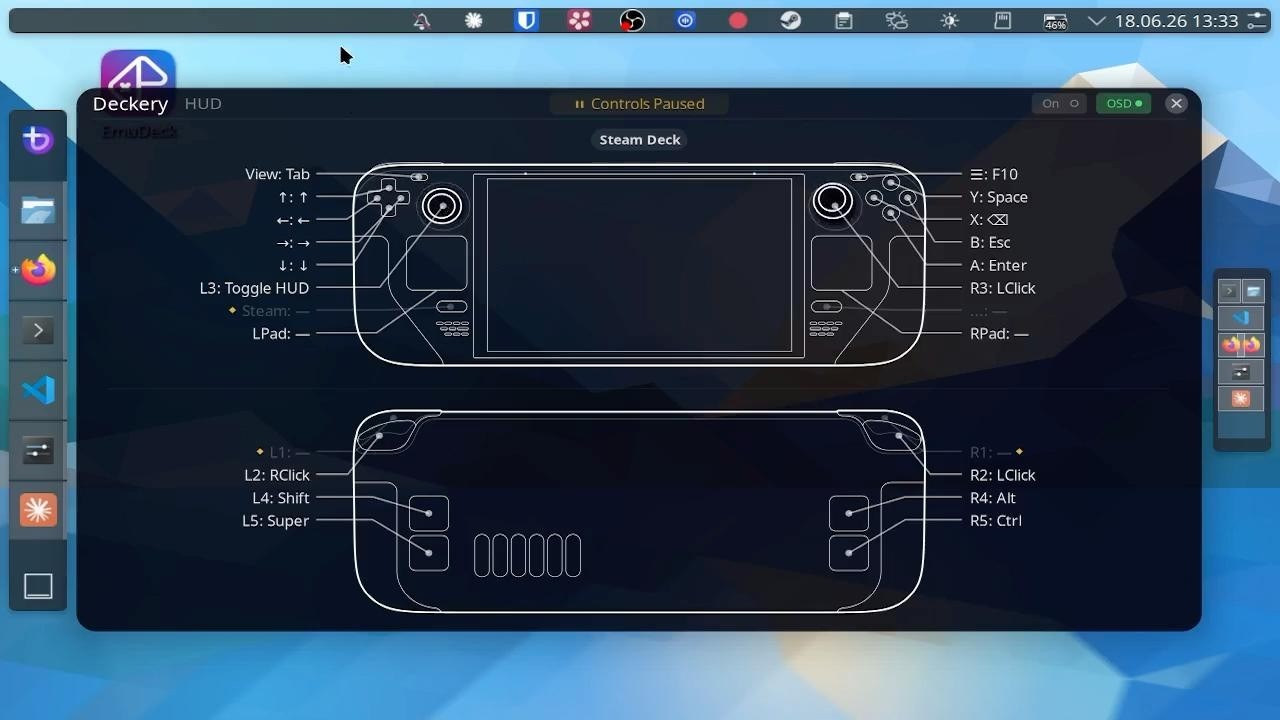
- Get the most out of the Steam Deck as a desktop device, without a physical keyboard.
- Become fully independent from the Steam process: all buttons, triggers, trackpads and inputs from the Deck should be usable without running Steam.
- Get the most out of the trackpads — cursor movement, scrolling, gestures, and haptics that match and go beyond Steam Input, without relying on it. → Trackpad roadmap
- Build a community library of well-crafted shortcut configs for the most commonly used apps. If you have a config you're happy with, please contribute.
Deckery is free and open-source. If you use this project or share the vision of a truly efficient Linux handheld, your support directly fuels its development.
A significant amount of development hours goes into this project. Small contributions help to get the whole thing across the finish line.
How funds are used:
- 🛠️ Dedicated development hours for feature implementation and testing
- ☕ Coffee for late-night debugging sessions
- 🏆 Sponsor Recognition: Monthly sponsors get their name/logo added to the
README.md. - 🎯 Prioritization: If you sponsor or contribute, I'm happy to prioritize your wishes for the project.
Every contribution brings the 1.0 release closer.
Deckery is an umbrella for several subprojects. Some form the core — remapping controller buttons to system functions, with visual companion apps like the HUD and tray. Others extend KDE Plasma with configurations and additional tooling so the desktop is optimally suited for handheld use on the Steam Deck.
A live overlay for visualising and exploring your button config. See what every button does at any given moment — controls should be discoverable and explain themselves, for easier onboarding and faster recall.
The heart of Deckery — the input remapper. Remaps controller buttons to keyboard keys, shortcuts, and actions, with per-app layouts, modifier layers, and trackpad gesture devices.
The control panel for the Deckery stack — a system tray applet that shows live service status, provides pause/resume/restart controls for makima, and handles one-click updates.

An opinionated KDE Plasma desktop tuned for the Steam Deck's screen size and controller input. Includes display scaling, dynamic window tiling, Steam keyboard focus fix, flat pointer acceleration, and power management — all documented and mostly scriptable for adoption in parts.
Beyond its own services, Deckery pulls in and patches a set of existing KDE and desktop tools to make them work well on the Steam Deck's screen size and controller input. Some are forked to apply targeted fixes; others are used as-is. Together they form an opinionated, curated desktop environment that goes beyond what any single tool provides.
curl -sSL https://raw.githubusercontent.com/Plasma-Deckery/deckery/main/get.sh | bashThe installer sets everything up and walks you through the Steam Input configuration interactively. Reading the setup guide is recommended.
Tested on: Steam Deck (Bazzite 43, KDE Plasma 6, Wayland)
Deckery is free and open-source. If you find the project useful and want to support its ambitious goal, i would be honoured if you considered donating. Thanks :)

