

A website that allows you to see which albums you have the most number of songs saved from on Spotify
How to Host the Site with Your Own Spotify Web App
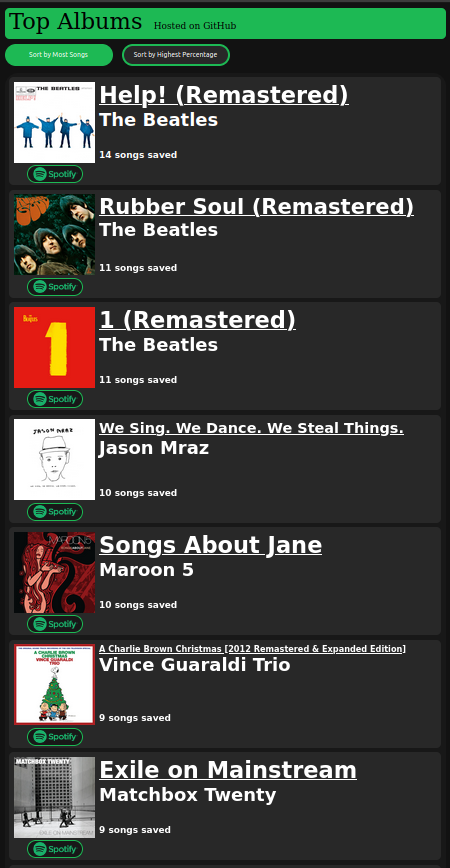
- Visit the site at https://rustyreich.github.io/Top-Albums/
- Click or tap the
Login with Spotifybutton - After loading, you shoud immediately see the 5 or so albums that you have the most songs saved from
- Scroll through the list to see every album that you have at least 1 song saved from
- Click or tap on an album to see a list of songs in the album and which ones you have saved from the album
- Song names will appear in green if they are songs that you have saved
- Click or tap the
Sort by Highest Percentagebutton to see the list sorted by albums which you have the highest percentage of songs saved from (e.g. an album with 10 songs of which you have 8 saved would have a percentage of 80%)- Singles (albums containing only a single song) are automatically removed from this list as they would all appear at the top with 100%
- Download
index.html,style.css, andsite.jsfrom this repository - Download HTML server software (for development, I used http-server)
- Start an HTML server at
localhost:8888- Make sure that
index.htmlis set as the main page - Make sure that the port is
8888, as it will not work with any other port
- Make sure that
- Open up any browser and connect to the site with the url
localhost:8888- Again, using any other port or connecting using any other url, such as
127.0.0.1:8888, will result in aninvalid callback URLerror
- Again, using any other port or connecting using any other url, such as
- Go to https://developer.spotify.com/dashboard/
- Sign in with your Spotify account
- Click the
Create an Appbutton - Fill out the submission box that appears and enter the dashboard for your newly created app
- Click the
Edit Settingsbutton - Under
Redirect URIs, clickaddto add a new callback URL and addhttp://localhost:8888/ - Copy your apps
Client ID - Download
index.html,style.css, andsite.jsfrom this repository - Open up
site.jswith an editing tool and look for the linevar client_id = 'cd65bb285db248e4b6352828ac986b66';. Replace this id with your own Web App's ID - Now follow the rest of the steps laid out in How to Host the Site Yourself