Implementation of CVPR2016 Paper: "Accurate Image Super-Resolution Using Very Deep Convolutional Networks"(http://cv.snu.ac.kr/research/VDSR/) in PyTorch
- VDSR is a deep learning approach for enlarging an image.
- The method uses a deep convolutional network inspired by VGG-net used for ImageNet classification.
- Increasing the network depth shows a significant improvement in accuracy. The final model uses 20 weight layers. By cascading small filters many times in a deep network structure, contextual information over large image regions is exploited in an efficient way.
- With very deep networks, however, convergence speed becomes a critical issue during training. The approach proposes a simple yet effective training procedure.
- It learns residuals only and uses extremely high learning rates, enabled by adjustable gradient clipping. According to the research paper, the proposed method performs better than existing methods in accuracy and visual improvements and the results are easily noticeable.
usage: main_vdsr.py [-h] [--batchSize BATCHSIZE] [--nEpochs NEPOCHS] [--lr LR]
               [--step STEP] [--cuda] [--resume RESUME]
               [--start-epoch START_EPOCH] [--clip CLIP] [--threads THREADS]
               [--momentum MOMENTUM] [--weight-decay WEIGHT_DECAY]
               [--pretrained PRETRAINED] [--gpus GPUS]

optional arguments:
  -h, --help            Show this help message and exit
  --batchSize           Training batch size
  --nEpochs             Number of epochs to train for
  --lr                  Learning rate. Default=0.01
  --step                Learning rate decay, Default: n=10 epochs
  --cuda                Use cuda
  --resume              Path to checkpoint
  --clip                Clipping Gradients. Default=0.4
  --threads             Number of threads for data loader to use Default=1
  --momentum            Momentum, Default: 0.9
  --weight-decay        Weight decay, Default: 1e-4
  --pretrained PRETRAINED
                        path to pretrained model (default: none)
  --gpus GPUS           gpu ids (default: 0)
An example of training usage is shown as follows:
python main_vdsr.py --cuda --gpus 0
usage: eval.py [-h] [--cuda] [--model MODEL] [--dataset DATASET]
               [--scale SCALE] [--gpus GPUS]

PyTorch VDSR Eval

optional arguments:
  -h, --help         show this help message and exit
  --cuda             use cuda?
  --model MODEL      model path
  --dataset DATASET  dataset name, Default: Set5
  --gpus GPUS        gpu ids (default: 0)
An example of training usage is shown as follows:
python eval.py --cuda --dataset Set5
usage: demo.py [-h] [--cuda] [--model MODEL] [--image IMAGE] [--scale SCALE] [--gpus GPUS]

optional arguments:
  -h, --help            Show this help message and exit
  --cuda                Use cuda
  --model               Model path. Default=model/model_epoch_50.pth
  --image               Image name. Default=butterfly_GT
  --scale               Scale factor, Default: 4
  --gpus GPUS           gpu ids (default: 0)
An example of usage is shown as follows:
python eval.py --model model/model_epoch_50.pth --dataset Set5 --cuda
- We provide a simple hdf5 format training sample in data folder with 'data' and 'label' keys, the training data is generated with Matlab Bicubic Interplotation, please refer Code for Data Generation for creating training files.
- We provide a pretrained VDSR model trained on 291 images with data augmentation
- No bias is used in this implementation, and the gradient clipping's implementation is different from paper
- Performance in PSNR on Set5
| Scale | VDSR Paper | VDSR PyTorch |
|---|---|---|
| 2x | 37.53 | 37.65 |
| 3x | 33.66 | 33.77 |
| 4x | 31.35 | 31.45 |
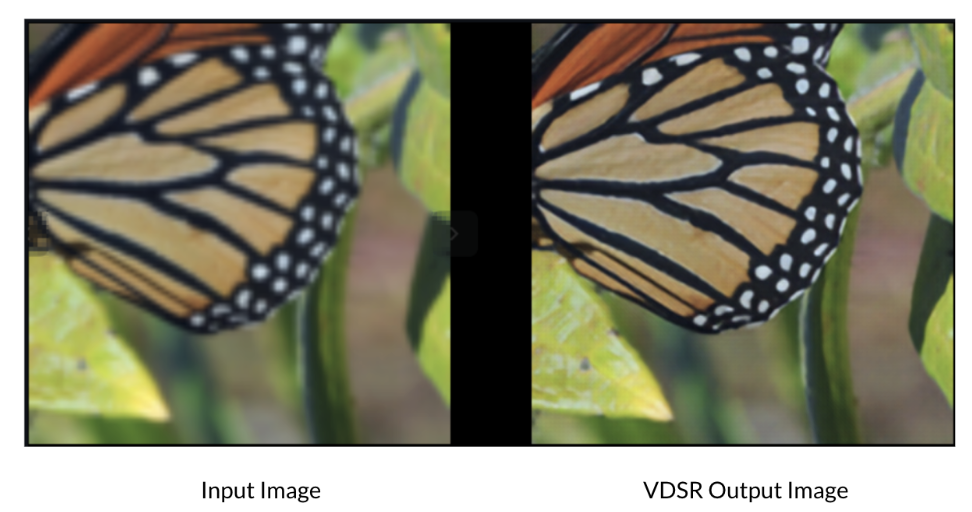
From left to right are ground truth, bicubic and vdsr


- Optimizations Applied
Pruning
We initially performed pruning on the original VDSR super resolution model to obtain a smaller architecture DNN model that will perform super resolution on input images faster such that the model is optimized for mobile devices. We have used the F1 Pruner technique for performing the pruning optimization on our VDSR super resolution model. We used the F1 pruner because we obtain the highest increment in PSNR Ratio while using the level pruner at a sparsity of 0.5
L1 Pruner: L1 norm pruner computes the l1 norm of the layer weight on the first dimension, then prune the weight blocks on this dimension with smaller l1 norm values. i.e., compute the l1 norm of the filters in the convolution layer as metric values, compute the l1 norm of the weight by rows in the linear layer as metric values.
Parameters: model (Module) – Model to be pruned. config_list (List[Dict]) – Supported keys: sparsity, sparsity_per_layer, op_types, op_names, op_partial_names, exclude mode (str) – ‘normal’ or ‘balance’ dummy_input
Configuration Used
config_list = [{
        'sparsity': 0.5,
        'op_types': ['Conv2d']
    }]
Hyperparameter Optimization
Thereafter, we performed hyperparameter optimization on the pruned VDSR super resolution model to obtain optimal values for the hyperparameters that are being used in our training process. The optimization of these hyperparameters will help us obtain as minimal a loss as possible and thus improve the model super resolution capability. We used TPE Tuner technique for performing the HPO optimization on our pruned VDSR super resolution model We used TPE Tune because it uses distributions of the configuration prior with non-parametric densities and we were able to obtain better results with this tuner.
Tree-structured Parzen Estimator (TPE) tuner: TPE is a lightweight tuner that has no extra dependency and supports all search space types, designed to be the default tuner. It has the drawback that TPE cannot discover relationships between different hyperparameters. Implementation: TPE is an SMBO algorithm. It models P(x|y) and P(y) where x represents hyperparameters and y the evaluation result. P(x|y) is modeled by transforming the generative process of hyperparameters, replacing the distributions of the configuration prior with non-parametric densities
Parameters: optimze_mode (Literal['minimize', 'maximize']) – Whether optimize to minimize or maximize trial result. seed (int | None) – The random seed. tpe_args (dict[str, Any] | None) – Advanced users can use this to customize TPE tuners.
HPO Configuration Used config.tuner.name = 'TPE' config.tuner.class_args = { 'optimize_mode': minimize }
Search Space
search_space = {
    'weight_decay'  	: {'_type': 'choice', '_value': [1e-4,1e-5]},
    'lr'            		: {'_type': 'loguniform', '_value': [0.05, 1]},
    'momentum'      	: {'_type': 'uniform', '_value': [0, 1]},
    'batchSize'     	: {'_type': 'choice', '_value': [64, 128, 256, 512]},
    'clip'         	 	: {'_type': 'uniform', '_value': [0, 1]}
}
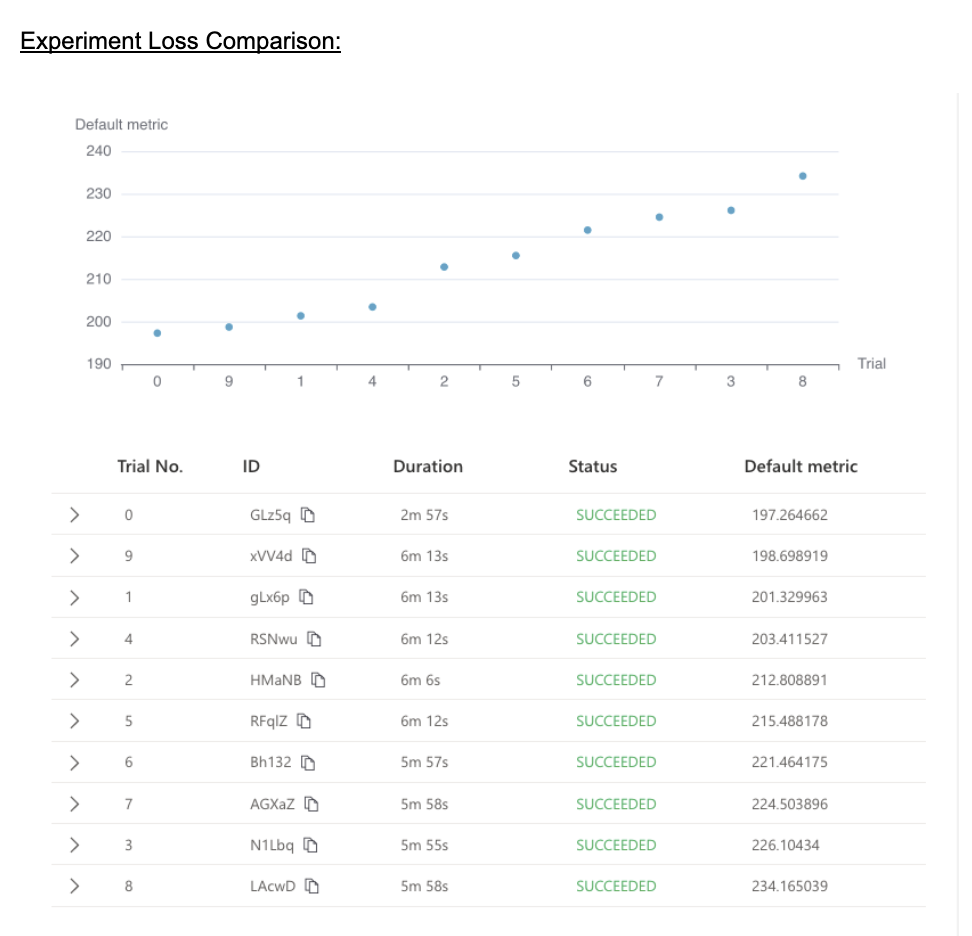
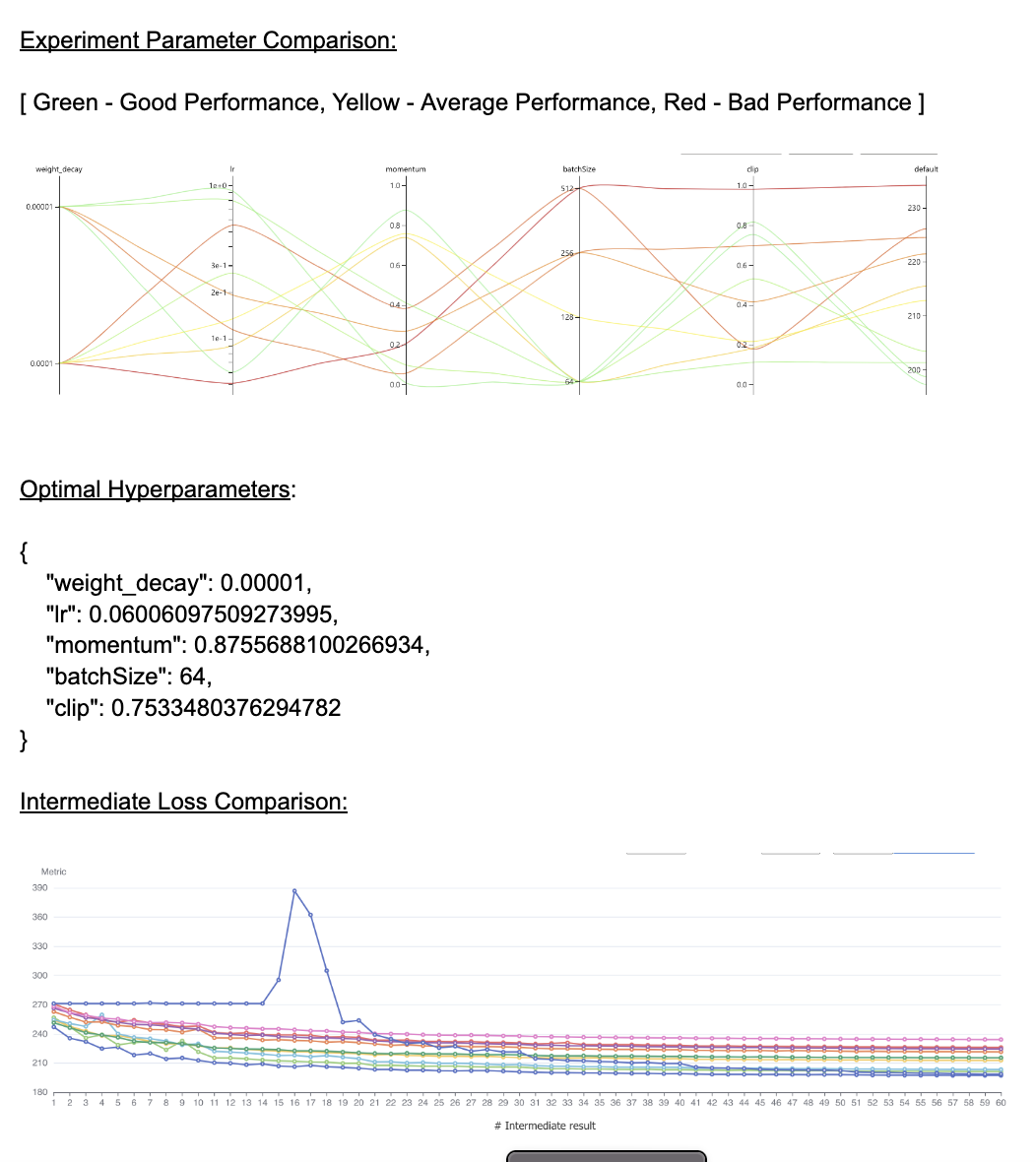
We run 10 trials with the given search space configuration and compare the final loss of each trial to determine the optimal hyperparameters with the least reported loss. The least loss reported with this experiment is 197.26 and the time taken by these sets of trials is around 2 min 57 sec.
- Performance of Original Model and Optimized Variants
Metrics used for Comparing Performance:
Quality: PSNR is used as the metric of quality. Most of the existing super resolution models already use it or some variant of it (e.g., PSNR-Y) in the validation process.
Speed: The inference speed is measured by XGen on a Samsung S10 cellphone.
Size: The size of the model refers to the size of the ONNX file of the DNN model.
Original Model:
We performed training on the original VDSR super resolution model and calculated its inference time on the server.
Server Inference Time - 1.743 sec
During the evaluation process of our original VDSR Super Resolution Model, we also calculated its PSNR Value.
Input bicubic PSNR for images scaled down by 2 - 33.690
Original Model Average PSNR for images scaled down by 2 - 37.652 Input bicubic PSNR for images scaled down by 3 - 30.407 Original Model Average PSNR for images scaled down by 3 - 33.773 Input bicubic PSNR for images scaled down by 4 - 28.414 Original Model Average PSNR for images scaled down by 4 - 31.464
Lastly, we converted our original model into its ONNX format and performed XGen inference test on it to obtain its inference time on a mobile device, and also noted the ONNX file size.
XGen ONNX Inference Time - 344.83 msec ONNX File Size - 2.8 MB