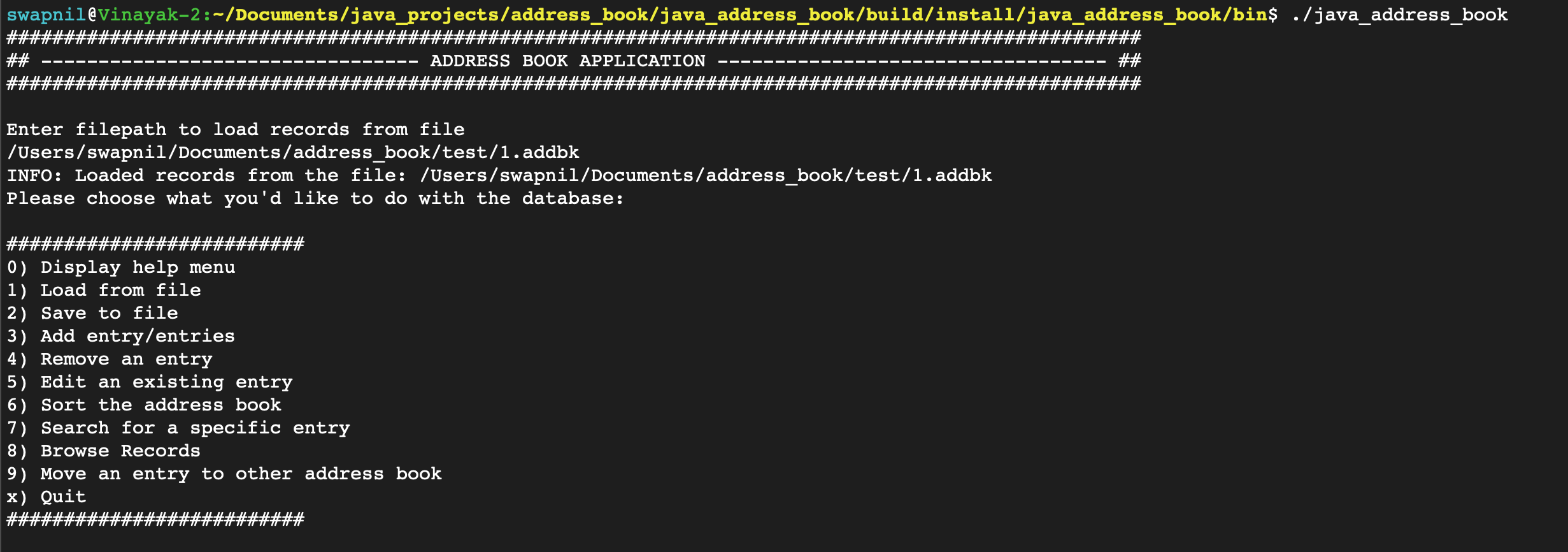
Write a program that functions as an address book. It should have entries containing at least the following information: first and last name, phone number, address, and email address. You should be able to add entries and remove entries, as well as printing out any given entry. It should save entries to a file, and be able to read in entries from a file as well.
-
git clone https://github.com/Swapnil-ingle/java_address_book -
gradle clean -
gradle installApp
The shell script and batch script for running the program are generated in the dir $Java_Address_Book/build/install/word-counter/bin after the plugin is setup.
cd $Java_Address_Book/build/install/java_address_book/bin
Linux:
./java_address_book<ABSOLUTE-PATH-TO-INPUT-FILES>
Windows:
java_address_book <ABSOLUTE-PATH-TO-INPUT-FILES>
Note:
-
This was tested on Gradle v2.0
-
The shell script and batch script for the program are in $Java_Address_Book/build/install/java_address_book/bin.
The records are saved in an external file. Give the full path of the file to load records from the file.
GIF: Load records from a file

This is operation is equivalent to the conventional "save" icon operation.
GIF: Save to file

Adding single entry to AddressBook.
This is a guided step-by-step form-filling operation.
GIF: Add single entry
Note: Email is mandatory and unique per record entry.

Adding multiple records in a single go. This is much more convenient for doing a bulk-insert to the address-book.
GIF: Add multiple entries

This operation removes an entry from the address-book.
GIF: Remove an entry

If the mail does not exists:
GIF: Example: If mail does not exists

This edits an existing entry in the address book. It uses email field as a key to match, edit and update the underlying record.
GIF: Edit an entry

This is record browser mode. It shows the records in paginated form, each page holds 10 records. Using this, the user can navigate through the records, each page at a time.
The browser mode is engaged whenever the user browses, searches, sorts through the records or attempt to move a record to other file.
GIF: Browser mode

Note:
- Enter 'n' --> To visit the next page.
- Enter 'b' --> To visit the previous page.
- Enter 'q' --> To quit the browser mode.
This operation sorts and display the records based on the input sorting key.
Example: Sorting by first_name

Example: Sorting by last_name

This operation searches for a specific entry and displays the results (in browsing mode) based on the given search key and the matching criteria
Example: Search with criteria FULL_MATCH

Example: Search with criteria CONTAINS

The user can move an entry from one address-book file to other.
Steps involved are:
- Search for a record
- Enter the full-path of the file to which you want to move the record
Note: User's search query must result in a single record.
GIF: Record movement across file

- The program can handle multiple files and can switch between files during the normal operational workflow.
- The program is pretty robust and does not crib against faulty inputs.