
Android Application(MIT App Inventor) ,Web Interface (Flask) ,Server And Client Communication, Google Assitant.
LCD_Web_Interface
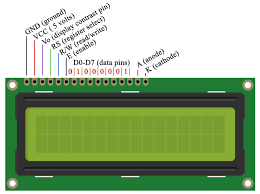
Web Interface Of LCD Interaction With Ardiuno . You can Run Flask Server And Control LCD Output Using A url (Need To Forward Port For Over Internet Connection).
-
Connection Of LCD With Ardiuno Board
-
LCD -> Ardiuno Port
-
vss ->gnd
-
vdd -> 5v
-
vo ->6 (Analog Pin)
-
rs ->12 (Digital Pin)
-
rw -> gnd
-
e -> 11
-
d4 -> 5
-
d5 -> 4
-
d6 -> 3
-
d7 -> 2
-
A -> 5v
-
k -> gnd
-
-
LED_ANDROID

Having A Android Application and Ardiuno Code Which Have To implement Into Ardiuno Using IDE etc. Then Make Connection using LED,Wire,Ardiuno According To Ardiuno Code .
LED_Brightness
This Section Control Brightness Of LED Using
JAVASCRIPTOver Web Interface And Also Using Android Application .
LED_GOOGLE_Assistant

LED Is Controlable via Google Assistant i.e when You say 'Hey Gooogle' 'Turn OFF/ON LED' Then The LED Will Behave Accordingly.Adafruit , Python Is Used To Make Server .This Is Done Without Using ESP8266 Module i.e Wifi Module For Ardiuno Which Is Used To Connnect Ardiuno with Internet .Ardiuno At Port /dev/ttyACM0.
LED_PYTHON

Server And Client Communication Based On Socket Programming .Run Server.py And Control Led Using Client.py By Entering ON/OFF.
LED_VOICE

Application voice Based Application Which nedd To Install In Android Phone .Then Control LED Using Voice.
LED_WEB_INTERFACE
Control LED Using Web Interface Or Via URL.