This is a blood bank application deployed on Heroku at https://bloodbank-prabhu.herokuapp.com/.
This app was made using PHP.
Run the following MySQL commands in PHPMyAdmin.
CREATE TABLE IF NOT EXISTS `hospital_accounts` (
    `id` int(11) NOT NULL AUTO_INCREMENT,
    `username` varchar(50) NOT NULL,
    `password` varchar(255) NOT NULL,
    `email` varchar(100) NOT NULL,
    `hospital_name` varchar(100) NOT NULL,
    PRIMARY KEY (`id`)
) ENGINE=InnoDB AUTO_INCREMENT=2 DEFAULT CHARSET=utf8;CREATE TABLE IF NOT EXISTS `receiver_accounts` (
`id` int(11) NOT NULL AUTO_INCREMENT,
`receiver_name` varchar(100) NOT NULL,
`username` varchar(50) NOT NULL,
`password` varchar(255) NOT NULL,
`email` varchar(100) NOT NULL,
`blood_group` varchar(3) NOT NULL,
PRIMARY KEY (`id`)
) ENGINE=InnoDB AUTO_INCREMENT=2 DEFAULT CHARSET=utf8;CREATE TABLE IF NOT EXISTS `blood_banks` (
`id` int(11) NOT NULL AUTO_INCREMENT,
`hospital_id` int(11) NOT NULL,
`blood_group` varchar(3) NOT NULL,
`blood_litres` decimal(4, 1) DEFAULT 0.0,
PRIMARY KEY (`id`)
) ENGINE=InnoDB AUTO_INCREMENT=2 DEFAULT CHARSET=utf8;ALTER TABLE blood_bank.blood_banks
ADD CONSTRAINT blood_banks UNIQUE(hospital_id, blood_group);CREATE TABLE IF NOT EXISTS `blood_requests` (
`id` int(11) NOT NULL AUTO_INCREMENT,
`receiver_id` int(11) NOT NULL,
`hospital_id` int(11) NOT NULL,
`blood_group` varchar(3) NOT NULL,
PRIMARY KEY (`id`)
) ENGINE=InnoDB AUTO_INCREMENT=2 DEFAULT CHARSET=utf8;ALTER TABLE blood_bank.blood_requests
ADD CONSTRAINT blood_requests UNIQUE(receiver_id, hospital_id);Then define foreign key relationships among the created tables as shown in the diagram below:
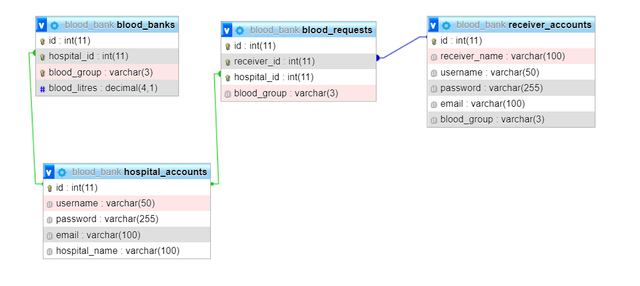

All the foreign keys should be defined with these configurations:
- On Delete: CASCADE
- On Update: RESTRICT
Now you can run the app by running a local apache server and MySQL on XAMPP. The website will be available here.