

Simple Scaffold is a file scaffolding tool. You define templates once, then generate files from them whenever you need — whether it's a single component or an entire app boilerplate.
Templates use Handlebars.js syntax, so you can inject data, loop over lists, use conditionals, and write custom helpers. It works as a CLI or as a Node.js library, and it doesn't care what kind of files you're generating.
See full documentation here.
The fastest way to get started is to run init in your project directory:
npx simple-scaffold initThis creates a scaffold.config.js and an example template in templates/default/. Then generate
files with:
npx simple-scaffold MyProjectA quick rundown of common usage scenarios:
-
Remote template config file on GitHub:
npx simple-scaffold -g username/repository -c scaffold.js -k component NewComponentName
-
Local template config file:
npx simple-scaffold -c scaffold.js -k component NewComponentName
-
Local one-time usage:
npx simple-scaffold -t templates/component -o src/components NewComponentName
The fastest way to get started is to is to re-use someone else's (or your own) work using a template repository.
A remote config can be loaded in one of these ways:
- For templates hosted on GitHub, the syntax is
-g user/repository_name - For other Git platforms like GitLab, use
-g https://example.com/user/repository_name.git
These remote configurations support multiple scaffold groups, which can be specified using the
--key or -k argument:
$ npx simple-scaffold \
  -g chenasraf/simple-scaffold \
  -k component \
  PageWrapper

# equivalent to:
$ npx simple-scaffold \
  -g https://github.com/chenasraf/simple-scaffold.git \
  -c scaffold.config.js \
  -k component \
  PageWrapper
By default, the template name is set to default when the --key option is not provided.
See information about each option and flag using the --help flag, or read the
CLI documentation. For information
about how configuration files work, see below.
When running in a terminal, Simple Scaffold will interactively prompt for any missing required values — name, output directory, template paths, and template key (if multiple are available).
Config files can also define inputs — custom fields that are prompted interactively and become template data:
module.exports = {
  component: {
    templates: ["templates/component"],
    output: "src/components",
    inputs: {
      author: { message: "Author name", required: true },
      license: { message: "License", default: "MIT" },
    },
  },
}
Inputs can be pre-provided via --data or -D to skip the prompt:
npx simple-scaffold -c scaffold.config.js -k component -D author=John MyComponentYou can use a config file to more easily maintain all your scaffold definitions. Simple Scaffold
auto-detects config files in the current directory — no --config flag needed.
It searches for these files in order: scaffold.config.{mjs,cjs,js,json},
scaffold.{mjs,cjs,js,json}, .scaffold.{mjs,cjs,js,json}.
scaffold.config.js
module.exports = {
  // use "default" to avoid needing to specify key
  // in this case the key is "component"
  component: {
    templates: ["templates/component"],
    output: "src/components",
    data: {
      // ...
    },
  },
}
Then just run from the same directory:
$ npx simple-scaffold PageWrapper
# or explicitly: npx simple-scaffold -c scaffold.config.js PageWrapper
This will allow you to avoid needing to remember which configs are needed or to store them in a
one-liner in package.json which can get pretty long and messy, and harder to maintain.
Also, this allows you to define more complex scaffolds with logic without having to use the Node.js API directly. (Of course you always have the option to still do so if you wish)
More information can be found at the Configuration Files documentation.
Templates are any file in the a directory given to --templates.
Simple Scaffold will maintain any file and directory structure you try to generate, while replacing
any tokens such as {{ name }} or other custom-data using
Handlebars.js.
templates/component/{{ pascalName name }}.tsx
// Created: {{ now 'yyyy-MM-dd' }}
import React from 'react'

export default {{pascalCase name}}: React.FC = (props) => {
  return (
    <div className="{{camelCase name}}">{{pascalCase name}} Component</div>
  )
}
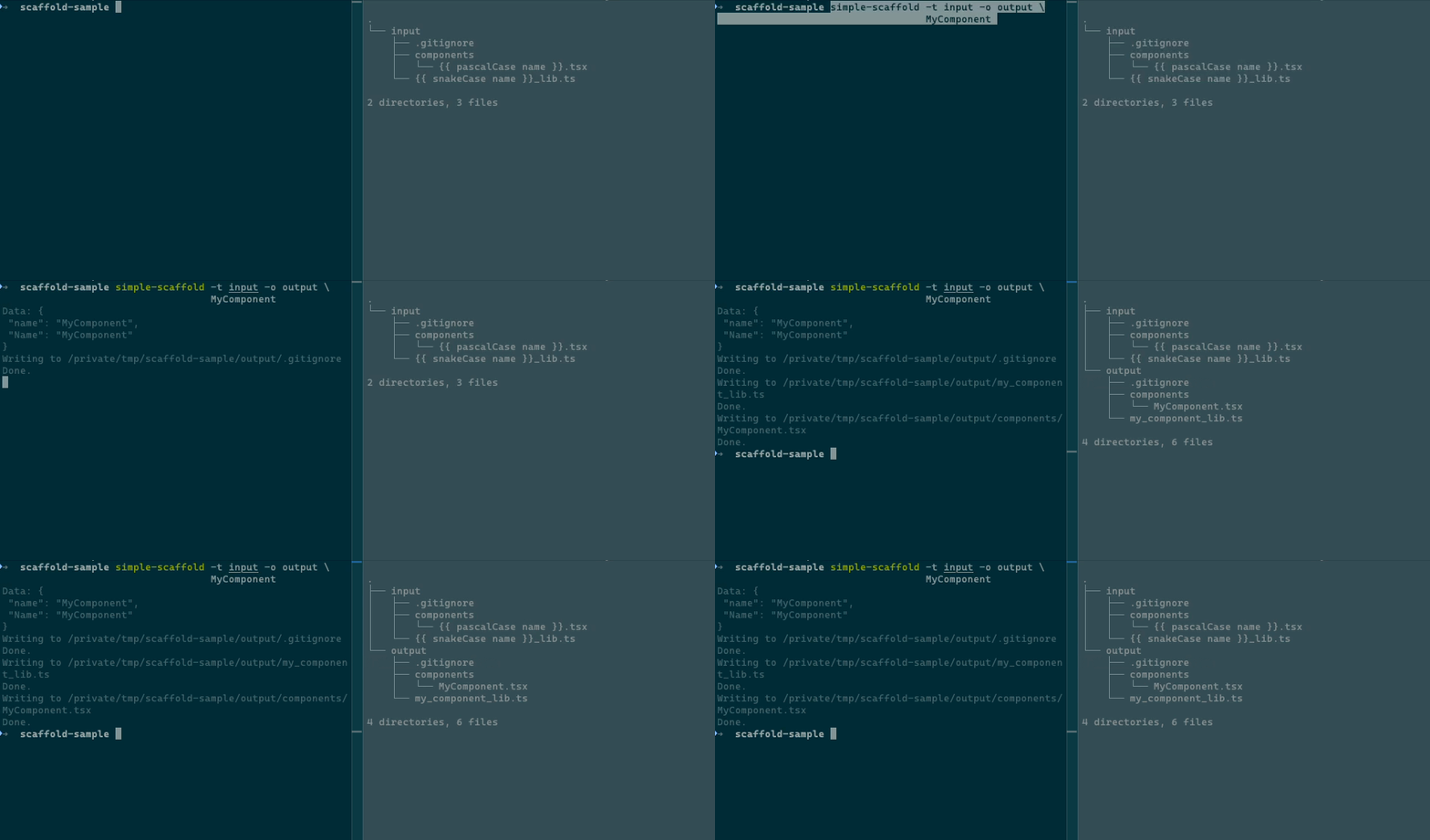
To generate the template output once without saving a configuration file, run:
# generate single component
$ npx simple-scaffold \
  -t templates/component \
  -o src/components \
  PageWrapper
This will immediately create the following file: src/components/PageWrapper.tsx
// Created: 2077-01-01
import React from 'react'

export default PageWrapper: React.FC = (props) => {
  return (
    <div className="pageWrapper">PageWrapper Component</div>
  )
}I am developing this package on my free time, so any support, whether code, issues, or just stars is very helpful to sustaining its life. If you are feeling incredibly generous and would like to donate just a small amount to help sustain this project, I would be very very thankful!

I welcome any issues or pull requests on GitHub. If you find a bug, or would like a new feature, don't hesitate to open an appropriate issue and I will do my best to reply promptly.
If you are a developer and want to contribute code, here are some starting tips:
- Fork this repository
- Run
pnpm install - Run
pnpm devto start file watch mode - Make any changes you would like
- Create tests for your changes
- Update the relevant documentation (readme, code comments, type comments)
- Create a PR on upstream
Some tips on getting around the code:
- Use
pnpm cmdto use the CLI feature of Simple Scaffold from within the root directory, enabling you to test different behaviors. Seepnpm cmd -hfor more information. - Use
pnpm testto run tests - Use
pnpm docs:buildto build the documentation once - Use
pnpm docs:watchto start docs in watch mode - Use
pnpm buildto build the output
