NEXT_SimPL_Post
An new Feature to explicite set a dynamic set to an Operation. Just add the string "dyn" with a following dynamic set 1..5 to the Operation Name. 1 means perfect surfaces 5 maximum speed.

This result in this SimPL Code:

If you want to maximize the customization of your result code, that's the way to do. The SimPL'st way to pass a command or a set of commands is this...
 # insert tool correction
 PathOffset = surfaceOffset
 PathCorrection mode=PathCorrectionMode.Left
 # end manual
this results in:


But if you want to work with heavy subprograms there is a slicker way that keeps your main program slim. Program a simpl "sub program" as you do it in your normal text editor. The post automatic create the program call in the Main program.
program ManualSubprogram
# insert tool correction
PathOffset = surfaceOffset
PathCorrection mode=PathCorrectionMode.Left
endprogram


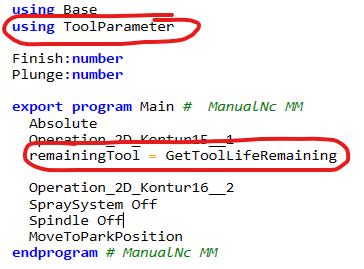
If there is a need to reference a external module, just add "using {your module name}" as the first row in your direct write command. This works also with "import" and the "program" feature.
using ToolParameter
remainingTool = GetToolLifeRemaining