FlipStack is a modern, distraction-free flashcard app designed to help you master any subject through the power of Spaced Repetition (SRS).
By utilizing a scientifically proven algorithm to halt the 'Forgetting Curve,' FlipStack calculates the perfect time for you to review a card, ensuring you memorize more in less time. Whether you are learning a new language, preparing for exams, or memorizing code syntax, FlipStack adapts to your pace to ensure long-term retention.
Built with Python and GTK4/LibAdwaita, it offers a clean, native, and fully adaptive experience on Linux Mint, Ubuntu, Fedora, and is also the first app of its kind to work perfectly as well as Linux Mobile devices (PinePhone, Librem 5, Volla etc.).
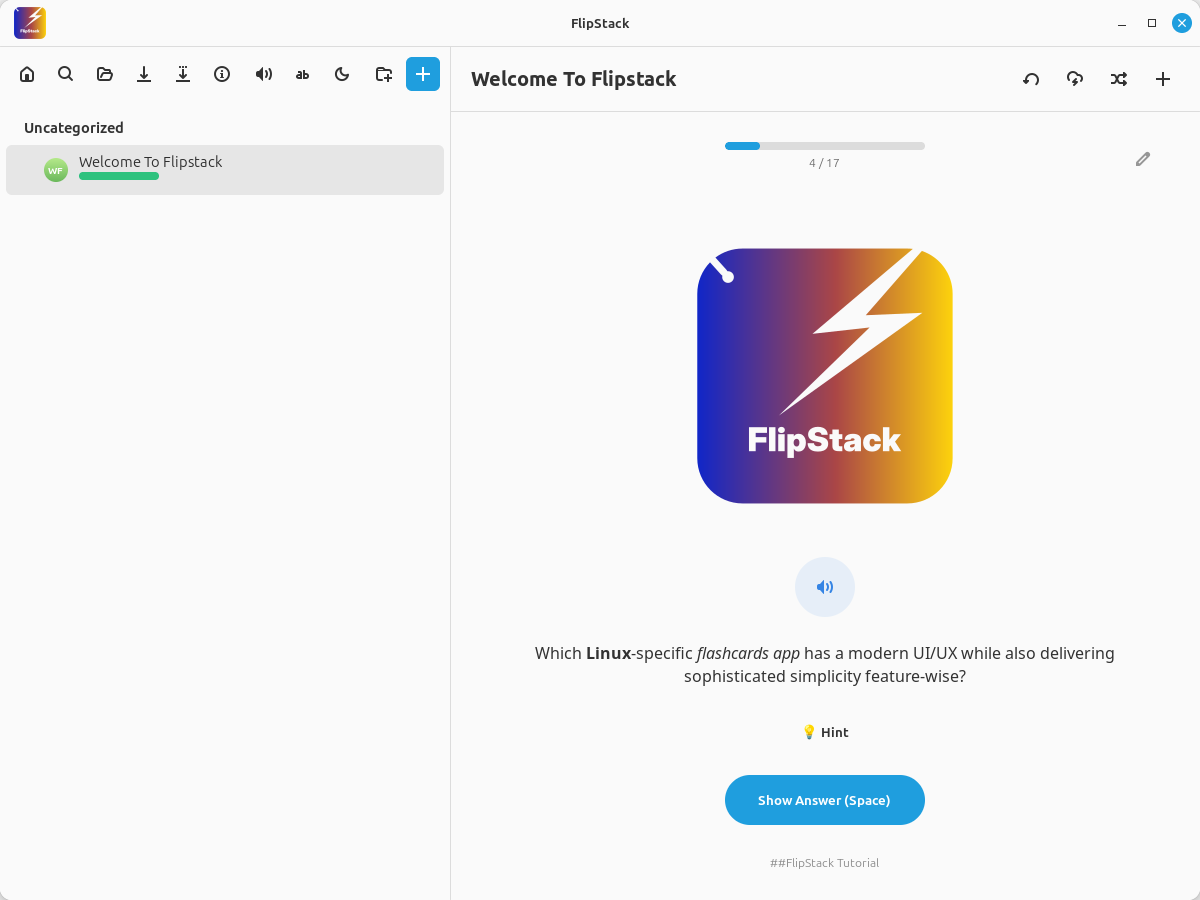
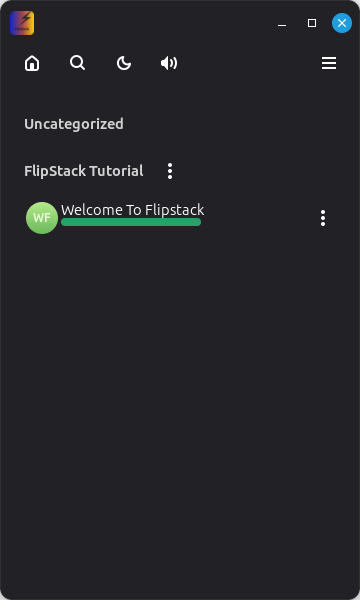
🧠 Smart Study Modes
- Spaced Repetition: Built on a Leitner-style algorithm that schedules reviews exactly when you need them.
- Cram Mode: Need to study now? Review entire decks instantly, ignoring the schedule.
- Reverse Mode: Flip the question and answer sides to test your knowledge bidirectionally.
- Shuffle: Randomize card order to prevent pattern matching.
- Hints: Cards support optional hints that remain hidden until you need a nudge.
📱Adaptive & Touch Friendly
- Responsive Layout: The UI automatically transforms from a split-pane desktop view to a mobile-friendly drawer navigation based on window size.
- Touch Controls: Large, easy-to-hit buttons and swipe gestures make studying on the go effortless.
- Swipe Gestures: Grade cards intuitively on touch screens—Swipe Right (Good), Up (Hard), or Left (Miss).
- Mobile Navigation: Streamlined menus and back-navigation ensure a native feel on handheld devices.
📊 Visual Progress Tracking
- Activity Heatmap: Visualize your daily consistency with a GitHub-style contribution graph.
- Streak Counter: Stay motivated by watching your daily streak grow.
- Deck Analytics: Drill down into specific decks to see daily accuracy charts and detailed logs of every past study session.
- Leech Management: Automatically identifies and suspends cards you struggle with, letting you focus on fixing gaps.
🗂️ Powerful Card & Deck Management
- Global Search: Instantly find any card or tag across all your decks directly from the sidebar.
- Categories: Keep your decks organized with custom tagging and categories.
- Backup & Export: Export decks to CSV/JSON or create full ZIP backups of your entire library.
- CSV Support: Import and export your data freely using standard CSV or JSON formats.
- Anki Import: Moving from Anki? Import your existing
.apkgfiles instantly.
🎨 Rich Editing & Customization
- Multimedia Support: Add Images and Audio to your cards for immersive learning. Includes a built-in audio player for pronunciation clips.
- Markdown Ready: Use headers, bold, italic, strike-through, or add code blocks easily.
- Font Control: Customize the font family and size globally with a live preview tool.
- Personalize It: Toggle Dark/Light mode, adjust font sizes, and enable or disable the inbuilt sound effects to match your style.
Runs on most Linux distributions (Ubuntu, Fedora, Mint, Arch, etc.).
- Download the
FlipStack-1.0.0-x86_64.AppImagefrom the Releases page. - Make it executable:
- Right-click file → Properties → Permissions → Check "Allow executing file as program"
- Or run via terminal:
chmod +x FlipStack-1.0.0-x86_64.AppImage
- Double-click to launch!
💡 Pro Tip: If you want FlipStack to appear in your system menu/launcher with the correct icon, we recommend installing AppImageLauncher. It will automatically detect and integrate the AppImage for you.
Note: We are currently submitting FlipStack to Flathub! In the meantime, you can install the standalone bundle.
- Download the
FlipStack.flatpakfile from the Releases page. - Install via terminal:
flatpak install --user FlipStack.flatpakFlipStack is built with Python 3, GTK4, and LibAdwaita.
You need the system-level development headers for GObject Introspection and GTK4.
Ubuntu / Debian / Linux Mint:
sudo apt install python3-gi python3-gi-cairo gir1.2-gtk-4.0 gir1.2-adw-1 libgirepository1.0-devFedora:
sudo dnf install python3-gobject gtk4 libadwaita speech-dispatcher- Clone the repository:
   git clone https://github.com/dagaza/FlipStack.git
cd FlipStack- Set up a virtual environment (Optional but recommended):
   python3 -m venv venv
source venv/bin/activate- Install Python requirements:
pip install -r requirements.txtor
pip install -e .- Run the app:
python3 main.pymain.py: The entry point and main window logic.data_engine.py: Handles database operations (JSON), imports, and the SRS algorithm.study_session.py: The logic for the flashcard review screen.dashboard_view.py: The "Home" screen with the heatmap and stats.performance_view.py: The "Performance" screen displaying stats for individual decks.deck_editor.py: The GUI for adding/editing cards and assets.assets/: Contains static application resources (Read-Only).assets/icons/: Application logos and window icons.assets/sounds/: UI sound effects (correct, incorrect, flip).assets/screenshots/: Images used in the README and AppStream metadata.
user_data/: Contains all user-generated content (Ignored by Git).user_data/decks/: Flashcard data stored as JSON files.user_data/assets/: Media files (images/audio) attached to user flashcards.user_data/backups/: Automatic backups (*.zip) of the user database.
Contributions are welcome! If you find a bug, want to add a feature, or improve the UX, feel free to open an Issue or Pull Request.
- Fork the Project
- Create your Feature Branch (
git checkout -b feature/AmazingFeature) - Commit your Changes (
git commit -m 'Add some AmazingFeature') - Push to the Branch (
git push origin feature/AmazingFeature) - Open a Pull Request
Distributed under the MIT License. See LICENSE for more information.