
A stack-agnostic CLI that scaffolds spec-driven development on top of OpenSpec, for any of opencode, Claude Code and Codex.
The core idea: Spec → Plan → Code. Code is the last artifact produced, never the first. OpenSpec structures every change as proposal + specs + design + tasks, and opencode executes the implementation with full traceability back to the requirements.
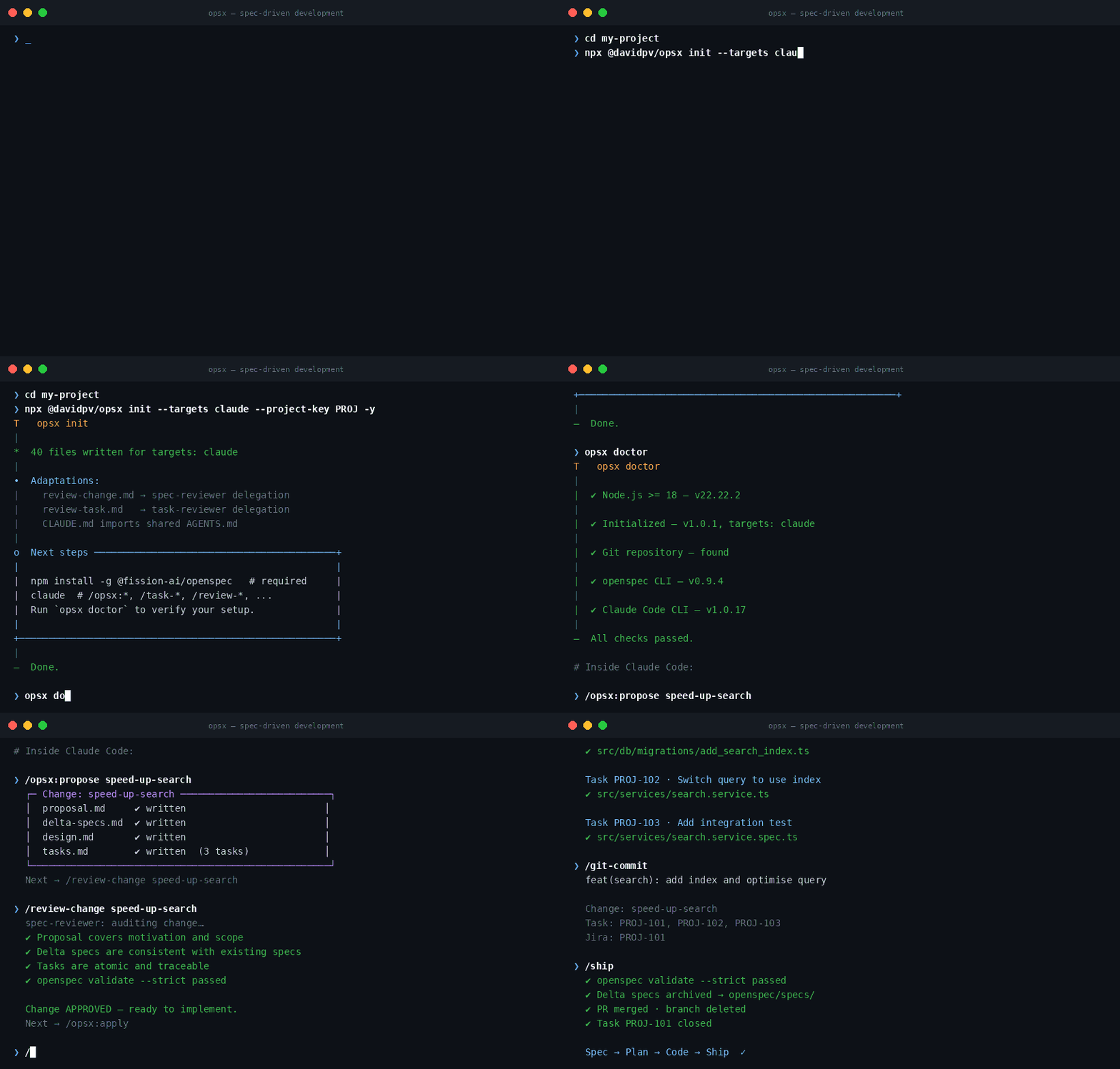
npx @davidpv/opsx initOr install it globally first if you'd rather call opsx directly:
npm install -g @davidpv/opsx
opsx init
That's it — just Node.js >= 18 and a git repo, nothing else to install upfront. It walks you through picking your agent (opencode / Claude Code / Codex) and writes everything in place. See Prerequisites and Quick start below for the rest of the setup.
Two planes coexist and must not be confused. The management plane (Jira vocabulary) decides what work exists and tracks it; the governance plane (OpenSpec) decides how the system must behave — and only the latter authorizes code:
flowchart LR
    subgraph MGMT["Management plane — what work exists (Jira)"]
        direction LR
        D["Discovery<br/>backlog/discovery/"] --> T["Task PROJ-123<br/>backlog/tasks/<br/>goal + acceptance criteria"]
    end

    subgraph GOV["Governance plane — how the system must behave (OpenSpec)"]
        direction LR
        C["Change<br/>proposal + delta specs<br/>+ design + steps"] -- "/opsx:archive" --> S["openspec/specs/<br/>SOURCE OF TRUTH"]
        S -. "read before proposing" .-> C
    end

    CODE["Code<br/>feature branch, commits, PR"]

    T -- "a task authorizes NO code<br/>it only motivates a change" --> C
    C -- "the ONLY gate to code" --> CODE
    CODE -. "traces back: Jira / Change / Task footers" .-> T
A task being well written changes nothing: implementation starts only when an OpenSpec change exists, is reviewed, and its branch gate is resolved. If a task ever contains design or implementation detail, that content belongs in the change — task-reviewer flags it. This is what keeps the workflow spec-driven even though the backlog speaks Jira: Jira rules the backlog, the spec rules the code.
To run opsx init itself you only need Node.js >= 18 (npx @davidpv/opsx init works with nothing else installed — it just writes files). To actually use the workflow it scaffolds, you need:
| Requirement | Needed for | Install |
|---|---|---|
| Git repository | The whole workflow assumes git (branches, gates, traceability) | git init |
| OpenSpec CLI (required) | Every /opsx:* command shells out to openspec |
npm install -g @fission-ai/openspec |
| At least one agent CLI | Running the commands/skills | opencode: npm install -g opencode-ai · Claude Code: npm install -g @anthropic-ai/claude-code · Codex: npm install -g @openai/codex |
gh or glab (optional) |
/pr-open and /ship PR automation; without them the PR description is written to backlog/exports/pr/ |
cli.github.com / gitlab.com/gitlab-org/cli |
You don't need all three agent CLIs — only the ones you selected as targets during init. opsx doctor checks all of this and tells you exactly what's missing.
# In your existing project
npx @davidpv/opsx init          # pick targets: opencode / Claude Code / Codex, configure branches, Jira key, language
npx @davidpv/opsx doctor        # verify required tooling (openspec CLI, agent CLIs)
npx @davidpv/opsx update        # after upgrading the opsx package: deploy new commands/skills to your project
init writes the shared, tool-agnostic layer once (workflow.yaml, AGENTS.md managed block, backlog/, templates/, openspec/) and a native layer per agent: .opencode/ (commands + skills + agents + opencode.json merge), .claude/ (commands + skills + subagents + settings.json merge + CLAUDE.md importing AGENTS.md), .codex/skills/ (skills; commands and reviewers compiled as skills, since Codex has no project-level slash commands or subagents).
Then, inside your agent (shown here with opencode):
/start                            # guided entry: routes you to the right first command
/req-capture checkout-flow        # 0. requirements interview → discovery doc
/task-generate checkout-flow      # 1. tasks with Jira IDs (PROJ-123)
/task-enrich PROJ-123             #    edge cases, scenarios, estimate
/task-jira PROJ-123               #    export as Jira wiki markup
/opsx:propose speed-up-search     # 2. proposal + delta specs + design + tasks
/review-change speed-up-search    # 3. audit before building
/opsx:apply                       # 4. implement task by task
/git-commit                       #    semantic commits traced to tasks
/pr-open                          # 5. PR against the integration branch
/ship                             # 6. validate + archive + merge
Stages 0–1 are optional for small technical changes; everything from /opsx:propose on is mandatory.
The flow is guided: /start is the entry point — it asks how the work begins (existing Jira ticket → /task-import; no ticket, propose directly → /opsx:explore//opsx:propose; no ticket, create the task first → /task-new or /req-capture) and routes you there. Every command ends by suggesting the next step, and /next tells you where you are and what to do whenever you're lost or coming back to the repo (it inspects branch, task frontmatter, change artifacts, and PR state).
Full map of flows and options. 🧑 = needs human interaction, 🤖 = agentic (runs on its own), 🧑🤖 = agentic with human checkpoint (approval, language gate, or fallback).
flowchart TD
    classDef human  fill:#fff3cd,stroke:#996f00,color:#000
    classDef agent  fill:#d6eaf8,stroke:#1a5276,color:#000
    classDef mixed  fill:#e8daef,stroke:#6c3483,color:#000
    classDef art    fill:#eaeded,stroke:#7f8c8d,color:#000

    START(["New work arrives"]) --> ENTRY["/start 🧑<br/>guided entry"]:::human
    ENTRY --> CASE{"How does this work start?"}

    %% Entry routes
    CASE -- "Jira ticket exists" --> IMP["/task-import 🧑🤖<br/>paste ticket + normalize + task-reviewer"]:::mixed
    IMP --> ST
    CASE -- "no ticket:<br/>investigate / propose" --> PROP
    CASE -- "no ticket:<br/>create task first" --> SIZE{"Initiative or single task?"}
    SIZE -- "single task" --> TN["/task-new 🧑🤖<br/>mini interview + draft ID"]:::mixed
    TN --> ST

    %% Product phase (optional)
    SIZE -- initiative --> RC["/req-capture 🧑<br/>interview + language gate"]:::human
    RC --> DISC["backlog/discovery/topic.md"]:::art
    DISC --> SG["/task-generate 🧑🤖<br/>language gate + Jira IDs from user"]:::mixed
    SG --> ST["backlog/tasks/PROJ-123.md"]:::art
    ST --> SE["/task-enrich 🤖<br/>asks only on ambiguity"]:::agent
    SE --> RS["/review-task 🤖"]:::agent
    RS -- REVISE --> SE
    RS -- APPROVE --> JIRAQ{"Export to Jira?"}
    JIRAQ -- yes --> SJ["/task-jira 🧑🤖<br/>language gate + translation"]:::mixed
    SJ --> JEXP["backlog/exports/jira/"]:::art
    JEXP --> PASTE["paste into Jira & confirm real key 🧑"]:::human
    JIRAQ -- no --> PROP
    PASTE --> PROP

    %% Spec phase
    PROP["/opsx:propose 🧑🤖<br/>you describe, agent writes artifacts"]:::mixed
    PROP --> CHG["openspec/changes/name/"]:::art
    CHG --> RV["/review-change 🤖<br/>spec-reviewer + validate --strict"]:::agent
    RV -- REVISE --> FIX["fix artifacts 🤖"]:::agent
    FIX --> RV
    RV -- APPROVE --> BRANCH{"Branch gate 🧑<br/>where to implement? (git.work_mode)<br/>blocks any code until resolved"}
    BRANCH -- "create feature branch<br/>(reviewed PR)" --> APPLY
    BRANCH -- "directly on develop<br/>(flexible mode, no review)" --> APPLY

    %% Build phase
    APPLY["/opsx:apply 🤖"]:::agent
    APPLY --> DRIFT{"Spec wrong or drifted?"}
    DRIFT -- yes --> SYNC["/opsx:sync 🤖"]:::agent
    SYNC --> APPLY
    DRIFT -- no --> GC["/git-commit 🧑🤖<br/>agent drafts, you approve message"]:::mixed
    GC -- more tasks --> APPLY

    %% Delivery phase
    GC -- all tasks done --> ONBR{"On a feature branch?"}
    ONBR -- "no: on develop" --> SHIPD["/ship 🤖<br/>validate + archive + push<br/>(skips PR and review)"]:::agent
    SHIPD --> DONE
    ONBR -- yes --> PRO["/pr-open 🧑🤖<br/>language gate + draft decision"]:::mixed
    PRO --> CLI{"gh / glab available?"}
    CLI -- yes --> PR["PR created against develop"]:::art
    CLI -- no --> PRF["description in backlog/exports/pr/<br/>you open the PR manually 🧑"]:::human
    PRF --> PR
    PR --> REVIEW["code review & approval 🧑"]:::human
    REVIEW --> SHIP["/ship 🤖<br/>validate + archive + merge"]:::agent
    SHIP --> MERGEQ{"CLI + CI green?"}
    MERGEQ -- yes --> DONE(["change archived, task done, branch deleted"])
    MERGEQ -- no --> WEBUI["merge in web UI 🧑"]:::human
    WEBUI --> DONE
"Spec wrong or drifted?" — checkpoint during implementation. Wrong: while coding you discover a requirement or scenario was incorrect or incomplete. Drifted:
openspec/specs/no longer matches what the code actually does (hotfixes, old unspec'd commits). In both cases the rule is the same: never diverge silently — run/opsx:syncto fix the spec first, then resume/opsx:apply. Code must always trace back to a correct spec.
Branch policy —
mainis release-only and never worked on directly.git.work_modeinworkflow.yamldecides the rest:flexible(default) lets you implement and commit directly on the integration branch —/shipthen just validates, archives, and pushes, skipping PR and review;featuremakes feature branches + PR mandatory. A mandatory branch gate runs before/opsx:applywrites any code: the working branch must be resolved (created and checked out) first;/git-commitre-checks at commit time as a safety net. Feature branches are namedfeature/<task id>-<change>when the change is linked to a backlog task with a real Jira key (e.g.feature/PROJ-123-speed-up-search),feature/<change>otherwise.
Human checkpoints, summarized: the /start entry questions, the /req-capture interview, pasting an existing Jira ticket (/task-import), every language gate (es/en, mandatory on client-facing text), choosing where to implement (feature branch vs develop), commit message approval, providing Jira IDs and pasting Jira exports, PR code review, and merging via web UI when no platform CLI exists. Everything else runs agentically.
Traceability chain: Discovery → Task (Jira) → Change → tasks.md step → Commit → PR. Each link is recorded where it happens: task frontmatter (change:), commit footers (Change:/Task:/Jira:), PR description. Task IDs ARE Jira keys (PROJ-123, provided by you; PROJ-Dnn drafts until the issue exists). Note the naming: a task is a backlog/Jira work item; tasks.md inside a change holds implementation steps.
Each change lives in openspec/changes/<name>/ until archived. Archiving merges its delta specs into openspec/specs/, the living description of how the system behaves. workflow.yaml configures branches (git-flow by default: feature/* → develop), commit convention, and Jira export — commands read it, so the pipeline stays platform-agnostic.
.
├── AGENTS.md                  # Rules every agent must follow
├── opencode.json              # opencode project config
├── workflow.yaml              # Pipeline config: branches, commits, Jira (tool-agnostic)
├── templates/                 # discovery.md, task.md, pr-description.md
├── backlog/
│   ├── discovery/             # Requirements-gathering notes (/req-capture)
│   ├── tasks/                 # Tasks with Jira IDs (/task-generate, /task-enrich)
│   └── exports/               # jira/ (wiki markup) and pr/ (fallback PR descriptions)
├── .opencode/
│   ├── agents/
│   │   ├── spec-reviewer.md   # Subagent: audits changes before apply/archive
│   │   └── task-reviewer.md   # Subagent: audits tasks (sizing, testability)
│   ├── commands/
│   │   ├── start.md           # /start — guided entry point (routes new work)
│   │   ├── req-capture.md     # /req-capture — requirements interview
│   │   ├── task-*.md          # /task-import|new|generate|enrich|jira
│   │   ├── review-*.md        # /review-change, /review-task
│   │   ├── git-commit.md      # /git-commit — semantic commits with traceability
│   │   ├── pr-open.md         # /pr-open — platform-agnostic PR creation
│   │   ├── ship.md            # /ship — validate + archive + merge
│   │   └── opsx-*.md          # /opsx:* — OpenSpec lifecycle (generated)
│   └── skills/                # OpenSpec workflow skills (generated)
└── openspec/
    ├── config.yaml            # Project context + per-artifact rules
    ├── specs/                 # Source of truth (current behavior)
    └── changes/               # In-flight changes; archive/ keeps history
| Command | Stage | What it does |
|---|---|---|
/start |
Entry | Guided entry point: asks how the work starts and routes you (ticket exists / propose directly / create task first) |
/next |
Any | Detect where you are in the pipeline and suggest the next step |
/req-capture <topic> |
Discover | Guided requirements interview → backlog/discovery/<topic>.md |
/task-import <id> |
Tasks | Import an existing Jira ticket (you paste it) into backlog/tasks/ |
/task-new <title> |
Tasks | Create a single task directly, without a discovery doc (draft ID) |
/task-generate <topic> |
Tasks | Slice a discovery doc into tasks; you provide the Jira IDs |
/task-enrich <id> |
Tasks | Add edge cases, unhappy paths, estimate; runs task-reviewer |
/review-task <id> |
Tasks | Audit a task: sizing, testability, traceability |
/task-jira <id|all> |
Tasks | Export tasks as Jira wiki markup to backlog/exports/jira/ |
/opsx:propose <name> |
Spec | Create a change: proposal, delta specs, design, tasks |
/opsx:explore |
Spec | Investigate the codebase/specs before proposing |
/review-change <name> |
Spec | Spec-reviewer audit + openspec validate --strict |
/opsx:apply |
Build | Implement the tasks of a change |
/git-commit |
Build | Conventional commit traced to change/step/Jira task |
/opsx:sync |
Build | Sync specs with reality when they drift |
/pr-open [name] |
Deliver | Create the PR against the integration branch (gh/glab/file fallback) |
/ship [name] |
Deliver | Validate + /opsx:archive + merge + close the task |
/opsx:verify <name> |
Deliver | Validate implementation matches change artifacts (run before archive) |
/opsx:archive |
Deliver | Merge delta specs into openspec/specs/ and file the change |
- Copy or clone this repo and re-init git.
- Fill the
context:block inopenspec/config.yamlwith your stack and conventions. - Adjust
workflow.yaml: branches (git-flow vs trunk-based), Jira project key, platform. - Extend
AGENTS.mdwith project-specific rules. - Start with
/start— it routes you to/task-import(existing ticket),/req-capture//task-new(create the task first), or/opsx:propose(direct change).
Since opsx is an evolving toolkit (new commands like /opsx:verify, skill improvements, schema updates), keeping it current ensures your workflow stays complete.
Upgrading the npm package alone does not deploy new commands or skills to an existing project — they live in the shipped payload/ directory and must be written to your project's .opencode/ (or .claude/, .codex/) structure by opsx update.
# Step 1 — upgrade the opsx package itself
npm update -g @davidpv/opsx

# Or, if installed locally in your project:
npm update @davidpv/opsx

# Step 2 — deploy new/changed files to your project
npx @davidpv/opsx update
Both steps are required. Step 1 updates the code that npx resolves; step 2 writes the new payload files (commands, skills, agents, templates) into your project. If you skip step 2, new capabilities like /opsx:verify won't appear even though the package is the latest version.
The command compares the shipped payload against what's already on disk in your project:
| Scenario | What happens |
|---|---|
New file (e.g., opsx-verify.md added in a newer opsx version) |
Created automatically |
| Changed file, not user-modified | Silently overwritten |
| Changed file, user-modified | Kept as-is (use opsx update --force to overwrite) |
AGENTS.md managed block |
Only the <!-- OPSX:START --> block is refreshed; your surrounding custom rules are preserved |
opencode.json / settings.json |
New top-level keys merged in; your overrides stay |
To see exactly what changed on the last run, check the output — it lists Added:, Updated:, and Kept (not touched): files.
npm outdated -g @davidpv/opsx     # check if a newer npm version exists
npx @davidpv/opsx --version       # show installed version
npx @davidpv/opsx doctor          # verify tooling and project state
New opsx versions are published to npm. Check the CHANGELOG for breaking changes before updating.