


🇸🇪arkitektur




Visualises JavaScript, TypeScript and Flow codebases as meaningful and committable architecture diagrams
Arkit is a powerful static analysis tool that automatically generates visual architecture diagrams from your codebase, making it easy to understand and communicate software structure.
- Automatic Code Analysis: Analyzes JavaScript, TypeScript, Flow, Vue, and Nuxt source files
- Component Grouping: Associates source files with configured architectural components
- Dependency Visualization: Renders grouped components and dependency graph including Node.js modules
- Multiple Export Formats: Exports as SVG, PNG, or PlantUML diagrams
- CI/CD Integration: Integrates seamlessly into development flow for automated documentation
- Configurable: Flexible configuration via CLI arguments or JSON/JS config files
- Real-time Updates: Keep architecture diagrams synchronized with code changes
# Run arkit instantly without installation
npx arkit
This will analyze your current directory and generate an arkit.svg diagram showing your project's architecture.
# Add as a dev dependency to your project
npm install arkit --save-dev
# or
yarn add arkit --devArkit requires Java Runtime Environment (JRE) 8 or higher for diagram generation:
Java Installation (Required):
- Windows: Download from Adoptium
- macOS:
brew install openjdk - Linux:
sudo apt-get install default-jre
GraphViz (Optional):
By default, Arkit uses @hpcc-js/wasm-graphviz (a WebAssembly port of GraphViz) which has no system dependencies. This is automatically used if installed:
npm install @hpcc-js/wasm-graphvizIf @hpcc-js/wasm-graphviz is not available, Arkit falls back to system GraphViz:
- Windows: Download from GraphViz
- macOS:
brew install graphviz - Linux:
sudo apt-get install graphviz
Note: You can generate PlantUML (.puml) files without any system dependencies by using the --output puml option.
# Generate SVG diagram from source folder
npx arkit src/ -o arkit.svg

# Specify entry files and output format (PlantUML)
npx arkit -f src/main.js -o puml

# Enable debugging and exclude specific paths
LEVEL=info npx arkit -e "node_modules,test,dist,coverage" -o puml

# Generate both SVG and PNG
npx arkit -o arkit.svg && npx arkit -o arkit.pngArkit uses local PlantUML conversion via Java to generate SVG and PNG diagrams. This means:
- ✅ No external web service calls - All conversion happens locally
- ✅ Your code stays private - No data is sent over the network
- ✅ Works offline - Generate diagrams without internet connection
⚠️ Requires Java - You must have Java Runtime Environment (JRE) 8+ installed
If you don't have Java installed, you'll see an error message with installation instructions:
- Windows: Download from Adoptium
- macOS:
brew install openjdk - Linux:
sudo apt-get install default-jre(Ubuntu/Debian) orsudo yum install java-openjdk(RHEL/CentOS)
To verify Java is installed: java -version
If your project is huge and first diagrams look messy, it's better to generate them per feature, architectural layer, etc.
Once you satisfied with results, add arkit command to your build script, so it will keep your architecture diagrams up-to-date.
Arkit can be configured using basic CLI arguments or advanced JSON, JS module or package.json configuration.
user@machine:~$ npx arkit --help
arkit [directory]

Options:
  -d, --directory  Working directory                              [default: "."]
  -c, --config     Config file path (json or js)         [default: "arkit.json"]
  -o, --output     Output path or type (svg, png or puml) [default: "arkit.svg"]
  -f, --first      File patterns to be first in the graph               [string]
  -e, --exclude    File patterns to exclude from the graph
        [default: "test,tests,dist,coverage,**/*.test.*,**/*.spec.*,**/*.min.*"]
  -h, --help       Show help                                           [boolean]
-v, --version Show version number [boolean]{
"$schema": "https://arkit.pro/schema.json",
"excludePatterns": ["test/**", "tests/**", "**/*.test.*", "**/*.spec.*"],
"components": [
{
"type": "Dependency",
"patterns": ["node_modules/*"]
},
{
"type": "Component",
"patterns": ["**/*.ts", "**/*.tsx"]
}
],
"output": [
{
"path": "arkit.svg",
"groups": [
{
"first": true,
"components": ["Component"]
},
{
"type": "Dependencies",
"components": ["Dependency"]
}
]
}
]
}See more possible JSON configuration options in the examples below
Arkit supports three output formats:
- SVG (default): Scalable vector graphics, perfect for documentation and web
- PNG: Raster images, great for presentations and PDFs
- PlantUML (
puml): Text-based format that can be version controlled or rendered with other tools
All SVG and PNG conversion is done locally using node-plantuml without any external web service calls.
Express.js using npx arkit

Arkit itself using npx arkit and config in package.json

ReactDOM using npx arkit and config in arkit.json

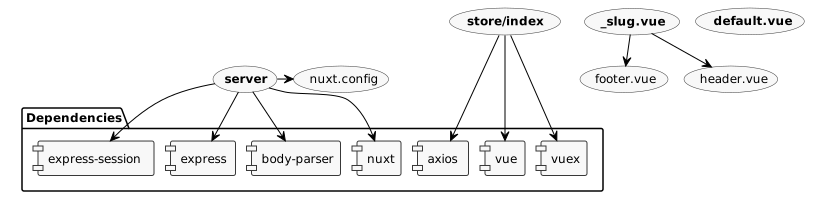
Vue/Nuxt TodoMVC using yarn arkit -o arkit.svg
The tool is under active development, so please feel free to contribute with suggestions and pull requests. Your feedback is priceless.
- Dependency cruiser validates and visualizes dependencies
- Madge generates a visual graph of module dependencies
- dependo visualizes CommonJS, AMD, or ES6 module dependencies
- JSCity visualizes JavaScript source code as navigable 3D cities
- colony in-browser graphs representing the links between your Node.js code and its dependencies
- TsUML generates UML diagrams from TypeScript source code
Fun stats, stargazers map by worldstar

Give a Github star to get on the map.