


Fast, native video compression for Flutter — no FFmpeg, no bundled binaries.
Compress a single clip or an entire batch on each platform's own hardware codecs
(Android MediaCodec / MediaMuxer, Apple AVFoundation). Beyond compression,
the plugin is a small media toolkit: H.264 / H.265 with automatic fallback, target
file size, frame-rate and audio control, trim / rotate / colour edits, thumbnails,
media info, a pre-flight size estimate, live progress with ETA, cancellation, and
optional background execution — MIT-licensed, with zero third-party dependencies.
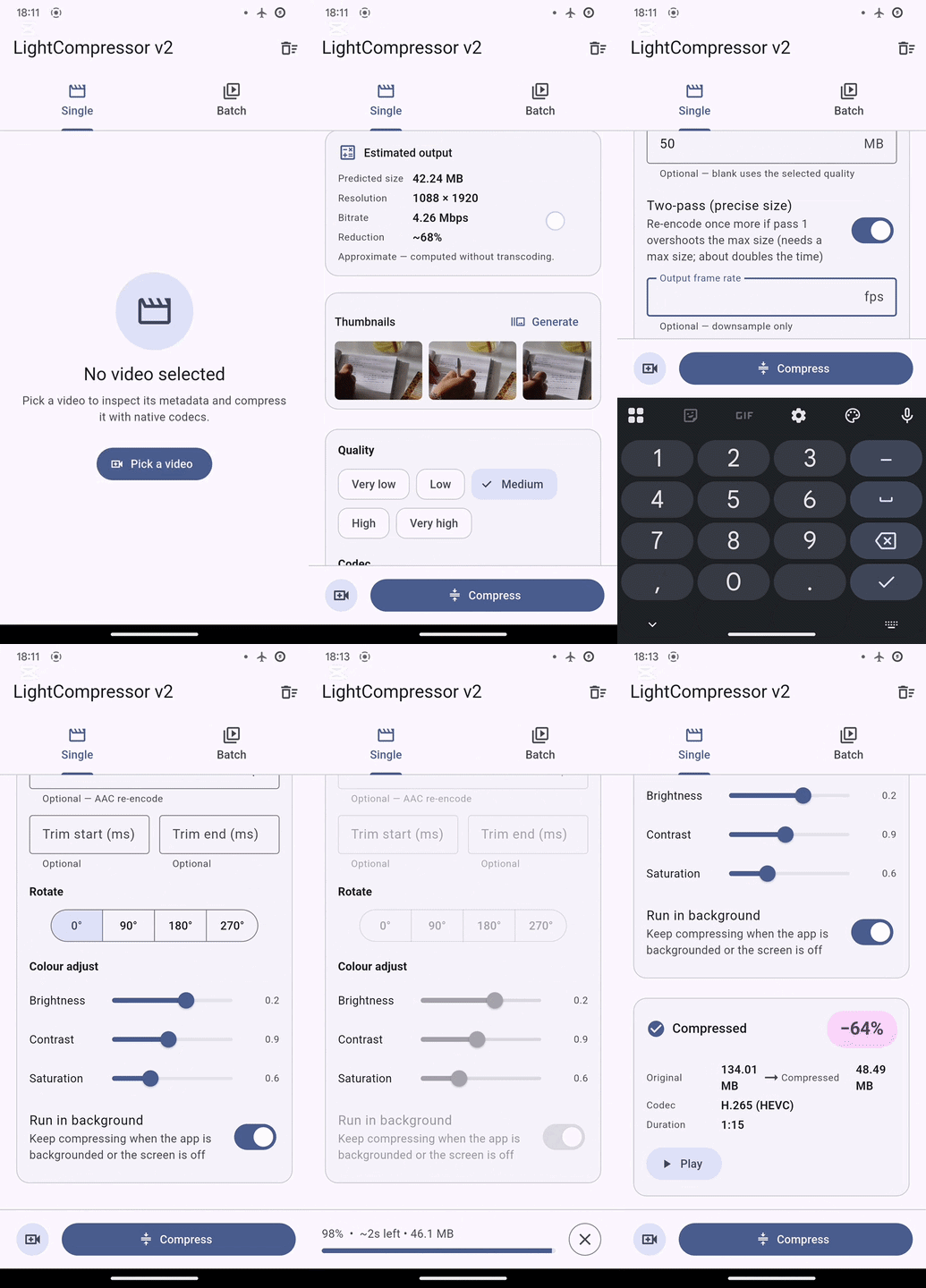
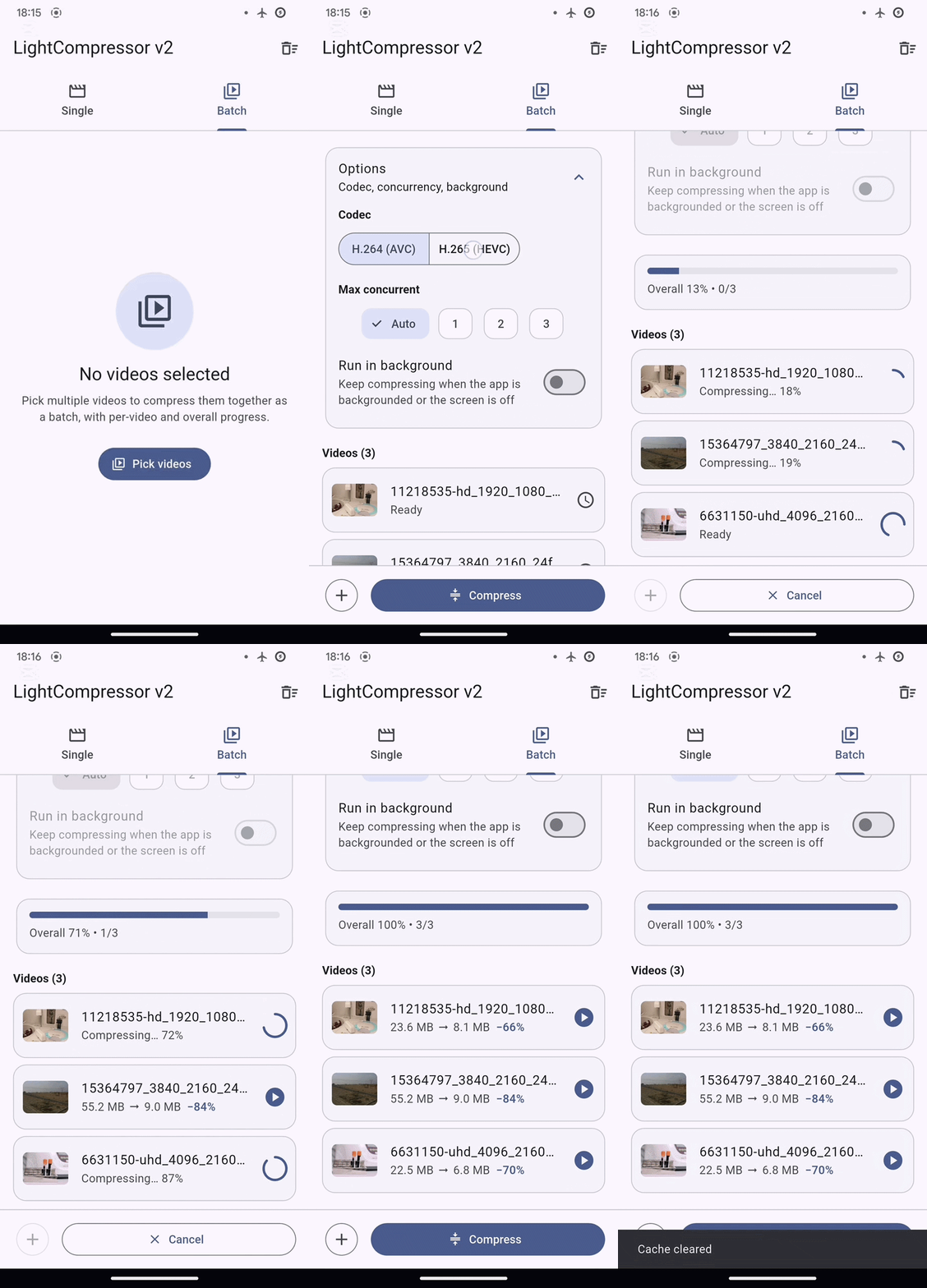
Single-video flow (left) · batch with per-item and overall progress (right)
Highlights · Platform support · Getting started · How it works · Platform setup · Usage · Large files · API reference
| Single & batch compression | H.264 / H.265 with automatic fallback |
| Target file size (optional two-pass) | Trim, rotate & colour while compressing |
| Frame-rate & AAC audio control | Thumbnails & media info |
| Live progress with ETA & bytes | Pre-flight size estimate (no transcode) |
| Cancellation & running-state query | Background execution (Android) |
| Typed, catchable exceptions | 100% native · no FFmpeg · MIT · zero deps |
| iOS | Android | macOS | Windows / Linux | Web |
|---|---|---|---|---|
| ✅ | ✅ | ✅ | Not planned | Not supported |
Minimum versions: iOS 11 · Android API 24 · macOS 10.15 Toolchain: Flutter 3.24+ · Dart 3.5+
Windows and Linux are not planned (each needs a large native effort — Media Foundation / GStreamer).
Add the dependency:
dependencies:
  light_compressor_v2: ^1.8.2
flutter pub getThen compress a video:
import 'package:light_compressor_v2/light_compressor_v2.dart';

final Result result = await LightCompressor().compressVideo(
  path: '/path/to/source.mp4',
  videoQuality: VideoQuality.medium,
  video: Video(videoName: 'compressed.mp4'),
  android: AndroidConfig(isSharedStorage: true, saveAt: SaveAt.Movies),
  ios: IOSConfig(saveInGallery: true),
);

if (result is OnSuccess) {
  print('Saved to ${result.destinationPath} — '
      '${result.ratio.toStringAsFixed(1)}% smaller');
} else if (result is OnFailure) {
  print('Failed: ${result.message}');
} else if (result is OnCancelled) {
  print('Cancelled');
}
LightCompressor() is a singleton, so you can construct it anywhere and share the
same progress streams.
Compression lowers a video's bitrate (and, by default, its resolution) while preserving perceptual quality, producing a smaller MP4.
- Quality presets — choose one of five (
very_low,low,medium,high,very_high) and the plugin derives the target bitrate automatically. Override it with a customvideoBitrateInMbps, atargetSizeMb, or explicit dimensions when you need finer control. - Minimum-bitrate guard — with
isMinBitrateCheckEnabled(on by default, a ~2 Mbps threshold) the plugin skips already-low-bitrate sources instead of re-compressing them, avoiding cumulative quality loss.
The plugin requires minSdk 24. Raise it in android/app/build.gradle if needed:
android {
    defaultConfig {
        minSdk = 24
    }
}
Why 24 and not lower? The native engine runs on API 21+, but recent Flutter's Gradle toolchain sets the practical floor: it fails the build for an app
minSdkbelow 23 and warns below 24, with no opt-out. 24 is the lowest clean target (23 still builds, with a warning; 21/22 are not buildable on a current Flutter).
Declare the storage permissions your target API level needs in AndroidManifest.xml:
<!-- API < 29 -->
<uses-permission android:name="android.permission.READ_EXTERNAL_STORAGE" />
<uses-permission
    android:name="android.permission.WRITE_EXTERNAL_STORAGE"
    android:maxSdkVersion="28"
    tools:ignore="ScopedStorage" />

<!-- API 29–32 -->
<uses-permission
    android:name="android.permission.READ_EXTERNAL_STORAGE"
    android:maxSdkVersion="32" />

<!-- API ≥ 33 -->
<uses-permission android:name="android.permission.READ_MEDIA_VIDEO" />
Background execution needs no manifest changes on your side — the plugin already
declares the foreground service and the FOREGROUND_SERVICE,
FOREGROUND_SERVICE_DATA_SYNC and POST_NOTIFICATIONS permissions, and requests the
POST_NOTIFICATIONS runtime prompt (Android 13+) for you. ProGuard / R8 needs no
special rules.
The plugin ships both a Package.swift (Swift Package Manager) and a .podspec
(CocoaPods); Flutter ≥ 3.24 uses SPM and older versions fall back to CocoaPods
automatically — no Podfile changes required.
If you save to the photo library (IOSConfig(saveInGallery: true)), add the usage
description to Info.plist:
<key>NSPhotoLibraryUsageDescription</key>
<string>Used to save compressed videos.</string>A single failing video never stops the others — its slot in the returned list
becomes an OnFailure, and results come back in the same order as paths.
final List<Result> results = await compressor.compressVideos(
  paths: ['/path/a.mp4', '/path/b.mp4'],
  videoNames: ['a_compressed.mp4', 'b_compressed.mp4'],
  videoQuality: VideoQuality.medium,
  android: AndroidConfig(saveAt: SaveAt.Movies),
  ios: IOSConfig(saveInGallery: false),
);

for (final (int i, Result r) in results.indexed) {
  if (r is OnSuccess) print('Video $i → ${r.destinationPath}');
}
By default Android compresses up to two videos at once and Apple starts them all.
Cap it with maxConcurrent — e.g. maxConcurrent: 1 for strictly sequential
compression, which lowers peak memory and device heat:
await compressor.compressVideos(
  paths: paths,
  videoNames: names,
  videoQuality: VideoQuality.medium,
  maxConcurrent: 1, // one video at a time
  android: AndroidConfig(saveAt: SaveAt.Movies),
  ios: IOSConfig(saveInGallery: false),
);Pass a BackgroundConfig to keep compressing while the app is backgrounded or the
screen is off (works for both entry points):
final result = await compressor.compressVideo(
  path: '/path/to/source.mp4',
  videoQuality: VideoQuality.medium,
  video: Video(videoName: 'compressed.mp4'),
  android: AndroidConfig(saveAt: SaveAt.Movies),
  ios: IOSConfig(saveInGallery: true),
  background: const BackgroundConfig(notificationTitle: 'Compressing video'),
);
Behaviour differs by platform:
- Android — runs under a foreground service with an ongoing notification showing
live progress, elapsed time, the current file (single) or a
done / totalcount (batch) and a Cancel action. - macOS — suppresses App Nap so the process keeps full CPU in the background; the notification fields are ignored.
- iOS — not supported. iOS suspends backgrounded apps within seconds, so a
BackgroundConfighas no effect; compression pauses and resumes with the app.
The default output is H.264 (AVC). Pass videoFormat: VideoFormat.h265 to request
HEVC — a more efficient codec (better quality per bit). It applies to both entry
points:
final result = await compressor.compressVideo(
  path: '/path/to/source.mp4',
  videoQuality: VideoQuality.medium,
  videoFormat: VideoFormat.h265,
  video: Video(videoName: 'compressed.mp4'),
  android: AndroidConfig(saveAt: SaveAt.Movies),
  ios: IOSConfig(saveInGallery: true),
);

if (result is OnSuccess) {
  print('Encoded with ${result.usedFormat.name}'); // h265 — or h264 if it fell back
}
HEVC is used only when the device has a hardware HEVC encoder (Android excludes
software-only encoders; iOS/macOS check the platform's advertised support). When it
isn't available the compressor silently falls back to H.264 rather than failing —
always read OnSuccess.usedFormat to know what you got. The plugin targets the same
bitrate for both codecs, so to shrink files further with HEVC, pair it with a lower
videoBitrateInMbps or a targetSizeMb.
Set targetSizeMb and/or videoFps on Video (the same fields are flat parameters
on compressVideos), and pass an AudioConfig as audio::
final Result result = await compressor.compressVideo(
  path: sourcePath,
  videoQuality: VideoQuality.medium,
  android: AndroidConfig(),
  ios: IOSConfig(),
  video: Video(
    videoName: 'compressed.mp4',
    targetSizeMb: 10, // aim for ≤ 10 MB (mutually exclusive with videoBitrateInMbps)
    twoPass: true,    // re-encode once more if the first pass overshoots 10 MB
    videoFps: 24,     // downsample 30 → 24 fps (downsample-only)
  ),
  audio: const AudioConfig(bitrate: 96000), // re-encode audio to ~96 kbps AAC
);

if (result is OnSuccess && !result.targetSizeMet) {
  // The target was below the quality floor for this resolution; the output is
  // larger than requested. (A future release may auto-drop resolution to fit.)
}
targetSizeMb is approximate (single-pass is typically within ~10–15%). Add
twoPass: true to land closer: the compressor re-encodes a second time only if the
first pass overshot the target (an undershoot is kept as-is), roughly doubling the
time on overshooting clips. OnSuccess.passesUsed reports how many passes ran.
audioSampleRate is honoured on iOS/macOS; Android re-encodes audio at the source
sample rate (no resampler), so only the audio bitrate applies there.
Pass an optional VideoEdit as edit: to trim to a time range, rotate by a
quarter-turn, and/or adjust colour while compressing:
final Result result = await compressor.compressVideo(
  path: sourcePath,
  videoQuality: VideoQuality.medium,
  android: AndroidConfig(),
  ios: IOSConfig(),
  video: Video(videoName: 'edited.mp4'),
  edit: const VideoEdit(
    trimStartMs: 1000,   // keep from 1s…
    trimEndMs: 5000,     // …to 5s (output ≈ 4s, rebased to 0)
    rotationDegrees: 90, // quarter-turn on top of the source orientation
    saturation: 0.0,     // 0..2 (1 = no change); 0 = grayscale
    brightness: 0.1,     // -1..1 (0 = no change)
  ),
);
Trimming is frame-accurate (the clip is re-encoded) and the reported duration
reflects the trimmed length. Rotation is a cheap container-metadata turn that players
honour — a 90°/270° turn swaps the displayed dimensions without re-rendering frames.
Colour adjustment (brightness / contrast / saturation, CIColorControls
semantics) is baked into the pixels — Android via a GL shader, Apple via a
CIColorControls composition — so exact pixel parity across platforms is not
guaranteed. Every field is optional; an empty VideoEdit (or null) leaves the
video untouched.
Single video — a Stream<double> from 0 to 100:
StreamBuilder<double>(
  stream: compressor.onProgressUpdated,
  builder: (context, snapshot) => Text('${(snapshot.data ?? 0).toStringAsFixed(0)}%'),
);
For estimated time remaining and the output size as it grows, listen to
onProgressDetail (a Stream<CompressionProgress>):
compressor.onProgressDetail.listen((CompressionProgress p) {
  final eta = p.etaMs != null ? '~${(p.etaMs! / 1000).ceil()}s left' : '—';
  print('${p.percent.toStringAsFixed(0)}%  $eta  ${p.bytesProcessed ?? 0} bytes');
});
etaMs is a rough projection (an indicator, not a guarantee) and is null until it
becomes estimable; bytesProcessed is the encoded output written so far.
Batch — per-video and overall progress, plus a completion event per item.
BatchProgress carries the same etaMs / elapsedMs / bytesProcessed fields:
compressor.onBatchUpdate.listen((BatchEvent event) {
  switch (event) {
    case BatchProgress(:final index, :final overallPercent):
      print('Video $index — overall ${overallPercent.toStringAsFixed(0)}%');
    case BatchItemCompleted(:final index, :final result):
      print('Video $index finished: $result');
  }
});await compressor.cancelCompression();The cancelled job resolves the pending compressVideo / compressVideos call to an
OnCancelled result.
// Metadata — dimensions, duration, bitrate, rotation, frame rate, MIME type.
final MediaInfo info = await compressor.getMediaInfo('/path/to/video.mp4');
print('${info.displayWidth} × ${info.displayHeight}, ${info.duration}');

// A single JPEG frame at a timecode.
final String thumb = await compressor.getVideoThumbnail(
  '/path/to/video.mp4', positionInMs: 2000, quality: 80,
);

// Several frames in one native call (paths returned in request order).
final List<String> thumbs = await compressor.getVideoThumbnails(
  '/path/to/video.mp4',
  const <ThumbnailRequest>[
    ThumbnailRequest(positionInMs: 0),
    ThumbnailRequest(positionInMs: 1000, quality: 80),
    ThumbnailRequest(positionInMs: 2000),
  ],
);

// Predict the output size/resolution WITHOUT transcoding.
final CompressionEstimate est = await compressor.getCompressionEstimate(
  '/path/to/video.mp4', videoQuality: VideoQuality.medium,
);
print('~${est.estimatedSizeBytes} bytes, ${est.outputWidth}×${est.outputHeight}');if (await compressor.isCompressing()) {
// e.g. disable the "Compress" button
}
await compressor.clearCache(); // delete temporary files created during compressionRecognised native failures are thrown as typed exceptions; unclassified failures are
returned as OnFailure instead.
try {
  final info = await compressor.getMediaInfo('/path/to/video.mp4');
} on VideoNotFoundException catch (e) {
  print(e.message);
} on PermissionDeniedException catch (e) {
  print(e.message);
} on LightCompressorException catch (e) {
  print(e.message); // base type — catches any of the above
}- Audio re-encode spills to disk, not RAM (Android). Passing an
AudioConfigmakes Android buffer the encoded audio to a temp file and stream it into the muxer (needed becauseMediaMuxerwants the audio format before it starts), so memory stays flat regardless of audio duration. The passthrough copy (noAudioConfig) doesn't buffer at all. - ~4 GB MP4 output ceiling (Android).
MediaMuxer's MP4 writer uses 32-bit box offsets, so an output approaching 4 GB may fail or truncate. PasstargetSizeMbto keep very large/long sources well under that. - iOS/macOS stream through
AVAssetReader/AVAssetWriter, so they don't buffer the whole track; the 4 GB note is Android-specific.
| Parameter | Type | Required | Default | Description |
|---|---|---|---|---|
path |
String |
✅ | — | Absolute path to the source video file. |
videoQuality |
VideoQuality |
✅ | — | Quality preset: very_low, low, medium, high, very_high. |
android |
AndroidConfig |
✅ | — | Android-specific storage configuration. |
ios |
IOSConfig |
✅ | — | iOS/macOS-specific storage configuration. |
video |
Video |
✅ | — | Output video configuration (name, resolution, bitrate). |
isMinBitrateCheckEnabled |
bool |
true |
Skip compression when source bitrate is below 2 Mbps. | |
disableAudio |
bool? |
false |
Strip the audio track from the output. | |
videoFormat |
VideoFormat |
h264 |
Output codec: h264 or h265 (HEVC). Falls back to H.264 when HEVC isn't supported. See VideoFormat. |
|
background |
BackgroundConfig? |
null |
Keep running while the app is backgrounded. See BackgroundConfig. |
|
audio |
AudioConfig? |
null |
Re-encode the audio track as AAC. See AudioConfig. |
|
edit |
VideoEdit? |
null |
Trim, rotate and/or adjust colour while compressing. See VideoEdit. |
|
debugLogging |
bool |
false |
Emit native structured debug logs for this run (paths reduced to base names). |
| Parameter | Type | Required | Default | Description |
|---|---|---|---|---|
paths |
List<String> |
✅ | — | Source video paths. |
videoNames |
List<String> |
✅ | — | Output file names; must match paths length. |
videoQuality |
VideoQuality |
✅ | — | Quality preset, shared by every video. |
android |
AndroidConfig |
✅ | — | Android-specific storage configuration. |
ios |
IOSConfig |
✅ | — | iOS/macOS-specific storage configuration. |
keepOriginalResolution |
bool |
false |
Keep source dimensions instead of downscaling. | |
videoWidth / videoHeight |
int? |
null |
Custom output size (set both together). | |
videoBitrateInMbps |
int? |
null |
Custom bitrate in Mbps (overrides the preset). | |
targetSizeMb |
int? |
null |
Compress toward this maximum output size in MB. Mutually exclusive with videoBitrateInMbps. See Video.targetSizeMb. |
|
videoFps |
int? |
null |
Downsample the output frame rate (downsample-only). | |
disableAudio |
bool |
false |
Strip the audio track from every output. | |
isMinBitrateCheckEnabled |
bool |
true |
Skip compression when source bitrate is below 2 Mbps. | |
videoFormat |
VideoFormat |
h264 |
Output codec for every video: h264 or h265 (HEVC). See VideoFormat. |
|
background |
BackgroundConfig? |
null |
Keep the whole batch running while backgrounded. See BackgroundConfig. |
|
audio |
AudioConfig? |
null |
Re-encode the audio track as AAC. See AudioConfig. |
|
edit |
VideoEdit? |
null |
Trim, rotate and/or adjust colour on every video. See VideoEdit. |
|
maxConcurrent |
int? |
null |
Cap how many videos transcode at once (>= 1). Unset keeps the platform default (Android 2; Apple starts all). No effect on a single video. |
|
debugLogging |
bool |
false |
Emit native structured debug logs for every video in the batch (paths reduced to base names). |
Predicts the output without transcoding. The parameters mirror the ones on compressVideo that affect the output size.
| Parameter | Type | Required | Default | Description |
|---|---|---|---|---|
path |
String |
✅ | — | Absolute path to the source video. |
videoQuality |
VideoQuality |
✅ | — | Quality preset to estimate for. |
videoFormat |
VideoFormat |
h264 |
Output codec. Does not change the estimated size — the compressor targets the same bitrate for H.264/H.265. | |
keepOriginalResolution |
bool |
false |
Keep source dimensions instead of downscaling. | |
videoWidth / videoHeight |
int? |
null |
Custom output size (set both together). | |
videoBitrateInMbps |
int? |
null |
Custom bitrate in Mbps (overrides the preset). | |
disableAudio |
bool |
false |
Exclude the audio track from the estimate. |
| Parameter | Type | Required | Default | Description |
|---|---|---|---|---|
videoName |
String |
✅ | — | Output filename (.mp4 appended automatically if missing). |
keepOriginalResolution |
bool? |
false |
Keep source dimensions instead of downscaling. | |
videoBitrateInMbps |
int? |
null |
Custom bitrate in Mbps (overrides the quality preset). | |
videoHeight |
int? |
null |
Custom height in pixels. Must be set with videoWidth. |
|
videoWidth |
int? |
null |
Custom width in pixels. Must be set with videoHeight. |
|
targetSizeMb |
int? |
null |
Target maximum output size in MB. The compressor solves for the video bitrate (clamped to a 2 Mbps floor and the source bitrate). Mutually exclusive with videoBitrateInMbps; must be > 0. Whether it was achievable is reported by OnSuccess.targetSizeMet. Single-pass and approximate. |
|
videoFps |
int? |
null |
Target output frame rate. Downsample-only — a value at or above the source rate leaves it unchanged (frames are never duplicated). Must be > 0. |
Lightweight native edits applied while compressing. Passed as edit: to compressVideo / compressVideos; every field is optional and an empty VideoEdit (or null) leaves the video untouched.
| Parameter | Type | Required | Default | Description |
|---|---|---|---|---|
trimStartMs |
int? |
null |
Start of the kept range, in milliseconds (>= 0). The output timeline is rebased to 0. |
|
trimEndMs |
int? |
null |
End of the kept range, in milliseconds. Must be greater than trimStartMs (or 0 when no start is given). |
|
rotationDegrees |
int? |
null |
Quarter-turn applied on top of the source orientation: 0, 90, 180, or 270. Cheap container-metadata rotation — a 90°/270° turn swaps the displayed dimensions. |
|
brightness |
double? |
null |
Brightness in -1.0..1.0 (0 = no change), additive. Clamped on the wire. |
|
contrast |
double? |
null |
Contrast in 0.0..2.0 (1 = no change). Clamped on the wire. |
|
saturation |
double? |
null |
Saturation in 0.0..2.0 (1 = no change, 0 = grayscale). Clamped on the wire. |
Re-encodes the audio track as AAC. Passed as audio: to compressVideo / compressVideos; when omitted the source audio is copied through untouched, and it is ignored entirely when disableAudio is true.
| Parameter | Type | Required | Default | Description |
|---|---|---|---|---|
bitrate |
int? |
null |
Target AAC bitrate in bits per second (e.g. 128000). Must be > 0. |
|
sampleRate |
int? |
null |
Target sample rate in Hz. iOS/macOS only — on Android the audio is re-encoded at the source sample rate (no resampler). Must be > 0. |
| Parameter | Type | Default | Description |
|---|---|---|---|
isSharedStorage |
bool |
true |
true = shared storage (MediaStore); false = app-specific directory. |
saveAt |
SaveAt |
Movies |
Target collection: Pictures, Movies, or Downloads. Ignored when isSharedStorage is false. |
| Parameter | Type | Default | Description |
|---|---|---|---|
saveInGallery |
bool |
true |
Save the compressed video to the photo library. |
Opt into background execution. notificationTitle is the Android foreground-service notification title; iOS and macOS ignore it.
| Parameter | Type | Default | Description |
|---|---|---|---|
notificationTitle |
String |
'Compressing video' |
Title of the Android foreground-service notification. |
Output codec, written into an MP4/QuickTime container.
| Value | Description |
|---|---|
h264 |
H.264 / AVC. The widely compatible default. |
h265 |
H.265 / HEVC. More efficient (better quality per bit); requires a hardware HEVC encoder and automatically falls back to h264 otherwise. Check OnSuccess.usedFormat for the codec actually used. |
| Type | Properties | Description |
|---|---|---|
OnSuccess |
destinationPath: String, originalSize: int, compressedSize: int, duration: double, ratio: double, usedFormat: VideoFormat, targetSizeMet: bool, passesUsed: int |
Output path, byte sizes, duration (seconds), percentage size reduction, the codec actually used, whether a requested targetSizeMb was achievable (true when no target was set), and how many encoding passes ran (1 or 2). |
OnFailure |
message: String, failureType: CompressionFailureType |
A failure: a human-readable message plus a CompressionFailureType category for reacting in code without parsing text. |
OnCancelled |
isCancelled: bool |
Compression was cancelled via cancelCompression(). |
The category carried by OnFailure.failureType, for reacting to why a video failed (including per-item in a batch) without parsing message. Defaults to unknown.
| Value | Description |
|---|---|
permission |
A required permission (e.g. storage) was denied. |
unsupported |
The source could not be processed — e.g. no decodable video track or an unsupported format. |
notFound |
The source file could not be found or opened. |
unknown |
Any other or unclassified failure. |
| Type | Properties | Description |
|---|---|---|
BatchProgress |
index: int, percent: double, overallPercent: double, plus etaMs / elapsedMs / bytesProcessed |
Progress of one video and the batch average. |
BatchItemCompleted |
index: int, result: Result |
A video finished; result is OnSuccess / OnFailure / OnCancelled. |
All fields are nullable — a container/device may not expose every value.
| Property | Type | Description |
|---|---|---|
width / height |
int? |
Encoded dimensions in pixels (before rotation). |
displayWidth / displayHeight |
int? |
Dimensions as displayed (rotation-aware). |
duration |
Duration? |
Total duration. |
fileSize |
int? |
File size in bytes. |
bitrate |
int? |
Bitrate in bits per second. |
rotation |
int? |
Rotation in degrees (0, 90, 180, 270). |
frameRate |
double? |
Frames per second. |
mimeType |
String? |
Container MIME type. |
A pre-flight prediction. Approximate — no transcode is run.
| Property | Type | Description |
|---|---|---|
originalSizeBytes |
int |
Source file size in bytes. |
estimatedSizeBytes |
int |
Predicted output size in bytes. |
targetBitrate |
int |
Target video bitrate (bps) used for the estimate. |
outputWidth / outputHeight |
int |
Predicted output dimensions in pixels. |
estimatedRatio |
double |
Predicted size reduction (0–100). |
| Parameter | Type | Default | Description |
|---|---|---|---|
positionInMs |
int |
— | Frame timecode in milliseconds (clamped to the video duration). |
quality |
int |
50 |
JPEG quality, 0 (smallest) to 100 (best). |
All extend LightCompressorException (catch the base type to handle any):
| Exception | Thrown when |
|---|---|
PermissionDeniedException |
Missing read/write permission. |
UnsupportedVideoException |
Unsupported format/codec or missing track. |
VideoNotFoundException |
The source video was not found. |
MediaInfoException |
Metadata could not be read (getMediaInfo). |
ThumbnailException |
A frame could not be extracted (getVideoThumbnail / getVideoThumbnails). |
EstimateException |
A compression estimate could not be computed (getCompressionEstimate). |
| Member | Signature | Description |
|---|---|---|
onProgressUpdated |
Stream<double> |
Single-video progress, 0–100. |
onProgressDetail |
Stream<CompressionProgress> |
Single-video progress with ETA, elapsed time and bytes written. |
onBatchUpdate |
Stream<BatchEvent> |
Per-video + overall progress and completion events during compressVideos. |
getMediaInfo() |
Future<MediaInfo> |
Read video metadata. |
getVideoThumbnail() |
Future<String> |
Extract a JPEG frame; returns its file path. |
getVideoThumbnails() |
Future<List<String>> |
Extract several frames in one call; returns paths in request order. |
getCompressionEstimate() |
Future<CompressionEstimate> |
Predict the output size/bitrate/resolution without transcoding. |
isCompressing() |
Future<bool> |
Whether a compression (single or batch) is currently running. |
clearCache() |
Future<void> |
Delete temporary .mp4 files created during compression. |
cancelCompression() |
Future<void> |
Cancel any running compression. |
The plugin ships two layers of tests:
-
Unit tests (
test/) cover the Dart surface — argument forwarding, result/event parsing, batch ordering and failure typing, progress coercion, and typed-exception mapping. No device needed:flutter test -
Integration tests (
example/integration_test/) exercise the real native pipeline on a device, emulator, or simulator:cd example flutter test integration_test/plugin_integration_test.dart -d <deviceId>
A short sample clip is bundled at
example/integration_test/assets/sample.mp4; the tests skip cleanly when it is absent.
flutter analyze, formatting, and the unit tests run in
CI on
every push and pull request; integration tests are run manually, since they need a
device.
Contributions are welcome:
- Fork github.com/Farid023/light_compressor_v2.
- Create a feature branch:
git checkout -b feature/my-feature. - Make your changes and run the example app to verify (
cd example && flutter run). - Open a pull request with a clear description.
Please report bugs via GitHub Issues, including the device name, OS version, and whether the issue reproduces in the example app.
Released under the MIT License — see LICENSE for the full text.
MIT © 2025 Farid Gurbanov · gurf.dev