


A modular, Streamlit-based stock market analysis application built on top of the Zerodha Kite Connect API. Below is a clean, polished, open-source–ready README refactored from your earlier version. This version is suitable for GitHub public repositories, recruiters, contributors, and maintainers. Tone is neutral, professional, and community-friendly, while still explaining internals clearly.
You can use this as-is for README.md.
A modular, Streamlit-based stock market analysis application built on top of the Zerodha Kite Connect API. The project emphasizes clean architecture, separation of concerns, and performance, making it easy to extend for backtesting, algo trading, or multi-broker integrations.
- 🔍 Stock search by symbol or company name
- 📊 Live price & historical OHLC data
- 📈 High-performance candlestick charts (Lightweight Charts)
- ⭐ Favorites / watchlist management
- 👤 User profile, funds & margins view
- ⚡ Instrument caching for fast search
- 🔐 Secure environment-based configuration
The application follows a layered architecture:
UI Layer (Streamlit)
        ↓
Service Layer (Business Logic)
        ↓
Broker Client Layer (Zerodha Kite)
        ↓
External Broker APIs
- UI never communicates directly with broker APIs
- All broker logic is isolated in services
- Configuration and secrets are environment-driven
- Services are reusable and testable
│
├── main.py
│
├── config/
│   ├── settings.py
│   └── env.py
│
├── services/
│   ├── kite_client.py
│   ├── profile_service.py
│   ├── search_service.py
│   ├── data_service.py
│   └── fav_service.py
│
├── ui/
│   ├── profile.py
│   ├── search.py
│   ├── saved.py
│   └── lightweight_charts.py
│
├── utils/
│   ├── instruments.py
│   ├── charts.py
│   └── downloader.py
│
├── data/
│   ├── favorites.json
│   └── cache/
│
├── requirements.txt
└── .env
- Initializes Streamlit
- Configures page layout and navigation
- Creates shared service instances
- Acts as the orchestration layer for the app
- Centralized application constants
- Time intervals, feature flags, defaults
- Keeps configuration out of business logic
- Loads environment variables from
.env - Prevents secrets from being hardcoded
- Enables easy environment switching
- Initializes and manages the KiteConnect client
- Implemented as a singleton
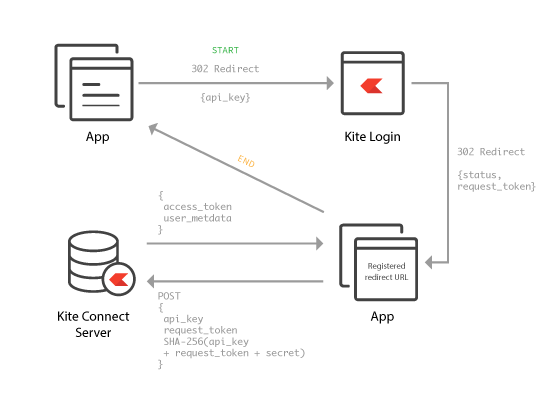
- Handles authentication and session reuse
- Fetches user profile information
- Retrieves funds and margin details
- Normalizes broker responses for UI
- Performs stock search using cached instruments
- Maps company names → trading symbols
- Fetches historical OHLC data
- Retrieves live market quotes
- Prepares data for chart rendering
- Manages favorites/watchlist persistence
- Abstracts storage away from UI
- Core trading interface
- Search bar and symbol selection
- Triggers data fetch and chart updates
- Displays user profile and account data
- Uses
profile_serviceexclusively
- Displays saved/watchlisted stocks
- Loads data via
fav_service
- High-performance chart renderer
- Candlestick, volume, and indicator support
- Optimized for real-time updates
- Loads and caches instrument dump
- Enables fast symbol-to-token mapping
- Avoids repeated API calls
- Shared Plotly helper functions
- Used for non-real-time visualizations
- CSV export utilities
- Enables data downloads
favorites.jsonstores user watchlistscache/holds cached instrument dumps- Designed for easy migration to DB/Redis later
main.py
 → load env
   → load settings
     → initialize Kite client
       → load instrument cache
UI (search.py)
 → SearchService
   → InstrumentCache
UI (search.py)
 → DataService
   → KiteClient
     → Zerodha API
UI (profile.py)
 → ProfileService
   → KiteClient
UI (saved.py)
 → FavService
   → favorites.json
- Python 3.9+
- Zerodha Kite Connect account
pip install -r requirements.txtCreate a .env file:
KITE_API_KEY=your_api_key
KITE_ACCESS_TOKEN=your_access_tokenstreamlit run main.pyPlanned or easily extendable features:
- WebSocket live tick streaming
- Backtesting engine
- Algo trading execution
- Multi-broker support (AngelOne, Upstox)
- Database-backed persistence
- Strategy indicators & signals
┌─────────────────────────────┐
│        User Browser         │
│  (Search • Charts • Profile)│
└───────────────┬─────────────┘
                │
                ▼
┌─────────────────────────────┐
│     Streamlit UI Layer      │
│  ───────────────────────── │
│  • search.py                │
│  • profile.py               │
│  • saved.py                 │
│  • lightweight_charts.py    │
└───────────────┬─────────────┘
                │
                ▼
┌─────────────────────────────┐
│     Service Layer           │
│  ───────────────────────── │
│  • SearchService            │
│  • DataService              │
│  • ProfileService           │
│  • FavService               │
└───────────────┬─────────────┘
                │
                ▼
┌─────────────────────────────┐
│   Broker Client Layer       │
│  ───────────────────────── │
│  • KiteClient (Singleton)   │
│  • Auth / Session Handling  │
└───────────────┬─────────────┘
                │
                ▼
┌─────────────────────────────┐
│   Zerodha Kite Connect API  │
│  ───────────────────────── │
│  • Quotes                   │
│  • Historical OHLC          │
│  • Profile & Margins        │
└───────────────┬─────────────┘
                │
                ▼
┌─────────────────────────────┐
│   Local Storage & Cache     │
│  ───────────────────────── │
│  • Instrument Cache         │
│  • favorites.json           │
└─────────────────────────────┘
- Interacts with the application via Streamlit UI
- Requests data through UI actions (search, select stock, view profile)
Role
- Presentation & interaction only
- No broker logic
- No raw API calls
Key Responsibilities
- Render search interface
- Display charts and tables
- Trigger service calls
- Maintain UI state across reruns
Why this layer exists
- Isolates business rules
- Makes logic testable and reusable
- Prevents UI → Broker coupling
Responsibilities
- Search logic using cached instruments
- Fetch & normalize market data
- Fetch profile, funds, margins
- Handle favorites persistence
Key Characteristics
- Singleton pattern
- Authenticated session reuse
- Centralized API error handling
Why singleton
- Streamlit reruns scripts frequently
- Prevents repeated login / token issues
- Avoids rate-limit problems
Provides
- Live market quotes
- Historical OHLC candles
- User profile & margin data
Access Rules
- Accessed only through KiteClient
- Never directly from UI
Instrument Cache
- Loaded once at startup
- Enables instant symbol search
- Avoids heavy repeated API calls
favorites.json
- Lightweight persistence
- User watchlist storage
- Easily replaceable with DB later
User
 → UI (search.py)
   → SearchService
     → Instrument Cache
User
 → UI
   → DataService
     → KiteClient
       → Zerodha API
User
 → UI (profile.py)
   → ProfileService
     → KiteClient
User
 → UI (saved.py)
   → FavService
     → favorites.json
-
Clean separation of concerns
-
Scalable to multi-broker support
-
Interview-grade architecture
-
Easy migration to:
- WebSockets
- Databases
- Algo-trading engines
-
Open-source contributor friendly
- WebSocket live ticks
- Redis instrument cache
- Backtesting engine
- Strategy execution engine
- Cloud deployment (Docker)