A project of CS601.475 Machine Learning (JHU) that aims to recognize alphabetic letters in American Sign Language.
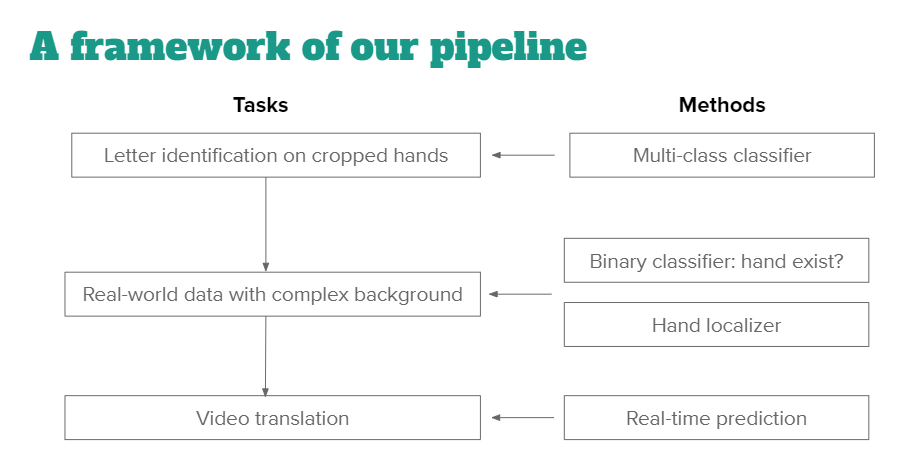
files needed for training:
- video_to_frame.py
- handClassification.py
- hand_localizer.py
- ASL_classifier/
files needed for testing:
- video_to_frame.py
- hand_localizer.py
- ASL_classifier/
modify main(), first argument of FrameCapture() should be your video file, second argument should be the folder where you want to store the extracted frames
if __name__ == '__main__':

  FrameCapture("/content/drive/MyDrive/ML_final/IMG_0358.MP4", "/content/drive/MyDrive/ML_final/External_test_data")
then run the file using
!python video_to_frame.py
- Change the line
dir = "/content/drive/MyDrive/ML_final/Sign_MNIST"
To the local directory containing the files in Sign_MNIST.
- Run the file using
!python handClassification.py
- modify the train function:
# initialize model
  gs = GestureRecognizer('/content/drive/MyDrive/ML_final/Sliding_window/')

  # specify dataset
  userlist=[ 'user_3','user_4','user_5','user_6','user_7','user_9','user_10']
  user_tr = userlist[:2]

  # train model
  gs.train(user_tr)

  # save model to directory
  gs.save_model(name = "sign_detector.pkl.gz", version = "0.0.1", author = 'Gill')
  print ("The GestureRecognizer is saved")
then run the file using
%run hand_localizer.py train
- modify the test function:
  # load model
  new_gr = GestureRecognizer.load_model(name = "/content/drive/MyDrive/Sliding_window/sign_detector.pkl.gz") # automatic dict unpacking

  # specify your own dataset
  userlist=[ 'user_3','user_4','user_5','user_6','user_7','user_9','user_10']
  user_te = userlist[-2:]
  data_directory = '/content/drive/MyDrive/ML_final/Sliding_window/'

  data = []
  for user in user_te:
    # load image data
    data.extend(glob.glob(data_directory+user+'/'+'/*.jpg'))

  ran_list = []
  for i in range(0,20):
    x = random.randint(0,a)
    ran_list.append(x)

  for i in ran_list:
    z = io.imread(data[i])
    z = np.array(z)
    x = new_gr.recognize_gesture(np.array(z))
then run the file using, you can modify the function to printout the prediction
%run hand_localizer.py test
- SVM
cd ASL_classfier
python svm.py --file_path your_file_path
- Random forest
cd ASL_classfier
python rf.py --file_path your_file_path
cd ASL_classfier
python cnn.py --file_path your_file_path
Addtional tunable parameters
--lr learning rate, default = 0.001
--epoch number of epochs, default = 3000
--batch_size batch size, default = 64