Federation Gateway is a platform built for teams that need a practical and lightweight Identity Provider focused on authentication, identity, and permissions.
The platform covers the essential identity lifecycle for modern applications, including tenant isolation, user management, access control, and integration through a simple .NET SDK. The goal is to centralize identity concerns without the overhead of large enterprise IAM platforms.
This repository is a monorepo that houses multiple independent applications and packages under a single version-controlled workspace. The monorepo approach is used for centralized visibility, shared tooling, and easier cross-context navigation, but it does not imply hard coupling between the contained systems.
The repository is organized into two top-level directories, each with a distinct purpose.
.
├── .github/                           # ci/cd workflows (pipelines)
├── Applications/                      # executable applications
│   ├── Backend/                       # main identity provider backend
│   └── Proxy/                         # optional gateway/proxy layer
└── Packages/                          # reusable sdk and contracts
	├── Federation.Sdk/
	└── Federation.Sdk.Contracts/
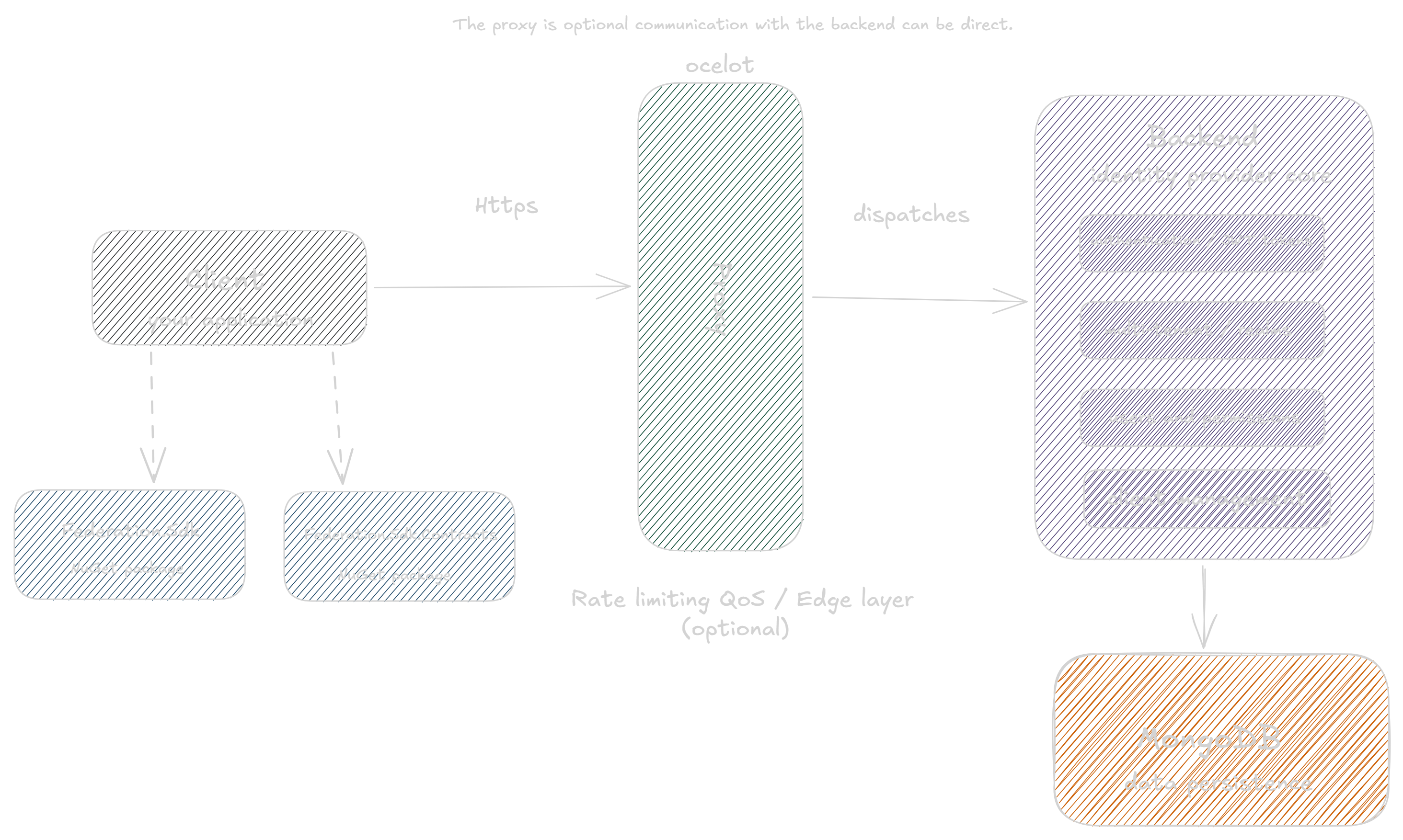
Federation Gateway is built with clear boundaries between runtime services and reusable integration packages. The Backend is the core identity service, while SDK packages provide consumer-facing contracts and client utilities.
The platform is multi-tenant by design. Each tenant can have its own users, permissions, and identity boundaries, enabling isolated and predictable behavior across customers.
The focus is on practical identity needs in real-world projects: issue useful tokens, manage users and permissions, and keep the model simple instead of overloading integrations with unnecessary claims and complexity.
The Proxy is optional. If you need to handle cross-cutting concerns like quality of service controls and rate limiting, you can deploy it as an edge layer in front of the Backend. For simpler scenarios, you can run only the Backend and consume it directly without the Proxy.
Install SDK packages in your .NET project:
dotnet add package HttpsRichardy.Federation.Sdk
dotnet add package HttpsRichardy.Federation.Sdk.ContractsAfter installing the SDK, you can register Federation directly in your service container. This keeps authentication setup centralized and allows each environment to provide its own authority, realm, and client credentials through configuration.
services.AddFederation(options =>
{
    options.Authority = settings.Federation.Authority;       // e.g., https://api.hosted.com (without "/")
    options.Realm = settings.Federation.Realm;               // e.g., "acme-corp"
    options.ClientId = settings.Federation.ClientId;         // e.g., "client-id-generated"
    options.ClientSecret = settings.Federation.ClientSecret; // e.g., "secret-key-generated"
    options.Audiences = settings.Federation.Audiences        // e.g., "[ "acme-corp-operations", "acme-corp-backoffice" ]"
});Federation Gateway is also distributed as a docker image, so you can run the service quickly without building the source code locally. If you prefer a rolling setup, use the latest tag. If you need predictability across environments, use a fixed version tag.
You can pull either:
docker pull httpsrichardy/federation:latest
docker pull httpsrichardy/federation:4.2.5
To run the container, provide the required environment variables for database and administration bootstrap:
docker run --name federation \
	-p 8080:8080 \
	-e Settings__Database__ConnectionString="mongodb://admin:admin@localhost2017/?authSource=admin" \
	-e Settings__Database__DatabaseName="federation" \
	-e Settings__Administration__Username="admin" \
	-e Settings__Administration__Password="admin" \
	httpsrichardy/federation:latest
If needed, replace httpsrichardy/federation:latest with a fixed version tag for controlled deployments.