





Wardrobe is a customizable cosmetics mod for Hytale that lets creators add customizable cosmetics in Asset Packs without needing to add new armor items!
Cosmetics support every feature Hytale cosmetics use, such as gradient set colors, texture variants, model options, and more! Asset Packs can even add new cosmetic slots and categories, in case your cosmetic doesn't fit into the default ones. Cosmetic appearances can also display different appearances depending on Armor and other Cosmetics the player is wearing.
Players are able to access a familiar avatar customization screen by crafting and interacting with the new Cosmetics Mirror block or by using the command /wardrobe.
With Wardrobe's extensible API, developers can create addons to add specialized cosmetic types to work with your mod or server and hook them right into the customization menu. This API is currently work in progress, and we need your feedback!

Wardrobe is an extremely flexible and customizable cosmetic system. It recreates the Hytale cosmetic system as close as possible, meaning all cosmetics support the same features that Hytale cosmetics support with a few differences.
These features include (but are not limited to):
- Texture Variants (Variants)
- Appearance Variants (Model Options)
- Gradient Set Colors
- Armor-Aware Appearances
- Cosmetic-Aware Appearances
The cosmetic system currently has two cosmetic types, Model Attachments and Player Models. Wardrobe Addon developers can add their own cosmetic types supported in the Wardrobe Menu with our API.
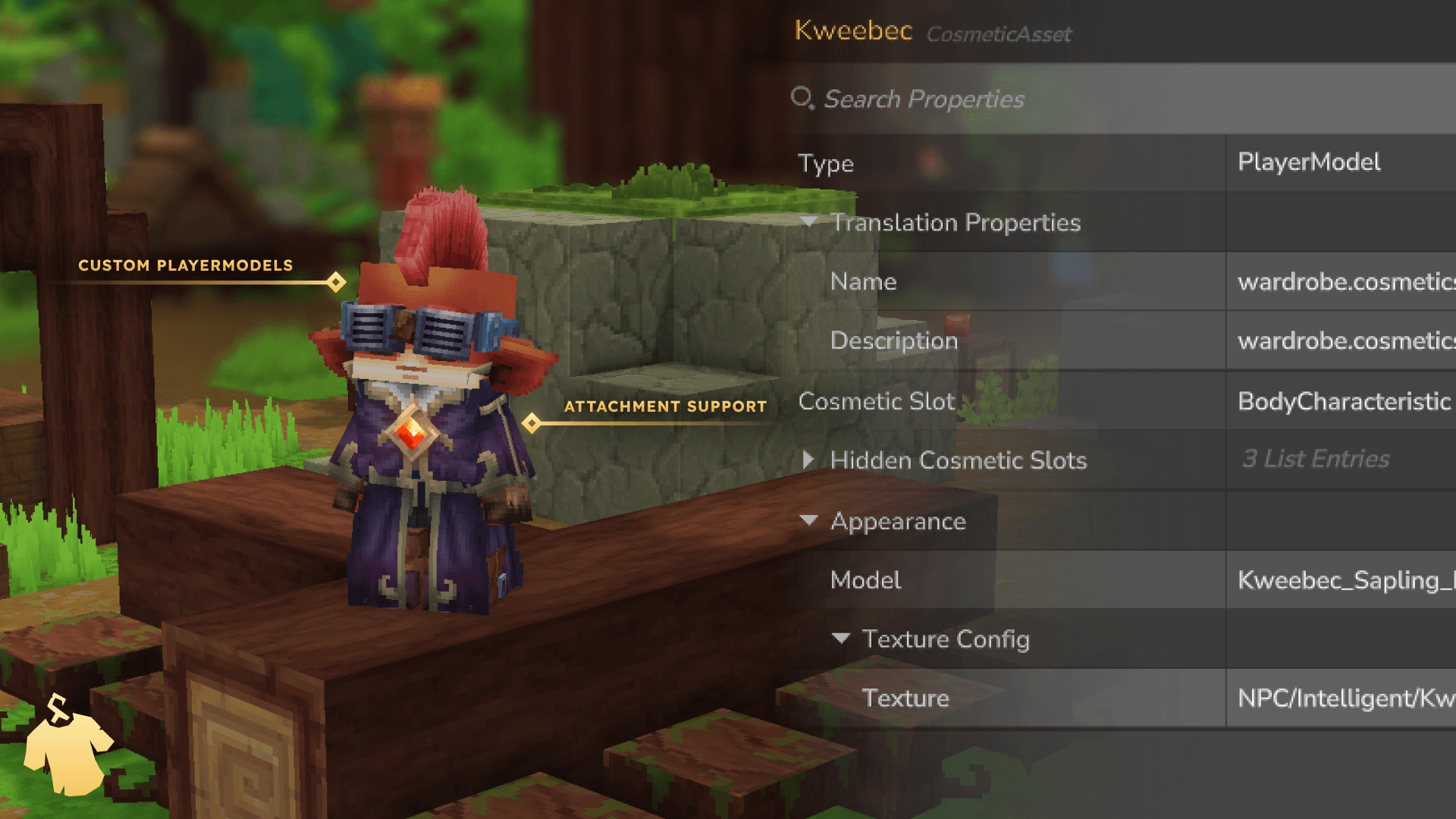
Player Model cosmetics are a special type of cosmetic that Wardrobe adds. This cosmetic type allows you to define a Server ModelAsset to use as the player's model. Player models use the same models accessible from the /model menu, meaning you can define custom animations, camera properties, hit boxes, and more.
Not only do they support custom models, but Player Model Cosmetics are just like any other cosmetic in Wardrobe. They can support model options, texture variants, gradient sets, and even hide other cosmetic slots if a specific slot is incompatible with the model.
Player Model Cosmetics do not support Cosmetic-Aware or Armor-Aware appearances. We hope to bring a Conditional Appearance system to all cosmetics soon!
Most cosmetics in Wardrobe and Hytale are Model Attachments. These are simple cosmetics that attach a Common blockymodel asset to your player using the built-in Model Attachment system. Model Attachments support all cosmetic features.
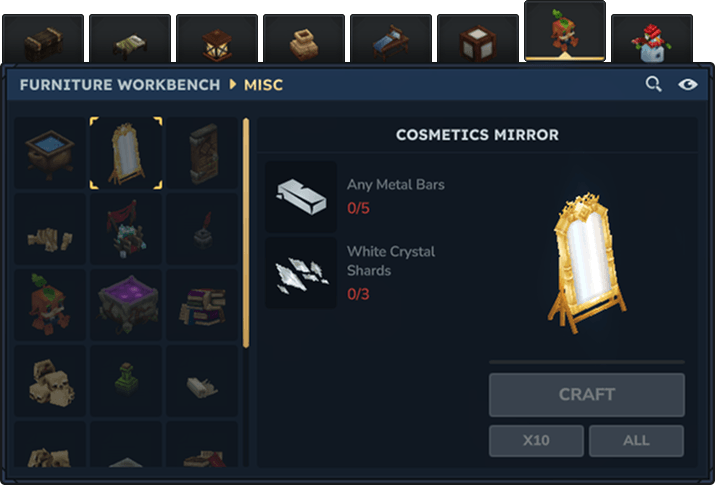
Players can access the Wardrobe Menu through the new Cosmetics Mirror! The Cosmetics Mirror can be crafted with five Metal Bars (of any type) and three White Crystal Shards. It can be placed on the ground or on the wall, and upon interacting with it, the new Wardrobe Menu will open where you can customize your avatar to your heart's content!
The menu is also accessible by using the /wardrobe command in chat. Server administrators can change the permissions of this command using the permission node hardaway.wardrobe.commands.wardrobe.
The Wardrobe Menu looks very familiar! It's meant to look just like the Hytale Avatar Editor, so players already know their way around it. Creators can add new categories and cosmetic slots in Asset Packs, along with Cosmetic Variants and Options. Cosmetic Variants allow a player to customize the texture / color of their Cosmetic, while Options allow for more advanced appearances like different model configurations.
Note: Official Hytale Cosmetics are not included in Wardrobe's menu and cannot be changed in-game. When you join a server, your equipped Hytale Cosmetics are treated as your default appearance. Wardrobe Cosmetics will override any Hytale Cosmetics occupying the same slot.
There is also a Hide Default Cosmetic button next to the search bar. When toggled, the Hytale Cosmetic occupying that slot will be hidden, in case it doesn't fit your custom avatar's style. Some cosmetics, such as Faces, Eyes, Ears, Underwear, and Body Characteristics, cannot be hidden with this button. Creators making player model cosmetics that do not support these types should consider using the HiddenCosmeticSlots field to hide them.

Wardrobe uses the built-in Asset Store system provided by Hytale. This means that all Cosmetic assets (Cosmetics, Slots, Categories) are supported by the in-game Asset Editor and can reload live.
Define your cosmetics in JSON files, point them to your models and textures, and they'll appear in the Wardrobe Menu automatically. Zero code is required to add new cosmetics!
The system is built to be flexible and powerful. You can add simple cosmetics with single-texture models, or complex ones with multiple variants, color options, armor-aware appearances, and overlap detection. Cosmetics can also hide conflicting slots or be restricted to players with specific permissions.
A simple Model Attachment cosmetic with one model and one texture:
{
  "Properties": {
    "Translation": {
      "Name": "example.Example_HeadAccessory_My_Example_Accessory.name"
    },
    "Icon": "Icons/Wardrobe/Cosmetics/HeadAccessory/Example_HeadAccessory_My_Example_Accessory.png"
  },
  "CosmeticSlot": "HeadAccessory",
  "Appearance": {
    "Model": "Characters/Wardrobe/Cosmetics/HeadAccessory/Example_HeadAccessory_My_Example_Accessory/My_Example_Accessory.blockymodel",
    "TextureConfig": {
      "Texture": "Characters/Wardrobe/Cosmetics/HeadAccessory/Example_HeadAccessory_My_Example_Accessory/My_Example_Accessory.png"
    }
  }
}
Cosmetics also support using a grayscale texture with gradient sets. These are built-in sets of colors provided by the game to provide handcrafted color palettes. As seen in the example below, this cosmetic is using the Colored_Cotton gradient set. This will automatically provide every color available in the gradient set and color the grayscale texture provided in the GrayscaleTexture field. These colors will be shown under the Variants section in the Wardrobe Menu
{
  "Appearance": {
    "Model": "Characters/Wardrobe/Cosmetics/HeadAccessory/Example_HeadAccessory_My_Example_Accessory/My_Example_Accessory.blockymodel",
    "TextureConfig": {
      "Type": "Gradient",
      "GrayscaleTexture": "Characters/Wardrobe/Cosmetics/HeadAccessory/Example_HeadAccessory_My_Example_Accessory/My_Example_Accessory_Grayscale.png",
      "GradientSet": "Colored_Cotton"
    }
  }
}
To offer multiple textures for the same model without using gradient sets, use a variant texture config. The model stays the same, but players can choose between different textures. The WardrobeColor array defines the preview colors shown in the menu. Each color in the array is a color stripe (see Wardrobe UI Overview)
Like gradient sets, these variants show under the Variants section in the Wardrobe Menu
{
  "Appearance": {
    "Model": "Characters/Wardrobe/Cosmetics/HeadAccessory/Example_HeadAccessory_My_Example_Accessory/My_Example_Accessory.blockymodel",
    "TextureConfig": {
      "Type": "Variant",
      "Variants": {
        "Red": {
          "Texture": "Characters/Wardrobe/Cosmetics/HeadAccessory/Example_HeadAccessory_My_Example_Accessory/Red.png",
          "WardrobeColor": ["#ff0000"]
        },
        "Blue": {
          "Texture": "Characters/Wardrobe/Cosmetics/HeadAccessory/Example_HeadAccessory_My_Example_Accessory/Blue.png",
          "WardrobeColor": ["#0000ff"]
        }
      }
    }
  }
}
To offer completely different models as options, use a variant appearance. These are shown in the Wardrobe Menu under Options dropdown.
{
  "Appearance": {
    "Type": "Variant",
    "Variants": {
      "Neck": {
        "Properties": {
          "Translation": {
            "Name": "example.Example_Cape_My_Example_Cape.Neck.name"
          },
          "Icon": "Icons/Wardrobe/Cosmetics/Example_Cape_My_Example_Cape/Neck.png"
        },
        "Model": "Characters/Wardrobe/Cosmetics/Example_Cape_My_Example_Cape/Neck.blockymodel",
        "TextureConfig": {
          "Texture": "Characters/Wardrobe/Cosmetics/Example_Cape_My_Example_Cape/Neck.png"
        }
      },
      "NoNeck": {
        "Properties": {
          "Translation": {
            "Name": "example.Example_Cape_My_Example_Cape.NoNeck.name"
          },
          "Icon": "Icons/Wardrobe/Cosmetics/Example_Cape_My_Example_Cape/NoNeck.png"
        },
        "Model": "Characters/Wardrobe/Cosmetics/Example_Cape_My_Example_Cape/NoNeck.blockymodel",
        "TextureConfig": {
          "Texture": "Characters/Wardrobe/Cosmetics/Example_Cape_My_Example_Cape/NoNeck.png"
        }
      }
    }
  }
}
Player Models are a little different. While they have the same structure as Model Attachments, the Model field in the Appearance is handled differently.
With Player Models, the Model field is a ModelAsset id instead of a blockymodel common asset path. Model Assets can be found and added by other Asset Packs in the Server/Models/ folder. These assets define properties like animations, eye height, hitboxes, and more.
These cosmetics should try to always be in the BodyCharacteristic slot to reduce potential conflictions. Player Model cosmetics completely override a player model base, meaning any other Player Model cosmetics attached in different slots may fight over which model gets shown.
{
  "Type": "PlayerModel",
  "Properties": {
    "Translation": {
      "Name": "example.Example_BodyCharacteristic_Kweebec.name"
    },
    "Icon": "Icons/Wardrobe/Cosmetics/BodyCharacteristic/Example_BodyCharacteristic_Kweebec.png"
  },
  "CosmeticSlot": "BodyCharacteristic",
  "HiddenCosmeticSlots": [
    "Haircut",
    "Ears",
    "Face"
  ],
  "Appearance": {
    "Model": "Kweebec_Sapling_Brown", // This is referencing the file Server/Models/Intelligent/Kweebec/Kweebec_Sapling_Brown.json
    "TextureConfig": {
      "Texture": "NPC/Intelligent/Kweebec_Sapling/Models/Model_Textures/Brown_Dark.png"
    }
  }
}
You can also combine multiple and have a variant appearance that changes its color choices depending on the option a player selects.
For full documentation on all features, configuration options, and advanced cosmetic features, see the wiki (Documentation work-in-progress!) or Join our Discord to get direct help.
Attribution Notice: All cosmetic assets used in screenshots and example material on this page are from Violet's Wardrobe and used with permission from the Author.

