The Algorithmic Trading Framework is a project that provides a set of tools for training and testing machine learning models for algorithmic trading. The Project includes a command-line interface that allows users to manage datasets, train models, and test them on historical data. In order to use the Framework, users must have Python 3.10 or later and Git installed on their system. The project uses environment variables to specify the location of data repositories and other settings, making it easy to customize the behavior of the framework. Overall, the Algorithmic Trading Framework offers a convenient and powerful set of tools for exploring and experimenting with algorithmic trading strategies.
To use the framework, users must have Python 3.10 and git installed on their system.
- Clone the repository
git clone https://github.com/lpiekarski/algo-trading.git cd algo-trading - Create python virtual environment
python3 -m venv venv --upgrade-deps
- Activate the environment
. ./venv/bin/activate - Install required python dependencies (from
setup.py)pip install .
There are a few environmental variables that are expected to be set by some parts of the framework:
GIT_DRIVE_REPO_URL - URL of the git repository that is being used as a data source for git drive
DRIVE - Default drive type. Can be local or git (Each file in core/drive not starting with __ corresponds to a drive type)
LOG_LEVEL - sets the level of logger information visability e.g. INFO or DEBUG
-
Set in cli by command
setthat saves variables in file~/.atfatf set [name] [value]It also can be unset by command:
atf unset [name] -
Saved directly in file
~/.atf. Example of environmental file formatting:DRIVE=git LOG_LEVEL=DEBUG [var name]=[var value] -
Passing variables as command argument using
-Doption:atf -D[name]=[value] [subcommand]...
-
Passing
.envfile absolute path as command argument using-Eoption:atf -E[file absolute path] [subcommand]...
Here are some examples of how to use the ATF CLI to perform common tasks.
File atf.py is the cli through which every subcommand can be referenced. ATF stands for Algorithmic Trading Framework. You can always run atf --help to get some information on available subcommands and atf <subcommand> --help to show information about a specific subcommand. Path to every file can be prefixed with <drive>:, where is local or git. If there is no drive prefix default value from environmental variable DRIVE is assumed. In case of local the file is located as usual, but in case of git program looks for the file in the repository specified by GIT_DRIVE_REPO_URL environmental variable. In this repository each file must be in separate branch, name of the branch should be the same as the path of the file, and the file should be zipped and divided into 100MB parts suffixed with 3 digits starting from 000. You can see an example of a repository set up like this here: https://github.com/S-P-2137/Data
Each argument can be assigned value through a environmental variable with the same name. Environmental variables can also be assigned directly in the command for example below command assigns values for environmental variables GIT_DRIVE_REPO_URL=https://github.com/S-P-2137 and LOG_LEVEL=DEBUG, then proceeds with the copy subcommand:
python -m atf -DGIT_DRIVE_REPO_URL=https://github.com/S-P-2137/Data -DLOG_LEVEL=DEBUG copy git:datasets/train/M30_H1 M30_H1.zip
- Download a file from drive using command below (you can also run
atf.py copy --helpto see additional options)python -m atf copy git:datasets/train/M30_H1 M30_H1.zip
Typically, a dataset file from the drive will have its own format that contains all the data but also description on which columns are used as labels etc. To extract raw csv from the dataset file format run:
python -m atf dataset2csv git:datasets/train/M30_H1 M30_H1.csvNotice that if you don't provide a config file or specify label columns through an argument (TODO: implement), this information will not be saved in the resulting dataset
python -m atf csv2dataset M30_H1.csv local:datasets/M30_H1If you have only .csv file first you need to convert it to dataset format.
- This will add H1 resampled indicators
python -m atf extract --dataset=local:raw/M1 --time-tag=1h --name=local:resampled_M1_H1.zip
- This will add regular M1 indicators
python -m atf extract --dataset=local:raw/M1 --name=local:M1.zip
- Upload a file to drive using command below (you can also run
python -m atf copy --helporpython -m atf upload --helpto see additional options)python -m atf copy M30_H1.zip git:datasets/train/M30_H1
- Run training of model
naive_bayes, use the dataset under a pathdatasets/train/M30_H1located in git repository, train using labelBest decision_0.01that is present within this dataset and save the weights of the model after training to a local file./models/naive_bayespython -m atf train --model=local:models/naive_bayes --dataset=git:datasets/train/M30_H1 --label=Best_decision_0.01
- Run training of model
fully_connectedwith configuration under a pathexamples/model_configs/fully_connected.json, use the dataset under a pathdatasets/train/M30_H1located in git repository, train using labelBest decision_0.01that is present within this dataset and save the weights of the model after training to a local file./models/fully_connectedpython -m atf train --model=local:models/fully_connected --model-config=local:examples/model_configs/fully_connected.json --dataset=git:datasets/train/M30_H1 --label=Best_decision_0.01
- Evaluate model
fully_connectedwith configuration under a pathexamples/model_configs/fully_connected.json, use the dataset under a pathdatasets/test/M30_H1located in git repository, test using labelBest decision_0.01that is present within this dataset. Evaluation result will be saved inevaluation/results.csv. If this file is already present new evaluation result will be appended.python -m atf evaluate --model=local:models/fully_connected --model-config=local:examples/model_configs/fully_connected.json --dataset=git:datasets/test/M30_H1 --label=Best_decision_0.01
- Backtest strategy
percentage_tp_slpython -m atf backtest --dataset=git:datasets/test/M30_H1 --model=local:models/fully_connected --strategy=local:strategies/percentage_tp_sl --model-config=local:examples/model_configs/fully_connected.json --strategy-config=local:examples/strategy_configs/percentage_tp_sl.json
- Generate predictions file for a model using command below (you can also run
atf.py predict --helpto see additional options)python -m atf predict --model=local:models/naive_bayes --dataset=git:datasets/test/M30_H1
- Delete a file from drive using command below (you can also run
atf.py delete --helpto see additional options)python -m atf delete git:datasets/raw/dataset_to_delete.zip
Collector module allows to download ohcl S&P 500 data from external soruces. To do this run command below (you can also run atf.py collect --help to see additional options)
atf collect -s [source]Currently available sources:
- yfinance
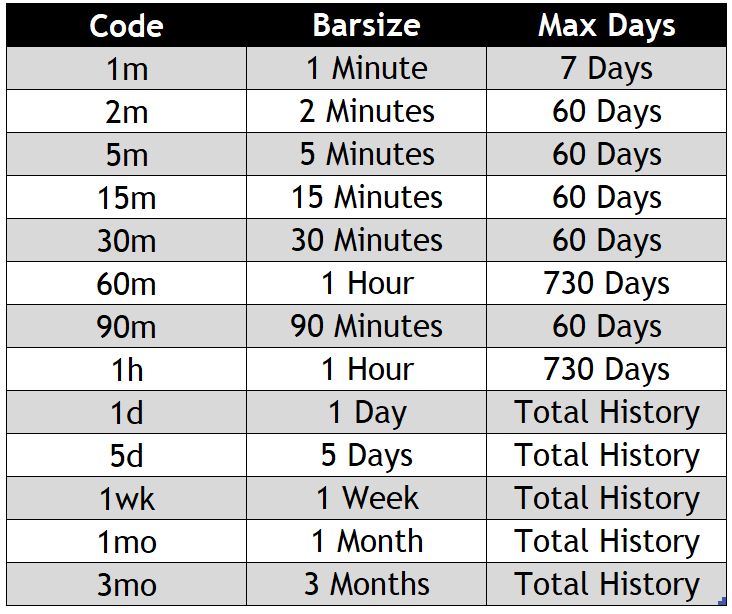
Additonal option -i (intervals) accepts standard pandas aliases
Warning Different sources accept only some types of intervals e.g. yfinance
python -m atf tradeEvery pull request should contain appropriate tests for the changes and all the previous tests present in the repository should be passing.
- Run tests regularly
python -m atf test - Run tests but skip unit tests
python -m atf test --skip-unit-tests - Run tests but skip shape tests
python -m atf test --skip-shape-tests - Run tests but skip checking the formatting
python -m atf test --skip-format-tests
- Create a new
[model_name].pyfile inside/model/predictorsdirectory. - This module has to implement 5 functions:
initialize(num_features: int, config: dict) -> Nonemodel initialization based on the number of input features and configuration from model's yaml config file.train(x: pd.DataFrame, y: pd.DataFrame) -> Nonetraining using x as inputs and y as targets.predict(x: pd.DataFrame) -> np.ndarraygenerating prediction from the input xsave_weights(path: str) -> Nonesaving model's state as file inpathlocationload_weights(path: str) -> Noneloading model's state from file locationpath
TODO