


ipyjadwal (derived from the Arabic Jadwal جَدْوَل meaning "Table" or "Schedule") is a clean, interactive Jupyter widget for browsing Google Sheets directly inside Google Colab or Jupyter Notebooks.
It simplifies the workflow of selecting spreadsheets, switching sheets, and previewing DataFrames without writing repetitive boilerplate code.
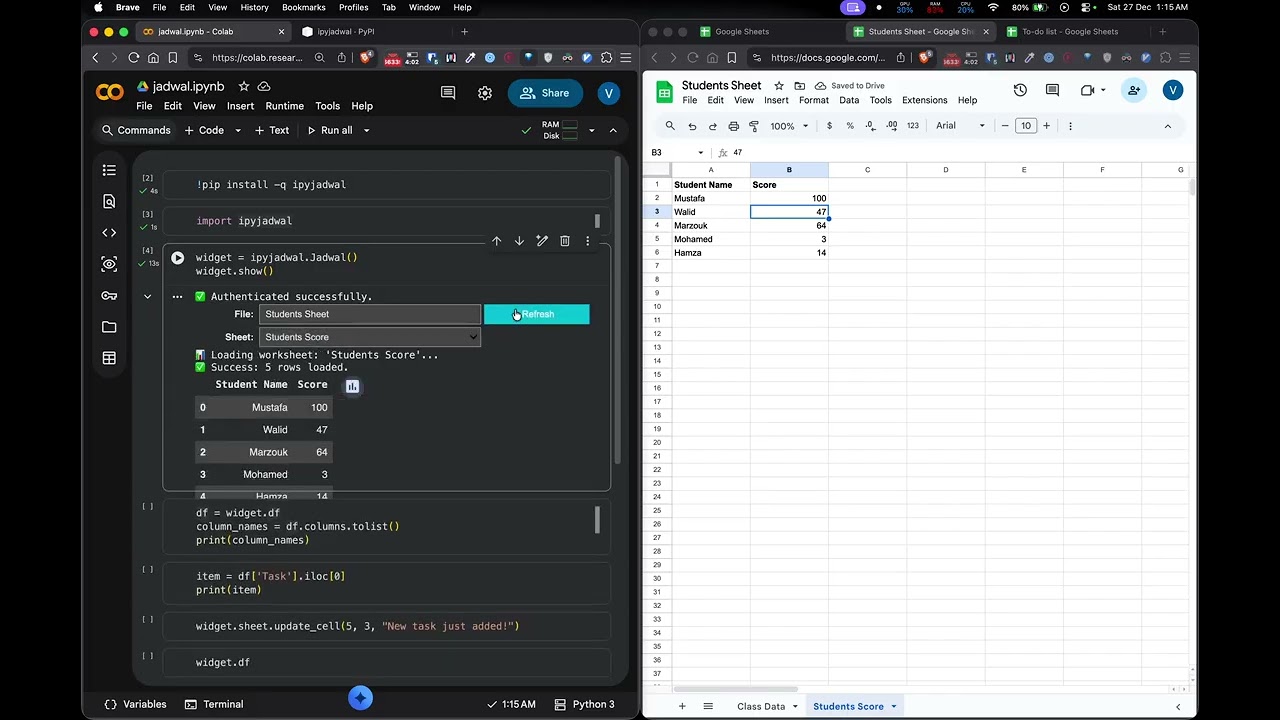
pip install ipyjadwalimport ipyjadwal
widget = ipyjadwal.Jadwal()
widget.show()
# Access selected data as pandas DataFrame
df = widget.df
# Write updates back using gspread
widget.sheet.update_cell(1, 1, "New Value")For local Jupyter Notebooks, provide a gspread client:
import gspread
import ipyjadwal

gc = gspread.service_account("credentials.json")
widget = ipyjadwal.Jadwal(client=gc)
widget.show()-
🔐 Easy Google Auth (Colab-friendly)
No boilerplate setup in Google Colab, authentication just works out of the box. -
🔍 Spreadsheet Picker
Select any Google Drive spreadsheet from a searchable dropdown. -
📑 Sheet Switching
Loads available worksheets automatically when a file is selected. -
🐼 Data Access
Access the sheet data as a pandas DataFrame viawidget.df. -
✏️ gspread Access
Use the raw gspread sheet object throughwidget.sheet.
Main widget class for browsing Google Sheets.
Parameters
client(optional): An authorized gspread client. IfNone, attempts automatic authentication in Google Colab.sort_method:"default"(default),"asc", or"dsc"— Sort order for the file list.
Properties
df: pandas DataFrame containing the full data from the currently selected sheet.sheet: gspread worksheet object for the currently selected sheet — use this to write back to Google Sheets.
Methods
show(): Display the interactive widget.
This project is licensed under the MIT License - see the LICENSE file for details.
- Built with gspread for Google Sheets API
- Powered by ipywidgets for interactive UI