Download sample apk from here

This repository has two branches master and mvp_with_rx_and_dagger. Master branch includes Android MVP architecture without using Dagger, RxJava, RxAndroid and branch mvp_with_rx_and_dagger includes Android MVP architecture using Dagger, RxJava, RxAndroid. In this repository, there is Retrofit, OkHttp for API purpose. AndroidMVPArchitecture is developed for beginners who are well known about basic Android application development and wants to use trending MVP Architecture with or without Rx and Dagger. There is different type of implementation in different branches. You can simply clone the project and checkout to any above mentioned branches and learn both type of implementation.
To switch between the branches simply type:
i) from master to mvp_with_rx_and_dagger
git checkout mvp_with_rx_and_dagger
ii)from mvp_with_rx_and_dagger to master
git checkout master
MVC vs MVP
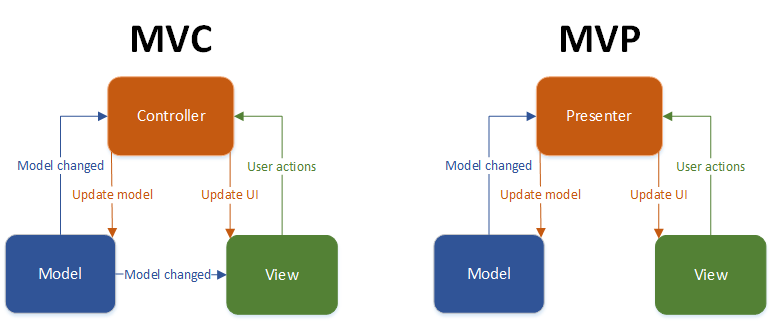
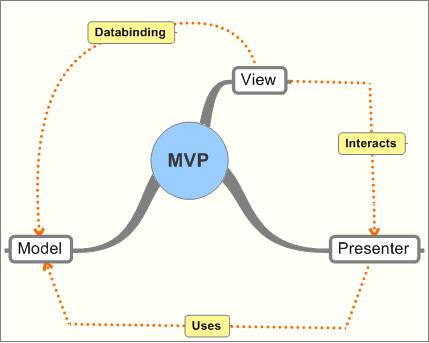
MVP is a user interface architectural pattern engineered to facilitate automated unit testing and improve the separation of concerns in presentation logic:
The model is an interface defining the data to be displayed or otherwise acted upon in the user interface. The view is a passive interface that displays data (the model) and routes user commands (events) to the presenter to act upon that data. The presenter acts upon the model and the view. It retrieves data from repositories (the model), and formats it for display in the view.
source: https://en.wikipedia.org/wiki/Model%E2%80%93view%E2%80%93presenter
https://medium.com/@cervonefrancesco/model-view-presenter-android-guidelines-94970b430ddf
https://github.com/googlesamples/android-architecture
https://code.tutsplus.com/tutorials/an-introduction-to-model-view-presenter-on-android--cms-26162
https://stackoverflow.com/questions/2056/what-are-mvp-and-mvc-and-what-is-the-difference
https://msdn.microsoft.com/en-us/library/ff649571.aspx
Note: If your code won't build due to missing keystore then you need to add keystore directory that contains four files with .jks extension for two different branches and generate the signed apk for debug and release build. The password and alias is available on gradle.properties file or if you are aware about generating signed apk then you may follow your own way.

Thank you Dinesh Gajurel for your wonderful contribution for developing the sample API that I have used in this repository. It was really helpful to have your input in this project.
Thank you Subhash Acharya for your continuous guidance and support to improve the coding standard. I sincerely appreciate the time you spent and assistance you have provided me by reviewing my code and recommending me for achieving the best result.
Feel free to submit any type of issues and suggestions for improving the coding standard
Happy Coding!!! 
Copyright 2017 Nawin Khatiwada

Licensed under the Apache License, Version 2.0 (the "License");
you may not use this file except in compliance with the License.
You may obtain a copy of the License at

    http://www.apache.org/licenses/LICENSE-2.0

Unless required by applicable law or agreed to in writing, software
distributed under the License is distributed on an "AS IS" BASIS,
WITHOUT WARRANTIES OR CONDITIONS OF ANY KIND, either express or implied.
See the License for the specific language governing permissions and
limitations under the License.