
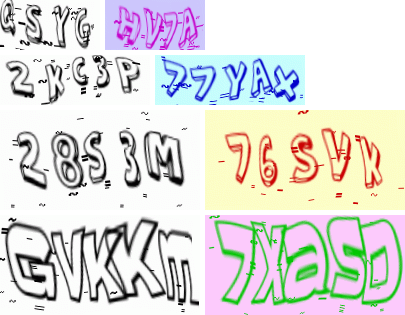
Captcha with the most flexible settings. Are changing:
- Font
- The size
- Colors
- Effects
Composer (recommended) Use Composer to install this library from Packagist: onnov/captcha
Run the following command from your project directory to add the dependency:
composer require onnov/captcha
Alternatively, add the dependency directly to your composer.json file:
"require": {
    "onnov/captcha": "^1.0"
}
The classes in the project are structured according to the PSR-4 standard, so you can also use your own autoloader or require the needed files directly in your code.
If you use SYMFONY framework:
in services.yaml file
services:
    Onnov\Captcha\Captcha:
        autowire: true
in the controller or service
use Onnov\Captcha\Captcha; /** @var Captcha */
protected $captcha;
public function __construct(Captcha $captcha) {
$this->captcha = $captcha;
}use Onnov\Captcha\Captcha;
$captcha = new Captcha();/**
* Returns CaptchaReturn Object
*
* @var CaptchaReturn $result
*/
$result = $captcha->getCaptcha();
// Save the value of the captcha in the session
$_SESSION['CaptchaKeyString'] = $result->getKeyString();
// Send the desired headers
foreach ($result->getHeaders() as $k => $v) {
header($k.': '.$v);
}
// Send captcha to browser
echo $result->getImg();The default font is ActionJackson. You can use monsterShadow or baveuse3d fonts already inside.
use Onnov\Captcha\Font\MonsterShadowFont;
use Onnov\Captcha\CaptchaConfig;

$captchaConfig = (new CaptchaConfig())->setFonts([new MonsterShadowFont()]);
$result = $captcha
            ->setConfig($captchaConfig)
            ->getCaptcha();
You can use several fonts at the same time, they will be used in random order.
use Onnov\Captcha\Font\ActionJacksonFont;
use Onnov\Captcha\Font\MonsterShadowFont;
use Onnov\Captcha\Font\Baveuse3dFont;
use Onnov\Captcha\CaptchaConfig;

$captchaConfig = (new CaptchaConfig())
            ->setFonts(
                [
                    new ActionJacksonFont(),
                    new MonsterShadowFont(),
                    new Baveuse3dFont(),
                ]
            );
$result = $captcha
            ->setConfig($captchaConfig)
            ->getCaptcha();
You can use any TTF font, specifying the path and the proportions to it in the form of two width and height parameters (you will have to select the parameters experimentally)
use Onnov\Captcha\Font\ModelFont;
use Onnov\Captcha\CaptchaConfig;

$font = (new ModelFont())
            ->setFontPath(__DIR__.'/SignboardCpsNr.ttf')
            ->setCharWidth(25)
            ->setCharHeight(30);
$captchaConfig = (new CaptchaConfig())->setFonts([$font]);
$result = $captcha
            ->setConfig($captchaConfig)
->getCaptcha();By default, two effects are used to distort the image in captcha:
- Interference
- Wave distortion (The algorithm is taken from the site http://captcha.ru/captchas/multiwave/)
You can turn off both effects.
use Onnov\Captcha\CaptchaConfig;

$captchaConfig = (new CaptchaConfig())->setEffects([]);
$result = $captcha
            ->setConfig($captchaConfig)
            ->getCaptcha();
You can use only one effect.
use Onnov\Captcha\CaptchaConfig;
use Onnov\Captcha\Effect\WaveDistortionEffect;

$captchaConfig = (new CaptchaConfig())->setEffects([new WaveDistortionEffect()]);
$result = $captcha
            ->setConfig($captchaConfig)
            ->getCaptcha();
You can change the sequence of application (by default, first Interference then WaveDistortion)
use Onnov\Captcha\CaptchaConfig;
use Onnov\Captcha\Effect\WaveDistortionEffect;
use Onnov\Captcha\Effect\InterferenceEffect;

$captchaConfig = (new CaptchaConfig())
            ->setEffects(
                [
                    new WaveDistortionEffect(),
                    new InterferenceEffect(),
                ]
            );
$result = $captcha
            ->setConfig($captchaConfig)
            ->getCaptcha();
Each effect can be configured.
use Onnov\Captcha\CaptchaConfig;
use Onnov\Captcha\Effect\InterferenceConfig;
use Onnov\Captcha\Effect\InterferenceEffect;
use Onnov\Captcha\Effect\WaveDistortionConfig;
use Onnov\Captcha\Effect\WaveDistortionEffect;

$waveDistortionConfig = (new WaveDistortionConfig())
            ->setAmplitudeStart(300)
            ->setAmplitudeEnd(500)
            ->setAmplitudeDivider(120);

$interferenceConfig = (new InterferenceConfig())
            ->setInterferenceMin(25)
            ->setInterferenceMax(35)
            ->setInterferenceSymbols(':#~');

$captchaConfig = (new CaptchaConfig())
            ->setEffects(
                [
                    new WaveDistortionEffect($waveDistortionConfig),
                    new InterferenceEffect($interferenceConfig),
                ]
            );

$result = $captcha
            ->setConfig($captchaConfig)
->getCaptcha();- setWidth(120) // image width px
- setHeight(50) // image height px
- setForegroundColor([0,0,0]) // foreground color array [R, G, B]
- setBackgroundColor([255,255,255]) // background color array [R, G, B]
- setAllowedSymbols('23456789') // symbols used to draw CAPTCHA
- number of characters in captcha
- setLengthMin(4) // minimum string length
- setLengthMax(5) // maximum string length
- size gap between symbols
- setGapMin(0) // minimum gap between symbols
- setGapMax(10) // maximum gap between symbols
- setFluctuationAmplitude(5) // symbol's vertical fluctuation amplitude
- setPadding(5) // indent from the edge of the image to the inscription
- setCharRotate(5) // The angle in degrees for char rotation
- setJpegQuality(70) // JPEG quality of CAPTCHA image
- The script tries to return the image sequentially first in the GIF format then jpg further to the PNG
- setMaybeReturnGif(false) // prevents the return of the image GIF
- setMaybeReturnJpg(false) // prevents the return of the image JPG
- setMaybeReturnPng(false) // prevents the return of the image PNG
configuration example
use Onnov\Captcha\CaptchaConfig;

$captchaConfig = (new CaptchaConfig())
            ->setWidth(120)
            ->setHeight(70)
            ->setPadding(5)
            ->setBackgroundColor([255,255,220])
            ->setForegroundColor([0,100,100]);

$result = $captcha
            ->setConfig($captchaConfig)
            ->getCaptcha();