




Just fast HTML -> plain text.
Lightweight, hand rolled, high-performance HTML to plain text conversion for .NET.
Check out the live demo and browser extension.
- Search / indexing pipelines: Strip HTML down to text for full-text search, indexing, classification, or deduping.
- Example: convert HTML to text before indexing in Elasticsearch / OpenSearch
- Batch processing: Convert large archives of HTML (docs, KB articles, CMS exports) into text efficiently.
- Email & notification processing: Get a readable text version of HTML emails for previews, logs, or plain-text fallbacks.
- Logging / auditing: Store a text representation of HTML content for review or compliance.
- LLM / NLP preprocessing: Normalize HTML into clean text before chunking, embedding, or extraction.
- LLM cost optimisation: Use deterministic local HTML -> text conversion instead of spending tokens on markup cleanup. Check out the MCP server setup.
Simple as possible:
using Html2Text;

string html = "<h1>Hello</h1><p>World</p>";

string text = Html2Text.Convert(html);
Output:
Hello

World
Install using NuGet (recommended):
dotnet add package Html2Text.Net
- .Net 8+
- .Net Framework 4.6.2+
- .Net Standard 2.0 for compatibility with other frameworks, including .Net 5/6/7
For .Net Framework users, PackageReference style dependencies are recommended. Also ensure binding redirects are enabled.
Contributions and pull requests are welcome! With .Net 10 SDK installed, to build locally:
dotnet build
To run unit and regression tests:
(windows): dotnet test
(linux/mac): dotnet test -f net10.0
To run the example console app:
dotnet build
dotnet run --project Html2Text.Example Samples/scottallen.html
HTML document -> Lexer (tokens) -> Parser (AST nodes) -> Renderer (string text)
- Text nodes are emitted in document order.
- Basic block separation is preserved (e.g., paragraphs/headings insert newlines).
- Whitespace is normalized to produce readable plain text.
Minimal formatting is added to make the plain text output readable in only 4 cases:
- HTML tables are given cell separators
|and horizontal lines---under column headers:
| Chart                  | Record Holder     | Record       |
| ---------------------- | ----------------- | ------------ |
| Opening Days           | Avengers: Endgame | $157,461,641 |
| Top Single Day Grosses | Avengers: Endgame | $157,461,641 |
- Lists and nested lists are indented and given a leading
-like so:
 - 1 Early life
 - 2 Enigma machine
 - 3 Solving the wiring
 - Toggle Solving the wiring subsection
   - 3.1 French help
 - 4 Solving daily settings
 - Toggle Solving daily settings subsection
   - 4.1 Early methods
   - 4.2 Bomba and sheets
   - 4.3 Allies informed
- In preformatted areas
<pre>whitespace is preserved:
private int GetSmallestNonNegative(int x, int y) {
    return x < 0 && y < 0 ? 0
        : x < 0 ? y
        : y < 0 ? x
        : Math.Min(x, y);
}
- The
<hr/>element adds a horizontal line of dashes---.
This project is focused on:
- High performance: designed for low allocations and fast throughput.
- Text extraction only: get the words from the page/document.
- No dependencies: Lightweight, not an embedded browser engine. No dependencies other than .NET itself.
The following are intentionally out of scope so the library can excel at the goals above:
- Respecting CSS, computed styles,
display:none, or visibility. - Pixel-accurate layout, whitespace mirroring, or browser-equivalent rendering.
- Executing JavaScript or loading remote resources.
High performance is a goal of this project. This library:
- is designed for converting many documents quickly (batch processing, indexing, search pipelines).
- avoids DOM dependencies.
- uses a lightweight, hand rolled lexer/parser/renderer pipeline.
Benchmarks are in Html2Text.PerfTests and can be run locally with:
dotnet run -c Release --project Html2Text.PerfTests
Or check out the latest automated perf test results here: https://pavlosmcg.github.io/Html2Text.Net/dev/bench/
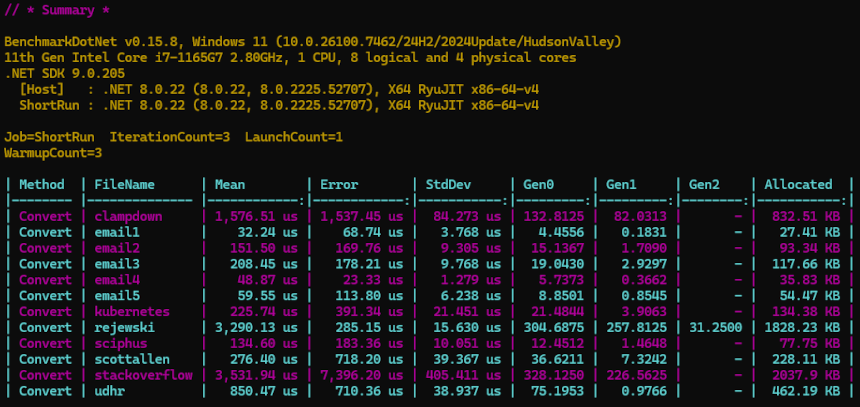
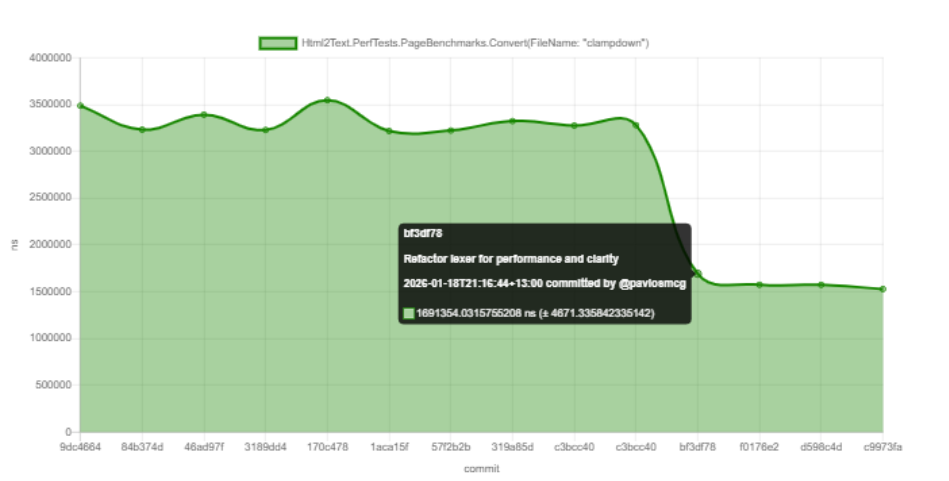
Each file in the Samples/ directory acts as an acceptance/regression test. The results of converting these HTML files to plain text are saved in Html2Text.RegressionTests/*.verified.txt:
Samples/<file-name>.html -> Html2Text.Convert(<file-contents>) -> <file-name>.verified.txt
For example scottallen.html -> scottallen.verified.txt
Html2Text.RegressionTests uses Verify to make test assertions against verified output snapshots. If you need to update the outputs please see the Verify docs for snapshot management.
Distributed under MPL-2.0 see LICENSE.txt