
Solana Mobile Wallet Adapter 2.0.3 plugin for Godot 4 on Android


Connect Solana wallets from any Godot 4 Android game — one plugin, full MWA 2.0.3 coverage.
Invoke SDK includes an encrypted auth token cache so users only see the wallet approval popup on first launch. Subsequent launches reconnect silently.
Three storage backends are available:
| Backend | Best For |
|---|---|
keystore |
Production — hardware-backed encryption via Android TEE |
file |
Emulators / devices without full Keystore support |
memory |
Development — clears on every app close, forces full re-auth |
📚 Full Auth Cache documentation →
Godot 4 has no native Solana integration. If you want your Android game or app to connect to Phantom, Solflare, or Jupiter, you're on your own — until now.
Invoke SDK is a drop-in Android plugin for Godot 4 that exposes the full Solana Mobile Wallet Adapter 2.0.3 API to GDScript via signals and method calls. It handles everything in Kotlin — auth tokens, session caching, transaction building, RPC calls — so your GDScript stays clean.
One
.aarfile. One signal interface. Full MWA 2.0.3 coverage.
🌐 Website — Landing page 📚 Full Documentation — Getting Started, API Reference, Auth Cache, Wallet Compatibility
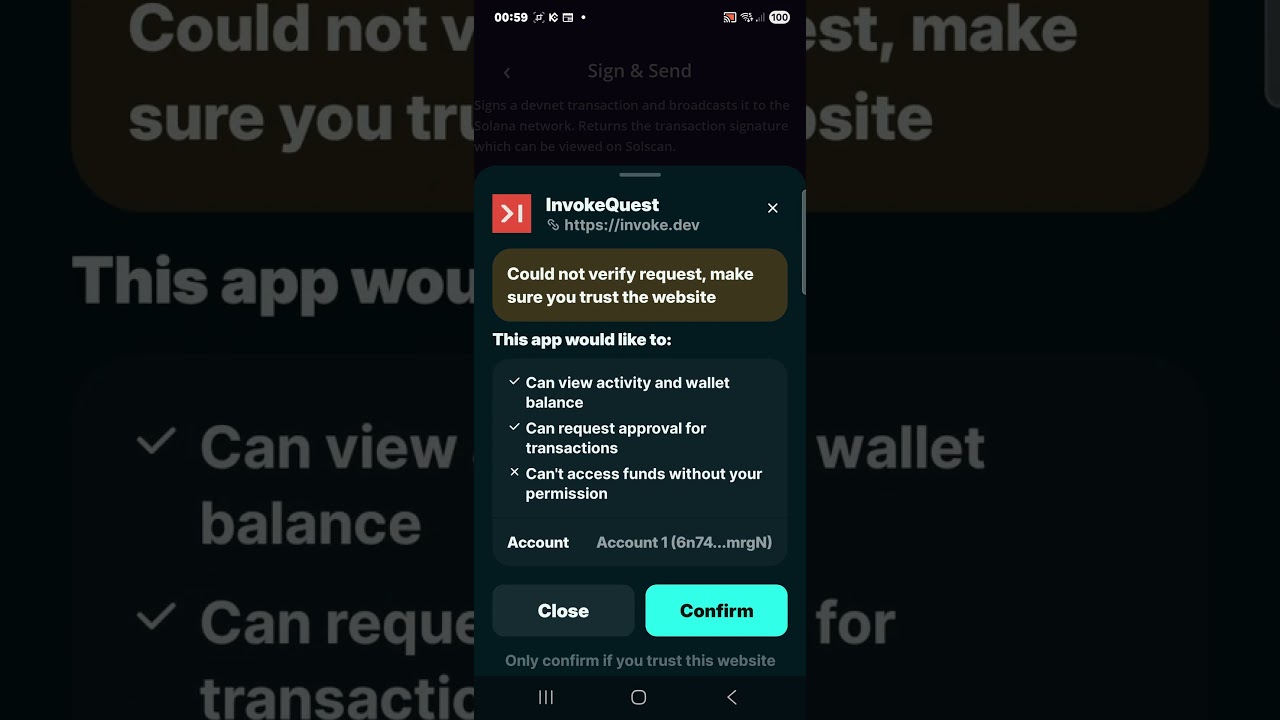
▶ Watch the full demo on YouTube
| Splash | Dashboard | Sign Transaction |
|---|---|---|
 |
 |
 |
| Sign & Send | Sign Message | Capabilities |
|---|---|---|
 |
 |
 |
| Auth Cache | Settings | Wallet Connected |
|---|---|---|
 |
 |
 |
 |
 |
 |
|---|---|---|
| Native Android Plugin | Encrypted Token Cache | Full MWA API |
| Kotlin bridge, zero JNI boilerplate | AES256-GCM, silent reconnect in 30 min | Every MWA 2.0.3 method exposed to GDScript |
| Feature | Status |
|---|---|
authorize — connect wallet, get auth token |
✅ |
reauthorize — refresh existing session |
✅ |
deauthorize — end session |
✅ |
signTransactions — sign raw transactions |
✅ |
signAndSendTransactions — sign + broadcast to network |
✅ |
signMessages — off-chain message signing |
✅ |
getCapabilities — query wallet feature support |
✅ |
getInstalledWallets — detect installed wallets |
✅ |
| Silent reconnect — reuse cached token (< 30 min) | ✅ |
| Auto reauth — wallet picker for stale sessions (< 24h) | ✅ |
| Instant disconnect — no wallet popup | ✅ |
| Encrypted auth token cache (AES256-GCM at rest) | ✅ |
| Real memo transactions — no dummy data | ✅ |
| Network-aware RPC (Devnet / Testnet / Mainnet) | ✅ |
| Full example app — InvokeQuest | ✅ |
Tested on Samsung Galaxy Android 14, March 2026:
| Wallet | authorize | signTx | signAndSend | signMessage | Notes |
|---|---|---|---|---|---|
| Solflare | ✅ | ✅ | ✅ | ✅ | Best for testing |
| Jupiter | ✅ | ✅ | ✅ | ✅ | |
| Phantom | ❌ | — | — | — | Domain not verified |
| Backpack | ❌ | — | — | — | MWA 2.0 incompatible |
MWA always opens the system wallet picker on every sign operation — this is by design, not a bug.
cp InvokeMWA.aar YOUR_PROJECT/addons/mobile_wallet_adapter/android/InvokeMWA.aar
In Godot editor: Project → Export → Android → Plugins → InvokeMWA ✅
var _mwa = null

func _ready() -> void:
    if Engine.has_singleton("InvokeMWA"):
        _mwa = Engine.get_singleton("InvokeMWA")
        _mwa.authorized.connect(_on_authorized)
        _mwa.mwa_error.connect(_on_mwa_error)

func connect_wallet() -> void:
    _mwa.authorize("solana:devnet", "My Game", "https://mygame.dev", "https://mygame.dev/icon.png")

func _on_authorized(auth_token: String, wallet_address: String) -> void:
    print("Connected: ", wallet_address)

func _on_mwa_error(code: int, message: String) -> void:
print("Error %d: %s" % [code, message])| Signal | Arguments | Description |
|---|---|---|
authorized |
auth_token: String, address: String |
Wallet connected, new session |
reauthorized |
auth_token: String |
Session refreshed |
deauthorized |
— | Session ended |
transaction_signed |
signatures: Array[String] |
Transactions signed (bytes) |
transaction_sent |
signatures: Array[String] |
Transactions broadcast |
message_signed |
signatures: Array[String] |
Messages signed |
capabilities_received |
json: String |
Wallet capabilities JSON |
wallet_apps_detected |
json: String |
Installed wallets JSON |
mwa_error |
code: int, message: String |
Error with code |
# Connect wallet — opens system wallet picker
_mwa.authorize(cluster: String, name: String, uri: String, icon: String)

# Refresh session with existing auth token
_mwa.reauthorize(auth_token: String, name: String, uri: String, icon: String)

# End session
_mwa.deauthorize(auth_token: String)

# Silent reconnect — reads auth token from cache automatically
_mwa.tryReauthorizeFromCache(name: String, uri: String, icon: String)

# Instant disconnect — clears cache, no wallet popup
_mwa.disconnectWallet()# Sign one or more raw transactions (Base64 encoded)
_mwa.signTransactions(transactions: Array[String])
# Sign and broadcast transactions
_mwa.signAndSendTransactions(transactions: Array[String], min_context_slot: int)
# Sign arbitrary messages off-chain
_mwa.signMessages(messages: Array[String], addresses: Array[String])# Build and sign a memo transaction — returns signed bytes via transaction_signed
_mwa.signMemoTransaction(memo: String, rpc_url: String)
# Build, sign and broadcast a memo transaction — returns signature via transaction_sent
_mwa.signAndSendMemoTransaction(memo: String, rpc_url: String)
# Sign a text message — returns signature via message_signed
_mwa.signMemoMessage(message: String)# Query wallet for supported MWA features and limits
_mwa.getCapabilities()
# Detect installed MWA-compatible wallets
_mwa.getInstalledWallets()_mwa.cacheHasToken() # → bool
_mwa.cacheGetAddress() # → String
_mwa.cacheGetAgeSeconds() # → int
_mwa.cacheIsStale() # → bool (true if > 30 min)
_mwa.cacheClear() # clear active wallet token
_mwa.cacheClearAll() # clear all wallet tokens| Code | Constant | Description |
|---|---|---|
| 1001 | USER_DECLINED |
User rejected the wallet request |
| 1002 | WALLET_NOT_INSTALLED |
No MWA wallet found on device |
| 1003 | SESSION_ALREADY_ACTIVE |
A session is already in progress |
| 1004 | AUTH_TOKEN_INVALID |
Cached token rejected by wallet |
| 1005 | AUTH_TOKEN_EXPIRED |
Token too old, re-auth required |
| 2001 | TRANSACTION_EXPIRED |
Transaction blockhash expired |
| 2002 | TRANSACTION_FAILED |
Transaction rejected by network |
| 2003 | SIMULATION_FAILED |
Transaction simulation failed |
| 2004 | INSUFFICIENT_FUNDS |
Wallet has insufficient SOL |
| 2005 | BLOCKHASH_NOT_FOUND |
RPC blockhash fetch failed |
| 3001 | NETWORK_TIMEOUT |
Network request timed out |
| 3002 | RPC_ERROR |
RPC endpoint returned an error |
| 9999 | UNKNOWN |
Unmapped exception |
The cache eliminates the wallet approval popup on repeat opens. Invoke SDK uses a three-tier strategy:
App opens → tryReauthorizeFromCache()
  │
  ├─ Token age < 30 min  → Silent reconnect. No wallet interaction. ✅
  │
  ├─ Token age < 24 hrs  → Reauthorize. Wallet picker appears once. ✅
  │
  └─ Token age > 24 hrs  → Session expired. Full authorize required.
Auth tokens are stored in EncryptedSharedPreferences (AES256-GCM key + AES256-SIV value). Tokens are never logged and never exposed to GDScript — all cache reads happen in Kotlin.
The repo includes InvokeQuest, a full example Android app that demonstrates every SDK method. Find it at example/invokequest/. It is a complete Godot 4 project with all screens, autoloads, and the compiled plugin — ready to build and run on any Android device.
invoke-solana-sdk/
│
├── android/
│   └── plugin/src/main/kotlin/com/invoke/mwa/
│       ├── MWABridge.kt       ← All wallet logic, transaction building, RPC calls
│       ├── MWAPlugin.kt       ← Godot plugin registration, @UsedByGodot methods
│       ├── AuthCacheImpl.kt   ← EncryptedSharedPreferences token cache
│       └── MWAError.kt        ← Error codes and exception mapper
│
├── example/invokequest/
│   ├── scenes/screens/        ← All GDScript screens
│   ├── autoloads/
│   │   ├── DesignTokens.gd    ← Colors, animation constants
│   │   └── SceneManager.gd    ← Push/pop scene navigation
│   └── addons/mobile_wallet_adapter/
│       └── android/InvokeMWA.aar  ← Compiled plugin
│
└── docs/                      ← Docusaurus documentation site
- Clone Authorization —
supports_clone_authorizationis in the MWA 2.0.3 spec and the SDK queries it correctly viagetCapabilities(). Solflare and Jupiter returnfalse— wallet adoption is incomplete. This is expected and will work automatically once wallets ship support. Use cases when available: multi-device gaming, game + companion app sharing one session, multiple SDKs sharing one authorization. - Backpack — MWA 2.0 incompatible, not supported
- Phantom — Rejects unverified dApp domains (register at developer.phantom.app)
- Silent reconnect — Only within 30-minute window; stale sessions trigger wallet picker
- Solscan devnet — Solscan dropped devnet support; transaction links only work on Testnet and Mainnet
- Wallet picker on every sign — MWA protocol requirement, not a bug
Engine.has_singleton("InvokeMWA") returns false
The plugin is not loaded. Verify InvokeMWA.aar is in addons/mobile_wallet_adapter/android/ and the plugin is enabled in Export settings. Check AndroidManifest.xml for org.godotengine.plugin.v2.InvokeMWA.
Wallet picker appears on every app open
Expected after 30 minutes. Use tryReauthorizeFromCache() on app start to silently restore sessions within the window.
AUTH_TOKEN_INVALID (code 1004) after reinstall
The cached token is stale. Call cacheClearAll() once after reinstall, then re-authorize.
WALLET_NOT_INSTALLED (code 1002)
No MWA-compatible wallet installed. Install Solflare or Jupiter.
Transaction broadcast fails with INSUFFICIENT_FUNDS
Fund your devnet wallet at faucet.solana.com.
Prerequisites: JDK 17, Android SDK, Godot 4.2.2, Python 3.x
# 1. Build the AAR
cd android
.\gradlew.bat :plugin:assembleRelease

# 2. Copy AAR to plugin location
Copy-Item "plugin\build\outputs\aar\plugin-release.aar" "..\example\invokequest\addons\mobile_wallet_adapter\android\InvokeMWA.aar" -Force

# 3. Build APK
cd ..\example\invokequest\android\build
.\gradlew.bat assembleRelease
See CONTRIBUTING.md for the full build pipeline, signing setup, and scene asset workflow.
Solana, the Solana logo, Phantom, Solflare, Jupiter, Backpack, and Godot Engine are trademarks or registered trademarks of their respective owners. This project is an independent open-source SDK and is not affiliated with, endorsed by, or sponsored by Solana Foundation, Phantom, Solflare, Jupiter, or the Godot Engine project.
MIT — see LICENSE
Built for the Solana Mobile ecosystem · Open Source · MIT License
Solflare · Jupiter · Godot 4 · Android 14 · MWA 2.0.3