- Model r01
- "_TZE200_ogkdpgy2"
- "_TZE204_ogkdpgy2"
- Model r02
- "_TZE200_yvx5lh6k"
- "_TZE204_yvx5lh6k"


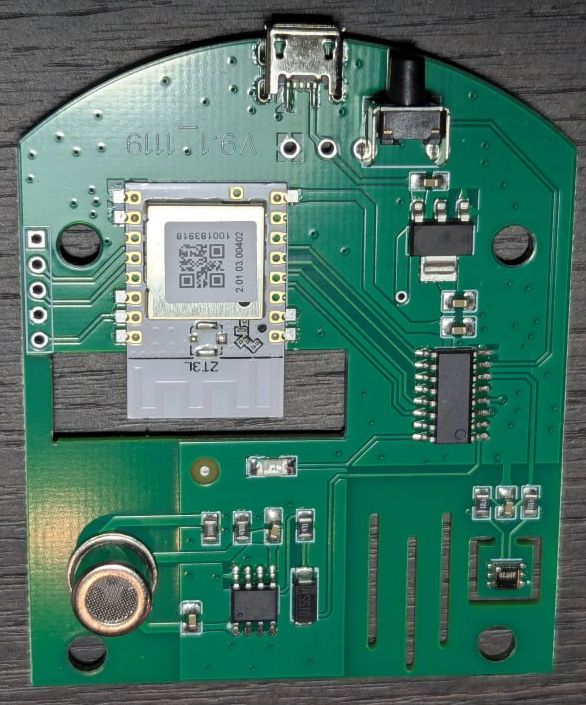
The author does not bear any responsibility if you turn your smart CO2 sensor into a crazy one by using this project.
If you have a different signature, it is better not to upload without checking for a match in the datapoints.
Tested only in zigbee2mqtt.
To avoid spamming the network. Sends data every one and a half seconds.

About

Exposes

Reporting

First, add external converter tuya_co2sensor_orig.js. He activates OTA in z2m for a sensor with firmware from Tuya.
Next you need to add a local update repository.
Create a directory images in the z2m directory and put the file 1141-d3a3-1111114b-tuya_co2sensor_zrd.zigbee there.
Copy the local_ota_index.json file to the z2m directory
And add local storage to the z2m config (configuration.yaml)
ota:
  zigbee_ota_override_index_location: local_ota_index.json
And we put converter tuya_co2sensor_orig.js in the directory external_converters that needs to be created in the root of z2m.
Next we reboot z2m. And we see a new device.

Next, go to the OTA section. And see your device there. Click check for updates.


Click on the red button. And update.


If everything is not as described, then you did something not according to the instructions (did not put the file where it should be, did not reboot z2m) or the signature of your sensor is not in the list of supported devices.
Warning
Attention!!! If during the process you find a new update on some Tuya devices that you may still have in the system, then you do not need to update anything!!! Otherwise, you will upload the firmware from the sensor to this device and get a brick!!! If the update process has already started by mistake, then simply de-energize this device!!!
Next, we wait for the end. This is what the log looks like at the first start after updating from Tuya firmware to a custom one.
OTA mode enabled. MCU boot from address: 0x0
Firmware version: v1.0.01
Tuya bootloader
Bootloader is overwritten. Reset
OTA mode enabled. MCU boot from address: 0x0
Firmware version: v1.0.01
SDK bootloader
out_pkt <== 0x55AA02000101000003
inp_pkt ==> 0x55AA02000101001C7B2270223A226F676B6470677932222C2276223A22312E302E30227DC1
Tuya signature found: "ogkdpgy2"
Use modelId: Tuya_CO2Sensor_r01
After the update, you need to remove the device from z2m. Reboot z2m. Allow pairing. If the LED on the sensor is lit, then you don't need to do anything else. If it's not lit, then hold the button for 5 seconds and release. The LED should light up. Pairing will begin.

That's it, the sensor is ready to work.
In Home Assistant it looks like this

There is a gap in the middle - I went for a walk with the dogs and opened all the windows.
All.
P.S. Not tested in real work, requires comprehensive testing.
You can contact me on Telegram.
If you want to thank the author, you can do it through ЮMoney
Thanks :))
- @upavlel for providing the CO2 sensor
_TZE200_ogkdpgy2to be torn apart. - @ekurdiukov for providing the CO2 sensor
_TZE204_yvx5lh6k. - @vladgennk for providing the CO2 sensor
_TZE200_yvx5lh6k.
- 1.0.01
- Initial version.
- 1.0.02
- The code for checking and overwriting
bootloaderhas been removed from the main firmware - it was a potential threat of boot sector corruption under certain circumstances. This code is now only contained in the firmware that is loaded on the first update. - At the first update, the version number will always be
1.0.00- done specially for the fastest update to the main firmware, where there is no code to check and overwritebootloader.
- The code for checking and overwriting
- 1.0.03
- Add
_TZE204_yvx5lh6ksensor.
- Add
- 1.0.04
- Add
_TZE200_yvx5lh6ksensor. - Fix bugs in reporting. Fixed bugs with reporting. It didn't work correctly with the float type. With a maximum interval of 0, we got a "brick" (bug SDK).
- Add

