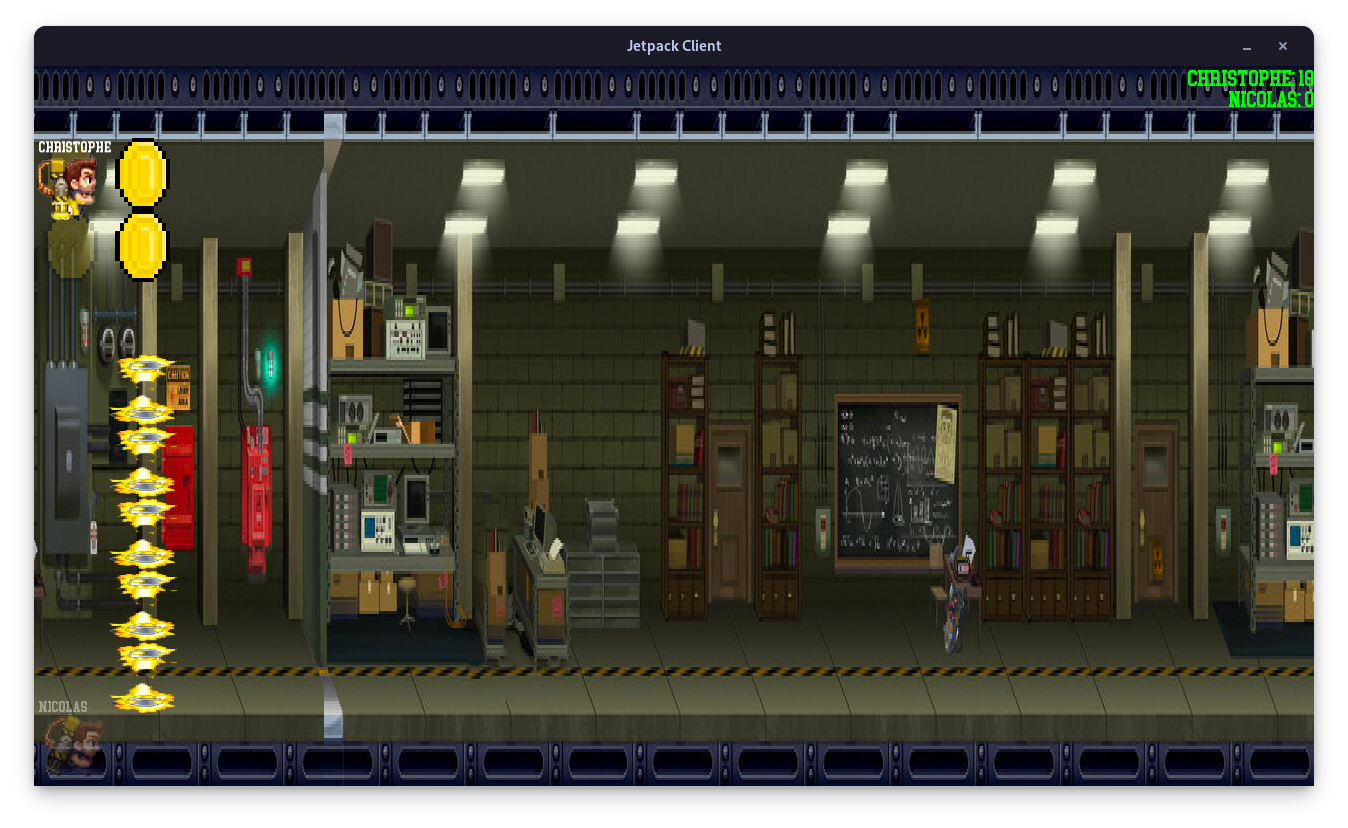
The Jetpack is a project carried out by groups of 3 (see Contributors, during our 2nd year in EPITECH Grand Ecole program.
Its purpose is to recreate in C++ a Jetpack Joyride game with a multiplayer mode.
We had to create a server and a client that communicate with each other using the TCP protocol.
The game is a side-scrolling runner where the player controls a character that automatically moves forward.
The player can control the character's vertical position by pressing space key to make it fly and releasing it to let it fall.
The goal is to collect coins while avoiding obstacles.
You can run Jetpack server like this :
./jetpack_server -p [port] -m [map]For more information, please see the help section.
> ./jetpack_server --help
USAGE: ./jetpack_server -p <port> -m <map> [-d]

DESCRIPTION:
        -p <port>       The port number on which the server socket listens
        -m <map>        The path of the map file
        -d              Enable debug mode
        -in             Enable infinite mode
        --help          Display this help message

CREDITS:
        Made by Christophe VANDEVOIR, Guillaume LECOCQ and Nicolas TORO
        EPITECH Nice 2025
You can run Jetpack client like this :
./jetpack_client -h [host] -p [port]For more information, please see the help section.
> ./jetpack_client --help
USAGE: ./jetpack_client -h <ip> -p <port> [-d]

DESCRIPTION:
        -h <ip> The server IP address
        -p <port>       The port number on which the server socket listens
        -d              Enable debug mode
        --help          Display this help message

CREDITS:
        Made by Christophe VANDEVOIR, Guillaume LECOCQ and Nicolas TORO
EPITECH Nice 2025The result of this project is a almost perfect Jetpack Joyride game in multiplayer.
If you discover a problem or an error, don't hesitate to create an issue and report it to us as soon as possible.
| Test name | Result | Crash |
|---|---|---|
| Server | OK | No |
| Client | OK | No |
| Minimal functions client (write and poll) | OK | No |
| Minimal functions server (write and poll) | OK | No |
| Documentation | OK | No |
| Results | 100% | No |
TODO
This project is compiled with CMake and Makefile.
This project use C++20 standard, CMake 3.20 or higher and SFML 2.5.1.
You can compile the project with this command :
- via CMake and Makefile :
cmake -B build -S . && make -s -C build -j- via only Makefile :
makeIf you want to debug the program, you can compile the project with this :
- via CMake and Makefile :
cmake -B build -S . && make debug -s -C build -j- via only Makefile :
make debug If you want clean the project, you can run this command :
- via CMake and Makefile :
cmake -B build -S . && make fclean -s -C build -j- via only Makefile :
make fcleanYou can clean and compile the project with the rules re and for debugging re_debug
The requested documentation for EPITECH is accessible here.
The protocol documentation is accessible here.
The map documentation is accessible here.
The code documentation is accessible here.
You can generate the documentation with this command :
- via CMake and Makefile:
cmake -B build -S . && make doc -s -C build -j- via only Makefile:
make docYou need multiple package for generate them :
- doxygen
- doxygen-latex
- doxygen-doxywizard
- graphviz
- You'll need to create a branch where you'll push your code. Once you've completed your tasks on this branch, we'll work together to merge it and check that everything works.
- Every function you add must be code-style and documented.
- If the github actions don't succeed, then ask yourself some questions
- Each commit will contain
[+]or[-]or[~]followed by a message[+]: Add feature[-]: Delete feature[~]: Edit feature
Of course, in exceptional cases, we may depart from these rules.
For this project, we were a group of 3 people. Here are the people in the group:
- Christophe VANDEVOIR : also published the Jetpack
- Guillaume LECOCQ
- Nicolas TORO : also published the Jetpack