Logitech F310 Button Layout
From community member DetroitMentor.
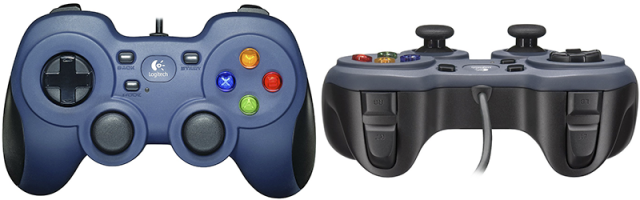
-
XReturns true if X button is pressed, false otherwise. -
YReturns true if Y button is pressed, false otherwise. -
BReturns true if B button is pressed, false otherwise. -
AReturns true if A button is pressed, false otherwise. -
DpadDownReturns true if D-pad Down is pressed, false otherwise. -
DpadLeftReturns true if D-pad Left is pressed, false otherwise. -
DpadRightReturns true if D-pad Right is pressed, false otherwise. -
DpadUpReturns true if D-pad Up is pressed, false otherwise -
LeftTriggerReturns range of value 0.0 to 1.0 as left trigger is pressed. -
RightTriggerReturns range of value 0.0 to 1.0 as right trigger is pressed.` -
LeftBumperReturns true if the left bumper is pressed, false otherwise. -
RightBumperReturns true if the right bumper is pressed, false otherwise. -
BackReturns true if Back button is pressed, false otherwise. -
StartReturns true if the Start button is pressed, false otherwise. -
Guide/ModeReturns true if the Guide/Mode button is pressed, false otherwise. -
LeftStickXReturns the left-right deflection of the left stick. Negative values represent left deflections and positive right deflections. Range is -1.0 to +1.0. -
LeftStickYReturns the up-down deflection of the left stick. Negative values represent up deflections and positive values down deflections. Range is -1.0 to +1.0. -
RightStickXReturns the left-right deflection of the right stick. Negative values represent left deflections and positive right deflections. Range is -1.0 to +1.0. -
RightStickYReturns the up-down deflection of the right stick. Negative values represent up deflections and positive values down deflections. Range is -1.0 to +1.0. -
LeftStickButtonReturns true if the left stick button is pressed, false otherwise. -
RightStickButtonReturns true if the right stick button is pressed, false otherwise. -
AtRestReturns true if joys sticks and triggers in neutral position, false otherwise. (AtRest is a property you can access in your programming - not actually a “button” on the controller)