
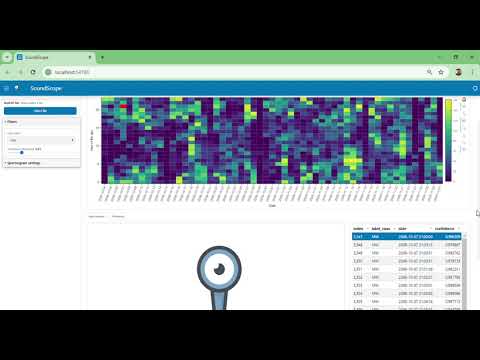
SoundScope is a python-based software that facilitates the visualization and manual verification of detections from automatic whale and fish sound detectors (or any other sound detectors). It allows to display and navigate through detections time series, filter and sort by classification confidence, and dynamically produce spectrograms of the detections. SoundScope is developed by the Acoustics and Conservation Technology (ACT) Lab at the Woods Hole Oceanographic Institution (WHOI).
Note: SoundScope is still under active development. Features and interfaces may change between versions. Please don't hesitate to reach out if you need help with using SoundScope or want to help with the development.

- How to use it
- Input data format
- Found a bug or want new features
- Contact and citation
- Versions
- Development notes
- Funding
- License
There are 2 ways to use SoundScope:
This is the easiest way as it does not require to install anything. The binaries are uploaded for each release here: SoundScope binaries Select your release version, go to Assets, download the zip file, unzip it, and double click on soundscope.exe to launch the application.
This is more involved as it requires to install python and required python libraries. For instructions see the "Development notes" section below.
Currently, SoundScope uses netCDF files as input. The data format in the netCDF files follows the structure of the Annotation and Measurement objects defined by the ecosound library. More documentation describing how to create these netCDF files will be added in the near future. In the meantime, you can have a look at the script convert_acodet2netcdf.py in the "utils" folder which converts outputs from the ACODET detector to the SoundScope format.
An example of netCDF file can be found in the folder here. You can open it directly in SoundScope. Note that it will allow you to play around with the detection plots, but will not be able to display the spectrogram of selected detections because it won't have access to the original audio data.
To examine the structure of the netCDF file you can open it in python with ecosound:
from ecosound.core.annotation import Annotation

annot = Annotation()
annot.from_netcdf(r'.\SoundScope_data_examples\SoundScape_detections_example.nc')

# all the detection data and metadata are in the pandas dataframe in annot.data
print(annot.data)
The code above requires to have ecosound installed. To install ecosound use the command: pip install ecosound
If you found a bug please add an entry to the issues list with the label "bug". Please include as much information as possible.
If you want new functionalities to be added to SoundScope, add an entry to the issues list with the label "enhancement". Use the thumbs-up emoji (👍) to boost the priority of a new features.
For questions, feedback, or collaboration inquiries, please open an issue on the GitHub repository or contact the development team at WHOI's Acoustic and Conservation Technology Lab.
If you use SoundScope in your research, please cite it as follows:
Mouy, X., Kuo, J., Transue, L., Davis, G., & Holdman, A. SoundScope: a python-based tool for visualization and manual verification of bioacoustic detections. Woods Hole Oceanographic Institution. https://github.com/xaviermouy/SoundScope
- Implemented feature requests #23, #17, #15
- Added manual verification capabilities (Y/N/P)
- Added autosave
- Bug fixes (issues #21, #24, #25, #26)
- Added keyboard shortcuts for go to the previous (s) and next (f) detections
- Added option to display spectrograms with fixed or adaptive frequency boundaries
- Added "Next" and "Previous" button to browse through detections more easily
- Added menu bar on the side panel
- Removed "open" button. Now in menu File> Open file
- Added capability to change path of audio files (Edit> Change audio path)
- Added capability to save changes to new nc file (File> Save as)
- Added "DPI" slider to adjust spectrogram quality and computing time
- Automatically decimate audio data to a sample rate 2.5x the maximum frequency requested to speed up spectrogram computation
- Enforced including files extensions when saving csv or wav files
- Dates and times in the exported csv now following ISO 8601 standard with time zone designator.
- Improved loading time for spectrograms
- Added loading spinner for the spectrogram calculation
- Added breakdown of spectrogram creation/loading times in the command window to help identify possible bottlenecks.
- Added capability to download daily and hourly detection summary as csv file (issue #14)
- Added capability to download audio clip of the selected detection
- Fixed bug where the first detection clicked in the table returned an error
- Showing time zone of the analysis in the main interface (top right)
- Added error notifications in main interface to help the user identify issues
- Upgraded to python 3.10
- Upgraded to panel 1.5.3
- Fixed instabilities with selections the calendar plots
- Increased maximum allowed time offset in spectrogram to 500 seconds
- Added time zone support
- Initial release
- OS: Windows (primary), macOS and Linux not tested
- Python: 3.10
- Audio: A working audio output device is required for playback functionality
python 3.10
$ pip install -r requirements.txt
-
Run soundscope:
$ panel serve soundscope.py --show --autoreload
-
or just..
$ python soundscope.py
- Make sure to work with the binary branch which contains extra code to optimize the binaries.
1.) Install pyinstaller:
$ pip install pyinstaller
2.) Compile code in Windows:
In a terminal change to current directory to the soundscope folder using the cd command. Then type
$ pyinstaller -i images\SoundScopeLogo.png --collect-all holoviews --collect-all distributed --collect-all param --hidden-import matplotlib.backends.backend_agg .\soundscope.py
or
$ pyinstaller .\soundscope.spec
3.) Copy over the images directory to the dist folder.
$ mv images dist/images
SoundScope has been supported by the following organizations:
- Woods Hole Oceanographic Institution (WHOI)
- NOAA Fisheries
- Canadian Healthy Oceans Network (CHONe)
- University of Victoria
SoundScope is released under the BSD 3-Clause License.